IT-Support-For-NC-Construction

Request Quote

Construction IT Support in North Carolina

Protect project profits by reducing time lost to IT problems. Computerbilities helps construction businesses with 10–250 technology users connect office and field teams, strengthen security, and plan for recovery.

From our Cary office, we support contractors across Raleigh, Durham, and the North Carolina Triangle. We focus on the technology behind estimating, scheduling, project files, billing, and day-to-day communication—so an IT interruption does not have to bring every part of the business to a stop.

Book a free 15-minute IT Priorities Call or call 919-469-5060. We will discuss where technology is slowing your team down and whether our support is a fit.

IT support for the office and the jobsite

When a superintendent cannot open a drawing or an estimator loses access to a business application, paid time and deadlines keep moving. We help address the systems behind those interruptions:

  • Project-file access: review how office and field teams reach drawings, schedules, and shared documents, including permissions and version control.
  • Field devices and remote access: manage supported laptops and tablets, sign-in controls, and secure connections suited to the way crews work.
  • Everyday support: troubleshoot supported devices, Microsoft 365, printing, connectivity, and business-application access; coordinate with software vendors when their help is needed.
  • Business communications: assess phone and connectivity issues that make it harder to reach coworkers, customers, and subcontractors.
We are here to answer your questions

Free 15-minute IT Priorities Call

Security, maintenance, and recovery for construction teams

Keeping work moving takes more than fixing today’s ticket. We review the risks around the systems your construction business relies on and agree which services belong in your support plan.

  • Network monitoring and maintenance: maintain supported systems, review alerts, and address recurring problems that interrupt office and field work.
  • Backup and recovery: identify critical files and systems, define backup responsibilities and recovery priorities, and agree on monitoring and testing. Backups and restoration times depend on the selected solution and scope.
  • Cloud and Microsoft 365: assess where applications and files should live, manage access, and support the Microsoft 365 services in your agreement. Moving a legacy application to the cloud is a separate design decision.
  • Email and account security: strengthen sign-in and endpoint controls, reduce exposure to email compromise, and support staff awareness. Payment-change requests still need independent verification using a trusted contact method.

We define covered users, devices, locations, support hours, onsite arrangements, and escalation responsibilities before work begins. Licenses, new deployments, office moves, and major migrations are included only where the agreement or a separate project scope says so.

Confidence in Your IT Partner

Iron Horse Contractors: less friction between the office and the field

Iron Horse needed more responsive support, stronger email security, and dependable access to business software from field tablets. Computerbilities improved its support process using ITIL 4 practices, strengthened email protection, and refined tablet access with a SASE solution and always-on VPN connectivity. We also used Wi-Fi heat mapping to design coverage for a larger office.

The practical value is fewer obstacles between employees and the tools they need: less time struggling to connect and more time focused on work. Reducing that friction helps protect the value of paid working time and supports better control of project costs.

Read the Iron Horse Contractors case study →

Allied Fire Protection: restoring a productive IT environment

At the start of a relationship spanning more than 20 years, Allied Fire contacted us about slow systems. We found a compromised server, exposed configurations, and workstations that did not meet AutoCAD requirements.

We backed up the files, reimaged the server, and corrected the firewall issues. When computers were later refreshed, we specified them for the software they needed to run. The result was a more productive working environment.

Read the Allied Fire Protection case study →

Cimarron Homes: clearer calls and better assistance

This four-user homebuilder needed better phone call quality and more useful support. Computerbilities improved voice quality and provided better training and assistance than the company had received from its previous provider.

The lesson for a construction business of any size: review how a provider will help people use their technology, as well as which systems the agreement covers.

Read the Cimarron Homes case study →

“We can always count on them to be responsive to our needs and do an excellent job.”

Carol Cheek · Former Vice President, Cimarron Homes

Discuss your business IT needs → · Read client experiences

Choose support around your people and projects

User count is a starting point. Your office locations, field access needs, security risks, and existing IT staff determine the right arrangement.

Construction businesses with 10–49 users

If you do not have a dedicated IT department, fully managed support can give employees a clear place to ask for help while keeping maintenance, access, and planning organized.

Explore IT support for 10–49 users →

Construction businesses with 50–250 users

Choose fully managed support or a co-managed arrangement that works alongside your IT team. Define who handles tickets, security tools, field locations, vendors, and longer-term planning.

Explore managed and co-managed IT for 50–250 users →

Compare Foundation, Blueprint and Leadership construction IT plans →

Review what each plan includes, then bring your office and field requirements to a free 15-minute IT Priorities Call. After the call, we’ll email a brief summary of up to three priorities or questions to investigate and a recommended next step. No cost, no obligation to purchase, and no system access required. Technical assessments are separately scoped.

Practical resources for construction teams

Guides to help your office and field teams prepare for file-access disruptions and verify vendor payment changes. Still comparing providers? Use our guide to choosing IT support for a North Carolina construction company to evaluate experience, coverage and responsibilities.

Request the Construction IT Checklist & Downtime Plan or the Construction Invoice-Fraud Prevention Kit for practical templates your team can use.

For a brief review with your office manager and IT provider, download the Contractor Cybersecurity Checklist. This five-page printable PDF covers 16 security topics and a final action list to help you record gaps and choose next steps.

For a deeper discussion with your team, download our 2026 cybersecurity book for construction companies. Its 16 chapters, practical diagrams, and nine printable worksheets connect payment verification, account and device protection, backups, and incident preparation to protecting your business and your clients’ information.

Construction IT support: questions before you buy

What determines the price of construction IT support?

Pricing depends on supported users and devices, office and jobsite locations, application complexity, security and backup requirements, support hours, and the condition of the existing environment. We start with a scoping conversation so a proposal reflects the work and responsibilities involved.

What counts as a supported user?

A supported user is a person covered by the agreement who uses the supported business technology and may need our help. We clarify office employees, field staff, shared devices, contractors, and additional devices during scoping. A company’s total headcount is not automatically its supported-user count.

Are projects included in ongoing support?

Ongoing support covers the services and supported environment listed in your agreement. An office move, new network, major software migration, or new jobsite setup may require a separate project scope and quote. We establish that distinction before starting the work.

Can you support our existing construction software?

We review the applications your team uses for estimating, accounting, scheduling, and project management. Support may include the devices, network, sign-ins, and access those applications depend on, plus coordination with the software publisher. Application development, specialist training, and vendor licensing are scoped separately.

How do switching providers and support escalation work?

We plan the handover around account ownership, administrator access, documentation, licenses, backups, and your current provider’s exit terms. Before service starts, we agree how to request help, how urgent issues are prioritized, and who handles escalation. Support hours, response commitments, and onsite coverage are defined in your agreement.

Talk through your requirements in a free 15-minute IT Priorities Call →

IT-Services-For-Construction

Why Computerbilities For The Construction Industry?

  • Business experience since December 1995: Computerbilities connects technology decisions to the work employees need to complete.
  • Confirmed construction experience: our Iron Horse Contractors case study explains real work on support, email security, field access, and office Wi-Fi.
  • Office and field access considered together: we assess the people, devices, software, and connections involved in a workflow.
  • Clear responsibilities: support coverage, vendor coordination, recovery priorities, and separately scoped projects are discussed before the agreement.
  • A local starting point: our Cary team supports construction businesses across the Triangle, with remote and onsite arrangements based on need and service scope.

Meet founder Adam Pittman and learn about his experience →

Since 1995
Serving business technology needs
Veteran-owned
Founded by Adam Pittman

What Client’s Say About us

CH

Responsive Support for Our Team

We can always count on them to be responsive to our needs and do an excellent job.

Carol Cheek

Former Vice President
Cimarron Homes
ME

Consistent, Trustworthy IT Support

Computerbilities provides excellent response times for all IT issues while maintaining consistent and trustworthy staff.

Travis Woodie

COO/CFO
Municipal Engineering
Jeff Gregorio

With Computerbilities You Get What You Pay For

Computerbilities is not the cheapest IT company in the Triangle, but you always get what you pay for and with Computerbilities you get the best.

Jeff Gregorio

CFO
Williams Realty & Building
J.D. Locklear

Reliability and Strong Communication

Reliability is the biggest benefit I have found since moving to Computerbilities. Whenever we call on Adam Pittman and his team, they always respond, and correct our issue immediately.

J.D. Locklear, JR.

President
Allied Fire Protection
Tony Nocito

Excellent Service and Attentiveness to My Account

I want to thank Computerbilities for your excellent service and attentiveness to my account. When needed, they always respond with a positive, helpful and professional attitude.

Tony Nocito

Managing Member
ABCOV Companies, LLC
Alicia Schautteet

Computerbilities Saves Me Both Time and Money

Computerbilities has benefited my company tremendously by saving me both time and money. I no longer employ a full time IT person, but I am still able to contact someone at a moment’s notice.

Alicia Schautteet

Administrative Officer
Synecor
Bill Aulicino

My Absolute Hero When It Comes To Technology

If there is a problem or issue, Computerbilities has a solution or an answer tailored to my specific problem. They are my absolute hero when it comes to technology.

Bill Aulicino

Owner
Crossroads European Automotive, Inc
Nicole Mastmeier

It’s Simple; Call Computerbilities

It’s simple; If you want your network and computers to work, call Computerbilities. Because of them, I have a tailored solution for my business.

Nicole Mastmeier

Owner
Blue Diamond Jewelers

Not Ready To Call Us Just Yet

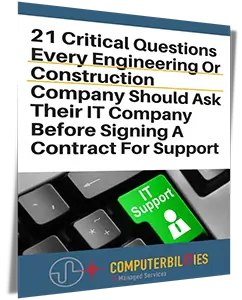
21Question

Get Your Free Report

Get our FREE report and learn the critical questions every construction and engineering business should ask before signing a tech support contract. Protect your business and avoid costly mistakes.

DOWNLOAD YOUR FREE COPY NOW