

Cyberattack Hits Websites Linked to 178 Organizations: What CNN, Zoom, and Other Visitors Should Know
A trusted website can be affected by a cyberattack even when its own servers are not directly hacked. That is one of the most important lessons from a November 2026 incident involving websites linked to CNN, Zoom, the BBC, and other major organizations.
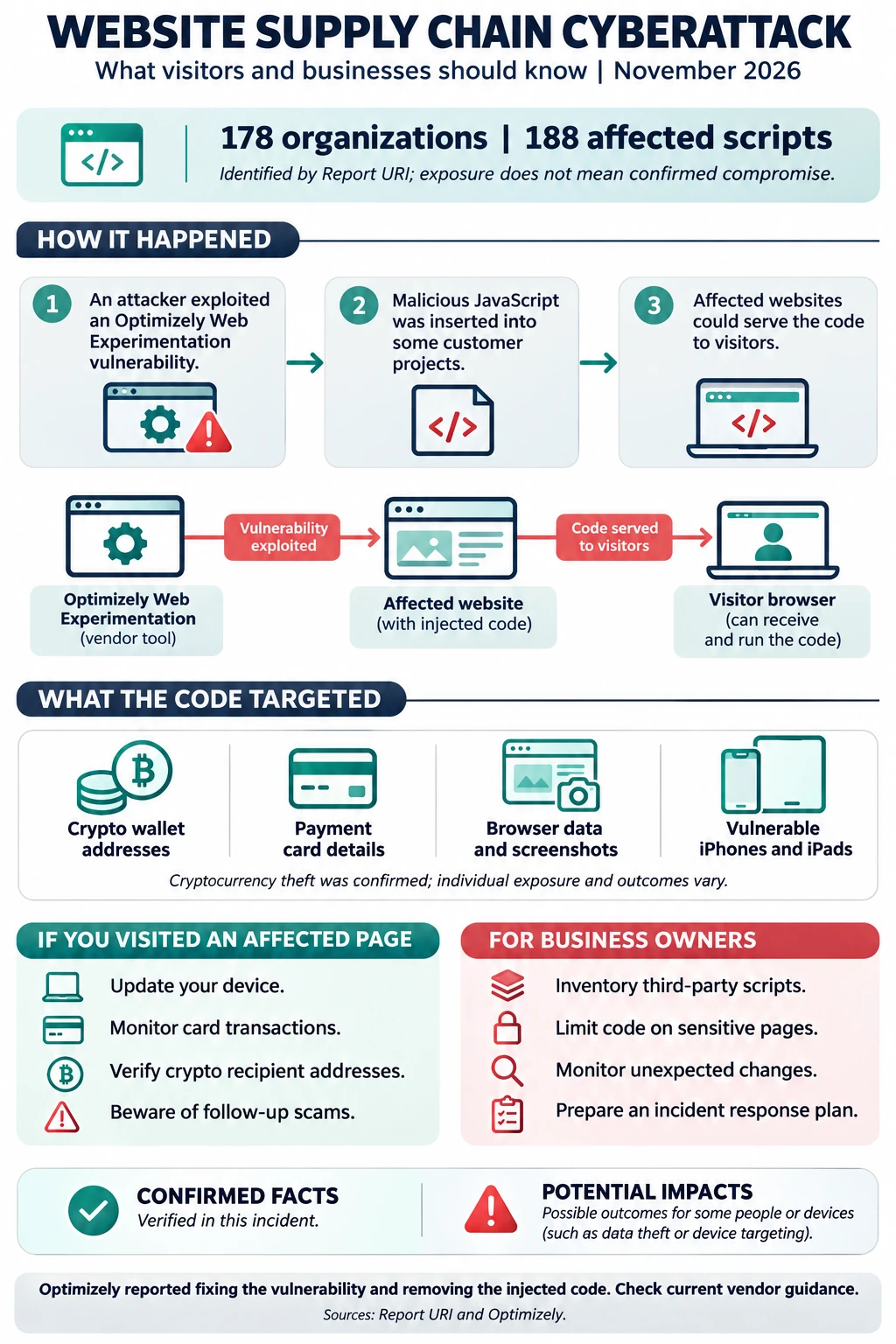
On November 16, attackers exploited a vulnerability in Optimizely Web Experimentation, a platform businesses use to test and personalize website experiences. They inserted malicious JavaScript into some customer projects. When affected websites loaded those projects, the code could reach visitors’ browsers.
Security researcher Scott Helme and Report URI identified 188 affected scripts associated with 178 organizations. The malicious code was designed to redirect cryptocurrency payments, capture payment card information, collect some browser data, and deliver exploit kits targeting certain iPhones and iPads. Researchers confirmed cryptocurrency theft associated with the attack, but exposure to the code does not mean every visitor lost money or had a device compromised. Report URI investigation
For business owners, this incident is a reminder that cybersecurity extends beyond the devices and applications your company directly controls. Website plugins, analytics tools, marketing platforms, and other outside services can also affect your customers’ security.
Here is what happened, what affected visitors should consider, and how businesses can reduce similar risks.
What Happened in the Optimizely Cyberattack?
The attack centered on Optimizely Web Experimentation, a third-party tool used to run website tests and customize online experiences. A business might use it, for example, to compare two versions of a page or determine which button placement leads to more inquiries.
To use the platform, a website loads a JavaScript snippet. JavaScript is code that runs in a visitor’s browser and supports many interactive website features.
According to Optimizely, an unauthorized party exploited a flaw in the platform’s account signup process. The flaw allowed the attacker to impersonate users on targeted customer accounts and insert malicious JavaScript into certain projects. The company said the incident was not a credentials breach and that it had no evidence customer passwords were exposed through this incident. Optimizely customer incident report
Because affected websites already trusted the Optimizely scripts, visitors could receive malicious code while browsing legitimate pages. This type of incident is often called a software supply chain attack: the attacker reaches intended victims through a service or component they rely on.
Optimizely reported that it closed the vulnerability and removed the injected code from affected projects. In its November 18 update, the company said the incident was limited to Web Experimentation and that it had contacted customers using that product to confirm whether they were affected. Its investigation was continuing. Optimizely service status
Were CNN, Zoom, and All 178 Organizations Directly Hacked?
The public reporting does not establish that attackers broke into the servers or internal networks of all 178 organizations.
Report URI found malicious code in Optimizely scripts associated with those organizations. That is a significant website security incident, but it is different from proof that each organization’s own infrastructure was directly breached. The affected domains and pages also varied by organization.
Similarly, visiting a named company’s website does not automatically prove that a particular person received the malicious script. Exposure depended on factors such as the page visited, whether it loaded an affected script, and the time of the visit. Report URI investigation
What Was the Malicious Code Designed to Do?
Researchers described a multipurpose payload. Different parts of the attack targeted different types of information and activity.
Redirect Cryptocurrency Payments
The malicious code was designed to replace cryptocurrency wallet addresses with addresses controlled by the attacker. If a person copied or used a substituted address without checking it, a payment could be sent to the wrong wallet.
Report URI said it verified cryptocurrency transactions to attacker-controlled wallets. That confirms some losses, but it does not establish that every visitor who used cryptocurrency was affected.
Cryptocurrency transactions can be difficult or impossible to reverse. That makes verifying the destination address especially important, even when the address appears on a familiar website.
Capture Payment Card Details
The code also included payment-card skimming capabilities. A skimmer attempts to capture card information entered into a web page and send it to an attacker.
This risk is most relevant to someone who entered card details on an affected page while the malicious script was active. It does not mean that every card previously used with a named organization was stolen.
If you entered payment information during a potentially affected visit, contact your card issuer using the number on the back of your card or through its official app. Explain the concern and ask whether it recommends monitoring, replacement, or other action.
Collect Browser Data and Screenshots
Report URI found functionality designed to steal accessible browser cookies and take screenshots. Cookies can support legitimate features such as keeping a user signed in, although protections vary.
Not all cookies are equally accessible to JavaScript. For example, properly configured HttpOnly cookies are not readable by ordinary page JavaScript. Even so, businesses should investigate possible exposure of accessible session data when a malicious script has run on their pages.
Target Vulnerable iPhones and iPads
The campaign also delivered the Coruna and DarkSword iOS exploit kits, according to Report URI. These kits attempt to take advantage of software vulnerabilities on certain devices and operating-system versions.
Being served an exploit is not the same as a confirmed infection. A successful compromise would depend on factors including the device, software version, and whether the exploit worked.
The practical takeaway is straightforward: keep iPhones and iPads updated, and involve your IT team if a business device may have been exposed.
What Should You Do If You Visited an Affected Website?
First, avoid assuming that a visit automatically resulted in theft or infection. Then consider what you did during the visit and whether the page and timing match the available incident information.
1. Review the Affected Websites and Timing
Check Report URI’s investigation for its list of affected organizations and domains. Remember that a company name alone may not identify the precise page or service involved.
Optimizely reported that the first malicious code was written on November 16 and that it removed injected code from affected projects later that day. Individual exposure windows can differ, so follow updates from the specific organization involved rather than relying on a single broad timeframe. Optimizely customer incident report
2. Update Your iPhone or iPad
On an iPhone or iPad, open Settings > General > Software Update and install the latest security update available for your device.
Report URI advised affected visitors to update to iOS 18.7.3 or later, or iOS 26.3 or later, based on the exploit kits it analyzed. Because security updates continue to change, the best ongoing practice is to install the newest version your device supports. Report URI guidance
If the device belongs to your employer, follow your organization’s update and incident-reporting procedures. Do not erase or reset a device before speaking with your IT or security team if an investigation may be needed.
3. Check Recent Card Activity
If you entered payment details on an affected page during the relevant period, review your transactions and contact the card issuer promptly about anything unfamiliar.
You can also enable transaction alerts where available. Do not wait for a fraudulent charge if your bank advises replacing the card as a precaution.
4. Verify Cryptocurrency Transactions
Review any cryptocurrency transfer made during a potentially affected session. Compare the destination recorded in your wallet’s transaction history with the intended recipient address, using an independent, trusted source.
If the addresses differ, contact your wallet provider or exchange immediately and preserve the transaction details. Recovery is not guaranteed, but prompt reporting can help the relevant parties investigate.
5. Be Alert for Follow-Up Scams
Major security stories often create opportunities for impersonation. Be cautious of unexpected messages claiming that you must click a link, install an app, share a verification code, or provide a wallet recovery phrase to resolve this incident.
Navigate directly to a company’s official website or app, or use a contact number you already trust. A legitimate support representative should not need your cryptocurrency recovery phrase.
What Should Businesses Using Optimizely Web Experimentation Do?
If your organization uses Optimizely Web Experimentation, start with the vendor’s direct communication and current incident guidance. Optimizely says it contacted customers using the affected product to confirm whether they were impacted. If you are unsure, contact Optimizely through a verified support channel. Optimizely service status
Then coordinate your response across website, security, legal, and customer-facing teams.
Confirm Which Pages Loaded the Affected Scripts
Create a list of the websites, domains, and page types connected to your Optimizely projects. Pay particular attention to pages where visitors could sign in, enter payment details, view sensitive information, or initiate cryptocurrency transactions.
A homepage alone may not tell the full story. A script could be present on some pages, subdomains, or regional sites and absent from others.
Preserve Evidence and Review Project Changes
Before making changes that might erase useful evidence, coordinate with your security team or incident-response provider. Preserve relevant logs, project history, alerts, and vendor communications.
Review custom code and project changes for unauthorized activity. Report URI published technical indicators and offered to share archived affected snippets with organizations and incident-response teams. A qualified investigator can compare that information with your own records. Report URI technical findings
Assess Potential Customer Exposure
Work with your security team, payment processor, legal counsel, and other relevant advisers to determine what information visitors may have entered on affected pages and what notification or reporting obligations apply.
The correct response depends on the facts. For example, a page displaying only public information presents a different exposure question from a checkout page that collects card details.
Review Accounts and Sessions
Optimizely says the attack did not involve stolen customer passwords. That finding should guide your response, but it does not replace an account and session review.
Check who can modify website experiments, scripts, and integrations. Investigate unexpected changes and consider invalidating potentially exposed sessions or rotating relevant secrets based on your team’s findings and vendor guidance.
How Can Businesses Reduce Third-Party Website Risks?
Many small and midsize businesses rely on outside website tools without maintaining a complete list of what those tools can do. The following steps can make that risk easier to manage.
1. Inventory Website Scripts and Vendors
List the third-party services running on your website, including analytics, advertising, chat, scheduling, payment, and testing tools.
For each service, record:
- Its business purpose and internal owner.
- The pages or applications where it runs.
- The information or page elements it can access.
- Who can change its configuration.
- How the vendor communicates security incidents.
This inventory helps your team answer a critical question quickly: Are we using the affected service, and where?
2. Remove Tools You No Longer Need
Old tracking tags and abandoned integrations can remain on a website long after their business purpose has disappeared. Each unnecessary script adds another dependency to review and maintain.
Ask your website team to confirm whether each tool is still needed before removing it. Some scripts support important functionality, so test changes before deploying them.
3. Limit Scripts on Sensitive Pages
Payment, login, and account pages deserve special attention. Review whether marketing, experimentation, and other nonessential scripts need to run there.
Reducing unnecessary code on sensitive pages can reduce exposure, although it does not eliminate all risk. Your payment processor and security team should also review how payment information is collected and protected.
4. Use Browser Security Controls Carefully
A Content Security Policy, or CSP, tells a browser which sources of scripts and connections a website permits. A well-designed policy can block some malicious behavior and provide reports about unexpected activity.
However, CSP is not a guarantee. A trusted third-party script may already have significant permissions, and a policy that is too permissive may not stop an attack. Configure and test the policy with experienced developers so it protects users without breaking necessary website features.
For scripts whose contents are fixed, Subresource Integrity can help a browser verify that a file matches an expected version. It is less straightforward for scripts designed to change frequently, such as some experimentation tools. Your website team should assess where it is practical.
5. Monitor for Unexpected Changes
Website security is not a one-time project. Consider monitoring for new scripts, unexpected changes to existing code, and unusual connections to outside domains.
Alerts need a clear owner and a response process. A warning is useful only when someone knows how to investigate it and can act quickly.
6. Protect Devices and Accounts
Website controls should be part of a broader security plan. Keep supported computers and mobile devices updated, use multifactor authentication where available, review access regularly, and provide employees with a clear way to report suspicious activity.
For organizations with staff in the office and the field, device visibility matters. A construction company in Raleigh, for example, may have office computers, project managers’ laptops, and shared tablets accessing business systems. Each device should have an owner, an update process, and a way to reach IT support.
7. Practice an Incident Response Plan
Before an incident occurs, decide who will:
- Contact the affected vendor.
- Preserve logs and other evidence.
- Review customer and payment exposure.
- Coordinate with legal counsel and the payment processor.
- Communicate with employees and customers.
- Approve restoration and follow-up improvements.
A short, tested plan is more useful than a lengthy document no one knows how to use. Run a tabletop exercise around a realistic scenario: a trusted website vendor reports that its script may have exposed visitors to malicious code.
Does This Mean Small Businesses Are at Risk Too?
Yes. The organizations named in this incident include major global brands, but the underlying risk is not limited to large enterprises.
A small business may use a website builder, online payment processor, booking platform, marketing tags, and customer chat software. Each service can be valuable, but each also creates a relationship that should be understood and managed.
That does not mean businesses should stop using third-party tools. It means they should choose vendors thoughtfully, limit unnecessary access, monitor important changes, and know what to do when a provider reports a security issue.
For many organizations, the first practical step is simply bringing the website agency, internal IT contact, and leadership team together to identify who owns each part of the website.
How Computerbilities Can Help
Cybersecurity decisions can feel overwhelming when your team is already focused on running the business. Computerbilities provides managed IT services for businesses that need help organizing their technology and security responsibilities.
Depending on the agreed scope, a conversation can cover employee devices, software updates, account security, monitoring, recovery planning, and coordination with technology providers. Website-specific investigation or remediation should be scoped with the appropriate website and security specialists.
For businesses in Raleigh, Cary, Durham, and surrounding North Carolina communities, the goal is to build a practical plan that fits how your people work, what systems they depend on, and what risks matter most.
Ready to review your IT priorities? Contact Computerbilities at 919-469-5060 or explore its managed IT support options.
Frequently Asked Questions
What was the Optimizely cyberattack?
On November 16, 2026, an attacker exploited a vulnerability in Optimizely Web Experimentation and inserted malicious JavaScript into some customer projects. Affected websites could then serve that code to visitors. Optimizely says it fixed the vulnerability and removed the injected code. Optimizely service status
Were 178 websites hacked?
Researchers identified affected scripts associated with 178 organizations. That does not establish that attackers directly breached every organization’s servers or that every page belonging to those organizations was affected. The number refers to the researcher’s observed set and may not represent every affected customer.
Was my iPhone infected if I visited CNN or Zoom?
Not necessarily. Researchers found that the campaign delivered iPhone and iPad exploit kits, but a visit to a named website does not by itself confirm exposure or infection. Update your device and contact your IT team if a work device may have been exposed.
Can malicious website code steal cryptocurrency?
Malicious code can attempt to replace a cryptocurrency address with one controlled by an attacker. In this incident, Report URI confirmed transactions to attacker-controlled wallets. Always verify the destination through an independent, trusted source before sending funds.
What is a third-party website script?
It is code supplied by an outside service and loaded by a website. Businesses use these scripts for functions such as analytics, advertising, chat, payments, and website testing. Because scripts can interact with a page in a visitor’s browser, they should be inventoried and reviewed.
What should a business do after a website vendor reports a security incident?
Confirm whether your organization uses the affected product, follow verified vendor guidance, preserve relevant records, and investigate which pages and visitors may have been exposed. Involve your security team, website provider, payment processor, and legal counsel as appropriate.