
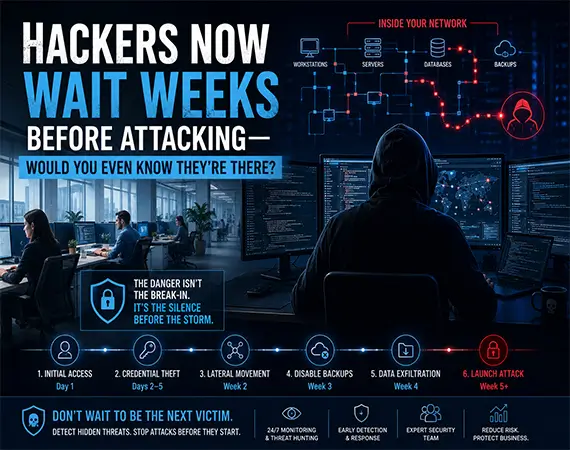
Hackers Now Wait Weeks Before Attacking—Would You Even Know They're There?
The Most Dangerous Cyberattack Isn’t the One You See—It’s the One You Don’t.
Imagine arriving at your office on a Monday morning.
Your employees can’t log in.
Your accounting software is locked.
Shared folders have disappeared.
Every computer displays the same ransom note demanding hundreds of thousands of dollars in cryptocurrency.
For most business owners, this is how they imagine a cyberattack begins—a hacker breaks through the firewall overnight, deploys ransomware, and instantly shuts everything down.
The truth is far more unsettling.
In many modern attacks, the ransomware is the final step, not the first.
Long before that ransom note appears, cybercriminals may have already spent days—or even weeks—inside your network. They quietly study your business, map your infrastructure, identify valuable data, steal privileged credentials, disable backups, and prepare for maximum impact before revealing their presence.
In other words, hackers stay hidden before attacking, and by the time most organizations realize something is wrong, the attackers have already completed the hardest part of the operation.
For small and medium-sized businesses across Raleigh, Cary, Durham, and the rest of North Carolina, this growing trend presents one of today’s biggest cybersecurity challenges. Many organizations still rely on traditional antivirus software and occasional IT maintenance, while modern threat actors use stealth, patience, and legitimate administrative tools to avoid detection.
The question every business owner should ask isn’t:
“Will we be attacked?”
It’s:
“If attackers were already inside our network today, how long would it take us to notice?”
That answer could determine whether your organization experiences a minor security incident—or a business-ending cyber crisis.
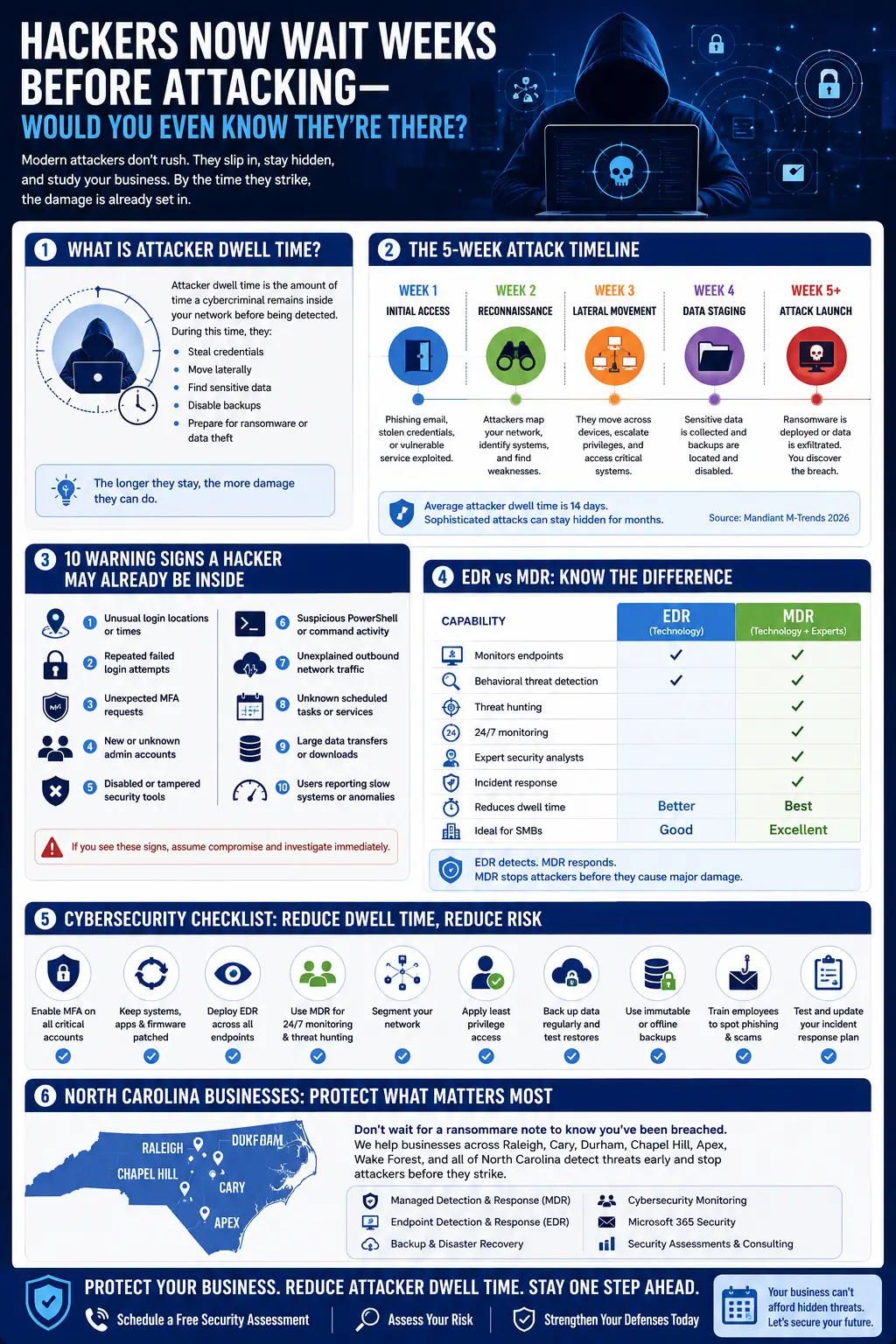
Cybercriminals Have Changed Their Strategy
A decade ago, many attackers relied on noisy malware that immediately encrypted files or attempted to spread as quickly as possible.
Today’s cybercriminals operate very differently.
Modern ransomware groups behave more like organized businesses than opportunistic hackers. They divide responsibilities among specialized teams responsible for:
- Initial access
- Credential theft
- Network reconnaissance
- Privilege escalation
- Data exfiltration
- Ransomware deployment
- Negotiation and extortion
Rather than attacking immediately after gaining access, many threat actors intentionally remain invisible while they learn everything they can about your organization.
According to Google Cloud’s M-Trends 2026 Report, the global median attacker dwell time increased to 14 days, up from 11 days the previous year. For cyber espionage operations and North Korean IT worker cases, the median dwell time reached 122 days, highlighting how sophisticated attackers increasingly prioritize stealth over speed.
That means many organizations unknowingly share their networks with attackers for weeks—or even months—before discovering the intrusion.
Why Patience Makes Hackers More Dangerous
Think of a burglar.
An inexperienced criminal smashes a window, grabs valuables, and runs.
A professional criminal watches the house for weeks.
They learn when the family leaves.
They identify security cameras.
They find spare keys.
They know exactly where the valuables are stored.
By the time they enter the home, almost nothing is left to chance.
Cybercriminals now operate in much the same way.
Instead of rushing into an attack, they quietly gather intelligence about your business until every move has been carefully planned.
This extended attacker dwell time dramatically increases the chances of a successful ransomware attack because the attackers already know:
- Which servers are most critical
- Where backups are stored
- Which users have administrator privileges
- How employees authenticate
- What security tools are running
- Which business applications are essential
- Which systems can cause maximum operational disruption
By the time encryption begins, the attackers have often eliminated many of the safeguards organizations depend on for recovery.
What Is Attacker Dwell Time?
Attacker dwell time is the period between the moment a cybercriminal first compromises a system and the moment the intrusion is detected.
During this time, attackers may not deploy ransomware, delete files, or trigger obvious alarms.
Instead, they focus on remaining hidden.
Their objective is simple:
Gain complete control before anyone notices they’re there.
For businesses, reducing cyber attacker dwell time is one of the most important goals of modern cybersecurity because every additional day provides attackers with more opportunities to:
- Steal sensitive information
- Escalate privileges
- Compromise additional devices
- Locate backup repositories
- Disable security controls
- Establish persistence
- Prepare for data theft or ransomware deployment
The longer attackers remain undetected, the more expensive and disruptive the eventual incident becomes.
Why Attackers Don’t Strike Immediately
Many business owners still believe hackers simply “break in and attack.”
That assumption is increasingly outdated.
Today’s sophisticated cybercriminals understand that patience often produces better financial results.
Instead of acting immediately, they spend valuable time conducting reconnaissance across the network.
Their goals include:
Mapping the Network
Attackers identify:
- Domain controllers
- File servers
- Backup appliances
- Cloud services
- Microsoft 365 environments
- Active Directory infrastructure
- Virtual machines
- Remote access systems
This allows them to understand exactly how your business operates before launching the attack.
Stealing Credentials
Rather than exploiting vulnerabilities repeatedly, attackers frequently steal legitimate usernames and passwords.
Compromised administrator credentials allow them to move almost invisibly because many activities appear to originate from trusted users.
Credential theft remains one of the most effective ways attackers maintain long-term access while avoiding traditional security alerts.
Avoiding Detection
Modern threat actors increasingly rely on legitimate administrative utilities instead of obvious malware.
Security professionals often describe this as “living off the land.”
Examples include:
- PowerShell
- Remote Desktop
- Windows Management Instrumentation (WMI)
- PsExec
- Built-in Windows administration tools
Because these utilities are commonly used by IT administrators, distinguishing normal administrative activity from malicious behavior becomes significantly more challenging.
Studying Employee Behavior
Attackers don’t just target technology.
They study people.
They observe:
- Working hours
- Login patterns
- Email habits
- Approval workflows
- Financial processes
- Vendor relationships
This information helps them craft convincing phishing campaigns, business email compromise attempts, and social engineering attacks that blend into everyday business operations.
What Hackers Do During the Silent Weeks Before They Strike
By the time most businesses discover a cyberattack, the attackers have often completed the most important phase of their operation.
They’ve already found your critical servers.
They know where your backups are stored.
They’ve identified your domain administrators.
They’ve stolen passwords.
They’ve mapped your cloud environment.
And in many ransomware incidents, they’ve already copied sensitive company data before encryption even begins.
This is why today’s cybercriminals focus on stealth instead of speed. Rather than rushing to deploy ransomware, they treat the initial compromise as the beginning of a carefully planned campaign. Modern threat intelligence shows attackers increasingly target identity systems, backup infrastructure, and virtualization platforms to make recovery as difficult as possible, while many use legitimate administrative tools to blend into normal business activity.
For business owners, understanding this hidden phase is one of the most effective ways to reduce risk.
The Five-Week Attack Timeline
Although every attack is different, many follow a similar pattern. Think of it as a project plan executed by cybercriminals, with each stage building toward maximum disruption.
Timeframe | What the Attackers Are Doing | Your Business Sees |
Day 1 | Initial access through phishing, stolen credentials, or an exploited vulnerability | Usually nothing |
Days 2–5 | Credential theft, persistence, and internal reconnaissance | No obvious symptoms |
Week 2 | Lateral movement across systems and privilege escalation | Minor anomalies, if any |
Week 3 | Backup discovery and security tool evasion | Normal operations continue |
Week 4 | Data exfiltration and preparation for encryption | Possible unusual outbound traffic |
Week 5 | Ransomware deployment or extortion | Major business disruption |
For organizations without continuous cybersecurity monitoring, much of this activity can appear indistinguishable from legitimate administrative work.
Day 1: Initial Access
Every cyberattack begins with an opening.
Sometimes it’s an employee clicking a phishing email.
Sometimes it’s a compromised VPN account.
Sometimes it’s an unpatched firewall or exposed Remote Desktop Protocol (RDP) service.
Increasingly, attackers also use voice phishing (vishing) and highly interactive social engineering to convince users into granting access or approving multifactor authentication requests. According to Google’s M-Trends 2026 report, voice-based social engineering has become one of the most common initial infection methods observed in incident response investigations.
Once inside, attackers rarely make dramatic changes. Instead, they focus on establishing a foothold that allows them to return even if the original access method is closed.
Days 2–5: Stealing Credentials and Establishing Persistence
With a foothold secured, the next priority is to collect credentials and ensure long-term access.
This stage often includes:
- Harvesting cached passwords
- Collecting browser-stored credentials
- Accessing Active Directory
- Enumerating privileged accounts
- Creating hidden administrator accounts
- Installing remote access tools
- Using credential dumping techniques
These actions help attackers maintain persistence even if passwords are changed or one compromised account is disabled.
The goal is no longer to compromise a single computer. The goal is to compromise the business.
Week 2: Moving Quietly Through the Network
After obtaining additional credentials, attackers begin lateral movement.
Rather than launching malware across every device, they move carefully from one system to another using legitimate administrative tools and trusted credentials.
Common targets include:
- File servers
- Accounting systems
- HR platforms
- Microsoft 365 environments
- Backup servers
- Domain controllers
- Virtualization hosts
Security professionals often refer to these tactics as “living off the land.” Instead of deploying obvious malware, attackers abuse built-in tools such as PowerShell, Windows Management Instrumentation (WMI), and remote management utilities, making their activity much harder to distinguish from legitimate IT administration.
For businesses relying solely on traditional antivirus software, these actions may never trigger an alert.
Week 3: Preparing the Environment for Maximum Damage
Once attackers understand the environment, they begin weakening your ability to recover.
This phase often involves:
- Identifying backup repositories
- Testing recovery processes
- Locating immutable backups
- Disabling endpoint security where possible
- Mapping virtualization infrastructure
- Enumerating identity services
- Identifying business-critical applications
Modern ransomware operators increasingly target identity systems, virtualization platforms, and backup infrastructure before encrypting data. Their objective is not simply to lock files—it is to prevent recovery and increase pressure to pay. Google Cloud’s M-Trends 2026 highlights this shift toward “recovery denial” as a defining characteristic of today’s ransomware campaigns.
Week 4: Data Theft Before Encryption
Many ransomware attacks are no longer just ransomware.
They’re data theft operations.
Before encrypting systems, attackers frequently exfiltrate:
- Customer databases
- Financial records
- Employee information
- Intellectual property
- Contracts
- Emails
- Product designs
- Legal documents
This creates a second layer of extortion.
Even if a business restores from backups, attackers may still threaten to publish or sell stolen information unless an additional payment is made.
For industries handling regulated or sensitive information, this can trigger legal, contractual, and reputational consequences that extend far beyond the initial technical incident.
Week 5: The Attack Finally Becomes Visible
Only after the groundwork is complete do attackers launch the final stage.
At this point they may:
- Encrypt servers
- Disable business applications
- Lock employee devices
- Destroy recovery paths
- Publish stolen data
- Demand payment
- Contact executives directly
Ironically, this is often the first moment the business realizes anything is wrong.
The visible ransomware event is simply the conclusion of an attack that may have been unfolding for weeks.
Why This Matters for Small and Medium Businesses
Many small businesses assume sophisticated attackers only target large enterprises.
Unfortunately, that assumption creates a dangerous blind spot.
Cybercriminals increasingly automate initial compromise and then selectively invest time in organizations that appear profitable. Once inside, they look for businesses with:
- Limited security monitoring
- Small IT teams
- Shared administrator accounts
- Flat network architectures
- Weak backup segregation
- Legacy infrastructure
- Valuable customer or financial data
For many organizations in Raleigh, Cary, Durham, and throughout North Carolina, the greatest risk isn’t being targeted—it’s remaining unaware that attackers are already inside the environment.
Signs Hackers Are Already Inside Your Network—And How Modern Security Finds Them Before It’s Too Late
By now, we’ve established a troubling reality:
Cybercriminals rarely attack immediately.
Instead, they remain hidden inside business networks, quietly collecting information, escalating privileges, and preparing for maximum impact.
The obvious question is:
If attackers are already inside your network, would you even know?
For many small and medium-sized businesses, the honest answer is probably not.
That’s not because their IT teams aren’t doing their jobs.
It’s because today’s attackers are intentionally designed to avoid traditional security controls. Modern threat actors increasingly rely on legitimate credentials, built-in administrative tools, and compromised identities instead of noisy malware. Google’s M-Trends 2026 report also highlights that attackers are targeting identity systems, edge devices, and virtualization infrastructure—areas that many organizations don’t continuously monitor.
The good news?
Even stealthy attacks leave clues.
The challenge is knowing where—and how—to look.
10 Warning Signs Hackers May Already Be Inside Your Network
No single indicator proves you’ve been compromised.
However, several unusual events occurring together should immediately trigger a security investigation.
- Logins From Unusual Locations
Has an employee suddenly logged in from another state—or another country—without traveling?
Modern identity monitoring tools can detect:
- Impossible travel events
- Logins from unfamiliar devices
- Unusual IP addresses
- Unexpected VPN activity
- Suspicious cloud sign-ins
Even if attackers steal legitimate credentials, abnormal login behavior often becomes one of the earliest indicators of compromise.
- New Administrator Accounts You Didn’t Create
One of the first objectives after gaining access is increasing privileges.
Attackers frequently:
- Create hidden administrator accounts
- Add users to privileged security groups
- Modify Active Directory permissions
- Create new service accounts
- Grant elevated Microsoft 365 permissions
These changes may appear legitimate unless someone is actively monitoring identity activity.
Remember:
Attackers don’t always steal administrator accounts.
Sometimes they simply create their own.
- Antivirus Suddenly Stops Reporting
Security software doesn’t usually fail without a reason.
If endpoint protection:
- Stops checking in
- Suddenly becomes disabled
- Reports repeated service failures
- Loses communication with the management console
…it deserves immediate attention.
Modern ransomware operators often attempt to weaken defenses before launching encryption, targeting recovery infrastructure, identity services, and security controls as part of their preparation.
- Strange PowerShell or Command-Line Activity
PowerShell is an essential Windows administration tool.
Unfortunately, attackers love it too.
Why?
Because PowerShell is trusted.
It rarely looks suspicious.
Examples include:
- Encoded PowerShell commands
- Remote script execution
- Hidden scheduled tasks
- WMI activity
- PsExec sessions
- Remote registry modifications
These “Living Off the Land” techniques allow attackers to blend into normal administrative operations while avoiding traditional antivirus detection. Google Cloud notes that both financially motivated and espionage groups increasingly abuse native tools rather than relying solely on custom malware.
- Unexpected Multi-Factor Authentication Requests
Have employees received repeated MFA prompts they didn’t initiate?
This could indicate:
- Stolen passwords
- MFA fatigue attacks
- Session hijacking attempts
- Identity compromise
Many successful breaches now begin with attackers overwhelming users until they accidentally approve an authentication request.
Employee awareness remains a critical line of defense.
- Large Amounts of Outbound Network Traffic
Most ransomware groups don’t just encrypt data anymore.
They steal it first.
Signs include:
- Large overnight uploads
- Unknown cloud storage destinations
- Excessive outbound bandwidth
- Unexpected encrypted traffic
- Transfers to unfamiliar countries
Organizations with proper network visibility and SIEM monitoring can often detect unusual data movement before attackers complete exfiltration.
- Unknown Scheduled Tasks
Persistence is everything.
Attackers want access that survives:
- Password changes
- Reboots
- Software updates
- Employee departures
Scheduled tasks may automatically:
- Launch malware
- Download additional payloads
- Reconnect to command-and-control (C2) servers
- Re-establish remote access
Unknown scheduled tasks deserve immediate investigation.
- Increased Failed Login Attempts
Thousands of failed logins aren’t normal.
Common causes include:
- Password spraying
- Brute-force attacks
- Credential stuffing
- Automated identity attacks
Identity is now one of the primary battlegrounds in cybersecurity, and Mandiant recommends continuous monitoring of authentication behavior rather than relying only on endpoint protection.
- Employees Report “Something Feels Off”
Never ignore intuition.
Employees may notice:
- Slow systems
- Random logouts
- Missing files
- Printer jobs they didn’t send
- Strange emails from coworkers
- Shared folders opening unexpectedly
These individual events might seem harmless.
Together, they can reveal an attacker moving quietly through the environment.
- Your Logs Are Missing
Ironically, one of the strongest signs of compromise is the absence of evidence.
Sophisticated threat actors increasingly:
- Delete security logs
- Clear Windows Event Logs
- Disable auditing
- Reduce log retention
- Destroy forensic evidence
Google Cloud warns that anti-forensic techniques and insufficient log retention make it difficult to reconstruct attacks, especially when intrusions last months. Organizations relying on only 90 days of logs may not be able to determine how the compromise began.
Why Small Businesses Often Miss These Warning Signs
Many owners assume attackers will trigger alarms the moment they break in.
Unfortunately, modern attacks are designed to avoid exactly that.
Common reasons SMBs fail to detect hidden attackers include:
No 24/7 Security Monitoring
Most businesses don’t have a dedicated Security Operations Center (SOC).
Threats that appear overnight may go unnoticed until employees return the next morning—or even weeks later.
Alert Fatigue
Modern environments generate thousands of alerts every day.
Without skilled analysts, important warnings become buried beneath routine notifications.
Limited IT Staff
In many organizations, one IT professional may be responsible for:
- User support
- Hardware
- Microsoft 365
- Networking
- Cybersecurity
- Vendor management
Continuous threat hunting simply isn’t realistic under those conditions.
Legacy Infrastructure
Older systems often:
- Produce limited telemetry
- Cannot support modern EDR tools
- Receive fewer security updates
- Create visibility gaps attackers exploit
Google Cloud also highlights unmanaged edge devices and virtualization infrastructure as common blind spots because traditional endpoint agents cannot monitor them effectively.
Insufficient Logging
If security logs aren’t retained long enough, investigators may never determine:
- When attackers first entered
- Which accounts were compromised
- What data was stolen
- Whether persistence still exists
Good logging isn’t just about compliance.
It’s about understanding the full attack lifecycle.
Traditional Antivirus vs. Modern Detection
Capability | Traditional Antivirus | EDR | MDR |
Signature-based malware detection | ✔ | ✔ | ✔ |
Behavioral threat detection | Limited | ✔ | ✔ |
Detect credential theft | ✖ | ✔ | ✔ |
Detect lateral movement | ✖ | Limited | ✔ |
24/7 expert monitoring | ✖ | ✖ | ✔ |
Threat hunting | ✖ | Limited | ✔ |
Incident response guidance | ✖ | Limited | ✔ |
Continuous cybersecurity monitoring | ✖ | Limited | ✔ |
For today’s threat landscape, antivirus alone is no longer enough. Modern attacks increasingly rely on stolen identities, legitimate administrative tools, and persistence techniques that require behavioral analytics, centralized telemetry, and continuous monitoring to detect effectively.
How Modern Security Stops Hidden Attackers
Organizations are increasingly adopting layered security strategies that combine technology, visibility, and expert analysis.
Key capabilities include:
- Endpoint Detection and Response (EDR): Monitors endpoint behavior to identify suspicious activity beyond known malware.
- Managed Detection and Response (MDR): Adds 24/7 human monitoring, threat hunting, and rapid incident response.
- Extended Detection and Response (XDR): Correlates endpoint, identity, email, cloud, and network signals for broader visibility.
- SIEM Monitoring: Centralizes logs and telemetry to detect patterns that individual systems might miss.
- Threat Hunting: Proactively searches for hidden attackers before they can execute ransomware or steal data.
- Behavioral Analytics: Identifies unusual user and system behavior rather than relying solely on malware signatures.
Google Cloud’s latest guidance emphasizes continuous monitoring of identities, infrastructure, backup environments, and virtualization platforms, along with stronger segmentation and immutable backups, to reduce attacker dwell time and improve resilience.
How to Reduce Attacker Dwell Time and Protect Your Business Before It’s Too Late
If you’ve made it this far, one thing should be clear:
The ransomware attack isn’t usually the beginning of the breach.
It’s the end.
By the time your screens display a ransom note, attackers may have already spent weeks inside your network stealing credentials, studying your systems, compromising backups, and preparing for maximum disruption.
The good news?
Modern cybersecurity isn’t just about stopping malware anymore—it’s about finding attackers before they can execute their final objective.
Organizations that reduce attacker dwell time dramatically improve their chances of preventing ransomware, minimizing financial losses, and protecting customer trust.
How Modern Businesses Detect Hidden Attackers
Traditional cybersecurity focused on prevention.
Modern cybersecurity focuses on visibility, detection, response, and resilience.
No single technology can stop every attack, which is why security professionals recommend a layered defense strategy.
- Endpoint Detection and Response (EDR)
Unlike traditional antivirus software that primarily looks for known malware signatures, Endpoint Detection and Response (EDR) continuously monitors endpoint activity for suspicious behavior.
EDR can identify:
- Credential dumping
- Privilege escalation
- PowerShell abuse
- Suspicious processes
- Unauthorized persistence
- Lateral movement attempts
Instead of asking,
“Is this known malware?”
EDR asks,
“Is this behavior normal?”
That behavioral approach is critical because many attackers now rely on legitimate administrative tools instead of custom malware.
- Managed Detection and Response (MDR)
Technology alone doesn’t stop cyberattacks.
Someone has to investigate alerts.
That’s where Managed Detection and Response (MDR) becomes invaluable.
MDR combines advanced detection tools with experienced cybersecurity analysts who monitor environments 24 hours a day, 365 days a year.
An MDR team can:
- Investigate suspicious logins
- Hunt for hidden attackers
- Validate security alerts
- Contain compromised devices
- Assist during incident response
- Reduce attacker dwell time
For many small and medium-sized businesses, building an internal Security Operations Center (SOC) isn’t financially realistic.
MDR delivers enterprise-level protection without the cost of staffing a full-time cybersecurity team.
- Extended Detection and Response (XDR)
Today’s attacks rarely affect only one device.
Attackers move between:
- Endpoints
- Cloud applications
- Microsoft 365
- Identity platforms
- Network infrastructure
Extended Detection and Response (XDR) connects these security signals into a single view.
Instead of investigating isolated alerts, security teams see the complete attack chain.
This dramatically improves cyber threat detection and shortens response times.
- SIEM Monitoring
Security Information and Event Management (SIEM) platforms collect logs from across your environment, including:
- Firewalls
- Servers
- Endpoints
- Microsoft 365
- Active Directory
- VPN appliances
- Cloud workloads
By correlating events from multiple systems, SIEM solutions help identify patterns that individual devices would never detect on their own.
Google Cloud’s M-Trends 2026 report also recommends expanding log collection and increasing retention because sophisticated attackers frequently remain inside environments for months while using anti-forensic techniques to hide their activities.
- Continuous Threat Hunting
Threat hunting flips the traditional security model.
Instead of waiting for alerts, analysts proactively search for hidden adversaries using:
- Behavioral analytics
- Threat intelligence
- Network telemetry
- Endpoint data
- Identity logs
- Cloud activity
Threat hunting is particularly effective against advanced persistent threats (APT) and ransomware operators that deliberately avoid detection.
- AI-Assisted Cyber Threat Detection
Artificial intelligence is transforming cybersecurity—but it’s helping both defenders and attackers.
Google Cloud reports that threat actors are increasingly experimenting with AI for highly personalized social engineering and malware development, making continuous monitoring and rapid response even more important.
Defenders are also using AI to:
- Detect unusual login behavior
- Identify anomalous user activity
- Correlate millions of events
- Prioritize high-risk alerts
- Reduce false positives
AI isn’t replacing cybersecurity professionals.
It’s helping them detect attacks faster.
Cybersecurity Best Practices Every SMB Should Implement
Technology alone isn’t enough.
Reducing attacker dwell time requires a combination of people, processes, and security controls.
Cybersecurity Checklist
✔ Enable Multi-Factor Authentication (MFA) on every critical account.
✔ Patch operating systems, firewalls, VPNs, and business applications promptly.
✔ Deploy Endpoint Detection and Response (EDR).
✔ Consider Managed Detection and Response (MDR) for 24/7 monitoring.
✔ Segment your network to limit lateral movement.
✔ Follow the Principle of Least Privilege.
✔ Regularly audit administrator accounts.
✔ Test backup restoration—not just backup creation.
✔ Use immutable or air-gapped backups whenever possible.
✔ Conduct employee phishing awareness training.
✔ Monitor Microsoft 365 and cloud identities continuously.
✔ Centralize security logs with SIEM.
✔ Perform proactive threat hunting.
✔ Develop and regularly test an Incident Response Plan.
✔ Review third-party access and vendor accounts.
Google Cloud also recommends isolating backup infrastructure, strengthening identity controls, enforcing phishing-resistant MFA where possible, and protecting virtualization platforms because modern ransomware increasingly targets these recovery systems before encrypting data.
Traditional Antivirus vs. Modern MDR
Capability | Traditional Antivirus | EDR | MDR |
Known malware detection | ✔ | ✔ | ✔ |
Behavioral detection | Limited | ✔ | ✔ |
Credential theft detection | ✖ | ✔ | ✔ |
Lateral movement detection | ✖ | Limited | ✔ |
Threat hunting | ✖ | Limited | ✔ |
Human security analysts | ✖ | ✖ | ✔ |
24/7 monitoring | ✖ | ✖ | ✔ |
Incident response assistance | ✖ | Limited | ✔ |
Reduced attacker dwell time | Limited | Better | Best |
Why This Matters for Businesses in North Carolina
If your organization operates in Raleigh, Cary, Durham, Chapel Hill, Apex, Wake Forest, or anywhere across North Carolina, you’re not too small to be targeted.
In fact, many ransomware groups actively pursue small and medium-sized businesses because they often have:
- Limited cybersecurity resources
- Smaller IT teams
- Flat networks
- Valuable customer data
- Less continuous monitoring
Whether you’re a law firm, healthcare provider, manufacturer, accounting office, engineering company, or professional services business, a hidden attacker can disrupt operations, expose sensitive information, and damage customer trust.
The question isn’t whether cybercriminals are interested in SMBs.
The question is whether your business can detect them before they strike.
How Computerbilities Can Help?
At Computerbilities, we help businesses throughout Raleigh, Cary, Durham, and across North Carolina strengthen their cybersecurity posture before attackers have the opportunity to cause serious damage.
Our cybersecurity services include:
- Managed Detection & Response (MDR)
- Endpoint Detection & Response (EDR)
- Security monitoring
- Threat exposure assessments
- Network health checks
- Microsoft 365 security
- Backup and disaster recovery
- Vulnerability management
- Incident response planning
- Employee security awareness training
Whether you need a second opinion on your current security posture or a fully managed cybersecurity solution, our team can help you reduce attacker dwell time and improve your organization’s resilience.
Schedule Your Free Security Assessment
Don’t wait until ransomware becomes your first indication that attackers were already inside your network.
Contact Computerbilities today to schedule a:
- Free Security Assessment
- Threat Exposure Scan
- Network Health Check
- Managed Detection & Response Consultation
A proactive investment today could prevent a costly cyber incident tomorrow.
Final Thoughts
Cybersecurity has changed.
Attackers no longer rely solely on speed.
They rely on patience.
They remain hidden.
They study your business.
They steal credentials.
They compromise backups.
They move quietly through your environment.
And only when they’re confident they’ve eliminated your ability to recover do they reveal themselves.
The organizations that succeed aren’t necessarily the ones with the biggest cybersecurity budgets.
They’re the ones that detect hidden attackers early, respond quickly, and continuously improve their visibility.
Because in today’s threat landscape, the most dangerous attacker isn’t the one making headlines.
It’s the one you haven’t discovered yet.
FAQS (Frequently Ask Questions)
- What is attacker dwell time?
Answer:
Attacker dwell time is the amount of time a cybercriminal remains inside a business network before being detected. During this period, attackers often steal credentials, move laterally, identify sensitive systems, disable security controls, and prepare ransomware or data theft attacks. Reducing dwell time is one of the most effective ways to minimize cyber risk.
- Why do hackers stay hidden before attacking?
Answer:
Hackers stay hidden before attacking because patience increases their chances of success. Instead of launching ransomware immediately, they quietly map the network, identify administrator accounts, locate backups, steal sensitive data, and study business operations. This preparation allows them to maximize disruption while making recovery more difficult.
- How long can hackers remain inside a network?
Answer:
The length of time hackers remain inside a network varies by attack type. Google’s Mandiant M-Trends 2026 Report found a global median attacker dwell time of 14 days, while sophisticated cyber espionage campaigns had a median dwell time of 122 days. Some advanced intrusions have persisted for more than a year before discovery.
- What are the warning signs of a hidden cyberattack?
Answer:
Common warning signs include unusual login locations, repeated failed login attempts, unexpected MFA requests, new administrator accounts, disabled security software, suspicious PowerShell activity, unexplained outbound network traffic, unknown scheduled tasks, and unusual account behavior. Monitoring these indicators helps detect attackers before they launch ransomware.
- Can antivirus detect attackers already inside a network?
Answer:
Traditional antivirus software is designed primarily to detect known malware signatures. Modern attackers often use legitimate administrative tools and stolen credentials, allowing them to bypass antivirus. Solutions such as Endpoint Detection and Response (EDR), Managed Detection and Response (MDR), and behavioral analytics provide much stronger visibility into these threats.
- What is lateral movement in cybersecurity?
Answer:
Lateral movement is the process attackers use to move from one compromised system to another after gaining initial access. Their objective is to locate valuable data, elevate privileges, access domain controllers, compromise backups, and ultimately gain control of the organization’s most critical systems before launching their attack.
- How do hackers avoid detection?
Answer:
Hackers avoid detection by using stolen credentials, legitimate Windows administration tools, PowerShell, Windows Management Instrumentation (WMI), remote access utilities, encrypted communications, persistence techniques, and anti-forensic methods such as clearing logs. These tactics allow malicious activity to blend with normal business operations.
- What is the difference between EDR and MDR?
Answer:
Endpoint Detection and Response (EDR) is a technology that continuously monitors endpoint activity for suspicious behavior. Managed Detection and Response (MDR) combines EDR technology with experienced security analysts who provide 24/7 monitoring, threat hunting, incident investigation, and rapid response to active cyber threats.
- How can small businesses detect hackers early?
Answer:
Small businesses can improve early detection by implementing EDR or MDR solutions, enabling multi-factor authentication, monitoring identity activity, centralizing logs with SIEM, performing regular vulnerability assessments, conducting threat hunting, and training employees to recognize phishing and social engineering attacks.
- How can Computerbilities help protect my business?
Answer:
Computerbilities helps businesses across Raleigh, Cary, Durham, and North Carolina reduce cyber risk through Managed Detection & Response (MDR), Endpoint Detection & Response (EDR), network security monitoring, vulnerability management, Microsoft 365 security, backup and disaster recovery, employee security awareness training, and proactive cybersecurity consulting.
- What is attacker dwell time?
Attacker dwell time is the period between the initial compromise of a system and the moment the intrusion is detected. During this time, attackers often steal credentials, move across the network, gather sensitive information, and prepare ransomware or data theft attacks. Reducing dwell time significantly limits business damage.
- Why do hackers wait before attacking?
Hackers wait before attacking because remaining hidden allows them to map networks, identify administrator accounts, locate backups, steal sensitive information, and disable security controls. This preparation increases the likelihood of a successful ransomware attack and makes recovery much more difficult for the targeted organization.
- How do hackers stay hidden?
Hackers stay hidden by using legitimate administrator tools, stolen credentials, PowerShell, Windows Management Instrumentation, remote access software, persistence techniques, and anti-forensic methods. Instead of relying on obvious malware, they blend into normal network activity, making detection much harder without continuous monitoring.
- How do businesses detect hidden attackers?
Businesses detect hidden attackers by combining Endpoint Detection and Response (EDR), Managed Detection and Response (MDR), SIEM monitoring, behavioral analytics, identity monitoring, threat hunting, and 24/7 security operations. These technologies identify suspicious behavior that traditional antivirus software often misses.
- What are the first signs of compromise?
The earliest signs of compromise include unusual login activity, repeated failed authentication attempts, unexpected MFA requests, new administrator accounts, disabled security software, suspicious PowerShell commands, unexplained outbound network traffic, and unknown scheduled tasks. Investigating these indicators quickly can prevent ransomware and data theft.