
Fortinet Firewall Users Under Attack: Why Every Business Should Review Its Security Today
Introduction
For years, firewalls have served as the digital front door to business networks. They inspect incoming traffic, block malicious activity, protect sensitive data, and enable employees to securely connect through Virtual Private Networks (VPNs). Whether you’re a multinational corporation or a small business in Raleigh, Cary, or Durham, your firewall is one of the most critical components of your cybersecurity strategy.
That is precisely why the recent Fortinet firewall attack has captured the attention of security professionals worldwide.
Security researchers recently uncovered a large-scale campaign—widely referred to as FortiBleed—that exposed credentials associated with tens of thousands of internet-facing Fortinet devices. Reports estimate that between 74,000 and 86,000 FortiGate firewalls and SSL VPN gateways may have been affected, making this one of the largest Fortinet credential exposure incidents reported in 2026.
It’s important to clarify one key point: according to Fortinet, this campaign was not caused by a newly discovered FortiOS software vulnerability. Instead, the attackers primarily exploited previously exposed credentials, password reuse, weak authentication practices, and inadequate security hygiene. This distinction matters because it shifts the focus from software flaws to operational security and identity protection.
The incident also prompted the Cybersecurity and Infrastructure Security Agency (CISA) to urge organizations to harden their Fortinet deployments, rotate credentials, review logs, and strengthen authentication practices. Even businesses that do not use Fortinet equipment should take note. The attack highlights a broader reality: cybercriminals increasingly target internet-facing security appliances because compromising a firewall can provide direct access to an organization’s internal network.
For small and medium-sized businesses across North Carolina, this serves as a timely reminder that business firewall security is no longer optional. Whether your organization uses Fortinet, Cisco, Palo Alto Networks, SonicWall, or another firewall platform, reviewing your security posture should be a top priority.
In this guide, we’ll explain what happened, how the attack worked, why firewalls have become prime targets, and what practical steps every organization can take to strengthen its network perimeter security against evolving cybersecurity threats in 2026.
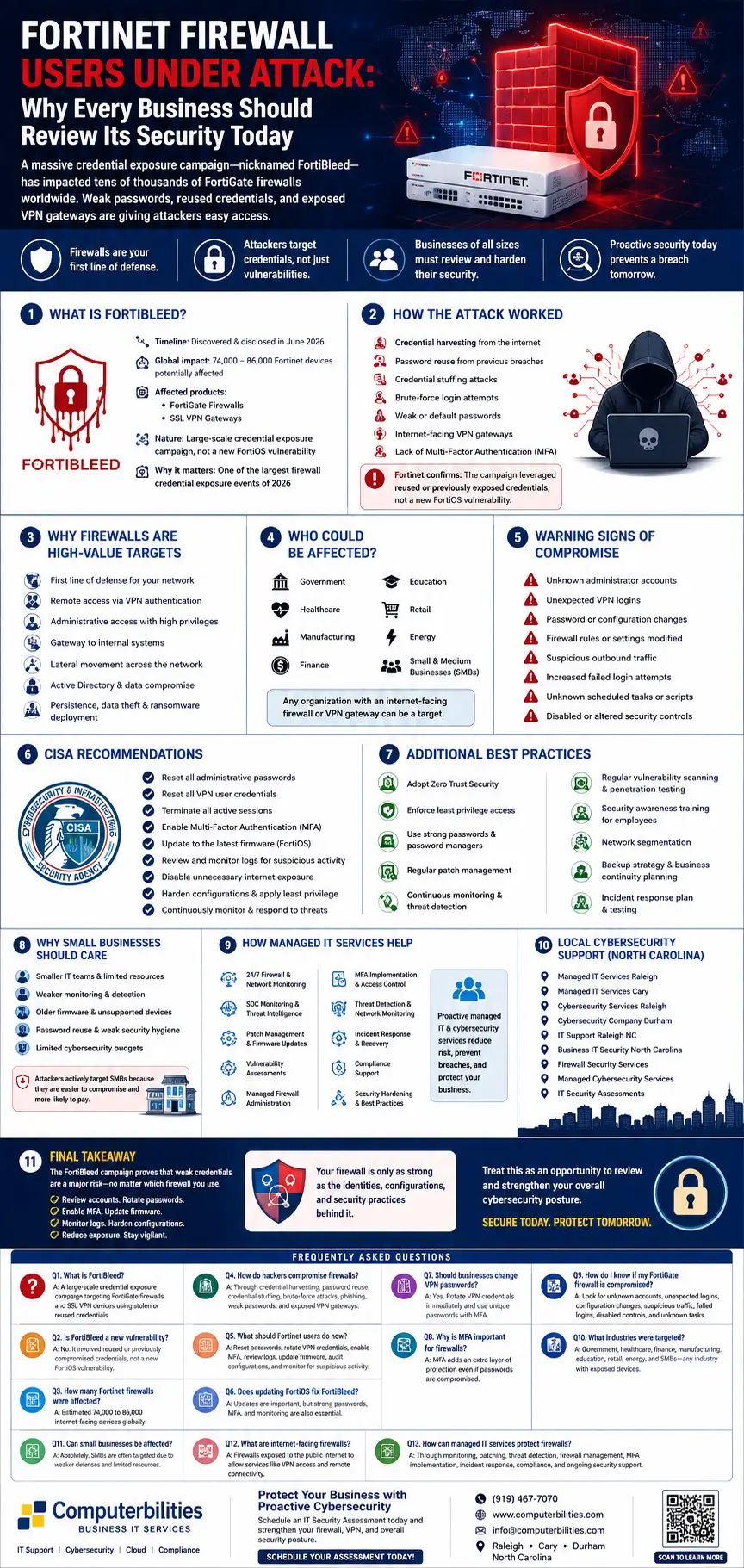
What Is FortiBleed?
The term FortiBleed has quickly become associated with one of the most significant firewall credential exposure campaigns of the year. Unlike traditional cyberattacks that rely on exploiting a newly discovered software bug, this campaign demonstrates how attackers can achieve widespread access simply by abusing stolen or reused credentials.
Understanding the Campaign
Security researchers identified a large collection of exposed login credentials linked to FortiGate firewall security appliances and Fortinet SSL VPN services. These credentials gave threat actors potential access to thousands of internet-facing devices used by organizations around the world.
Although reports vary slightly, industry estimates suggest that approximately 74,000 to 86,000 Fortinet devices were potentially exposed during the campaign. The affected systems were spread across multiple countries and industries, emphasizing the global scale of the issue.
The campaign primarily targeted:
- FortiGate Firewalls
- Fortinet SSL VPN gateways
- Internet-facing VPN appliances
- Remote access infrastructure
Because many organizations depend on these systems to provide secure remote connectivity, compromised credentials could allow attackers to bypass perimeter defenses without triggering traditional exploit-based detection mechanisms.
Why This Incident Is Different
Many headlines initially suggested that Fortinet itself had suffered a major product vulnerability. However, Fortinet’s investigation concluded that the activity was largely related to:
- Previously compromised usernames and passwords
- Password reuse across multiple services
- Weak authentication practices
- Insufficient password rotation
- Lack of multi-factor authentication (MFA)
In other words, the attackers often didn’t need sophisticated malware or zero-day exploits—they simply logged in using valid credentials.
This serves as a powerful reminder that identity security has become just as important as vulnerability management. Even the most advanced firewall cannot protect a business if attackers possess legitimate administrative credentials.
Why Businesses Should Pay Attention
Many small business owners assume cybercriminals only target large enterprises. The reality is quite different.
Threat actors increasingly automate credential-stuffing campaigns against thousands of internet-connected devices, searching for organizations that have:
- Reused passwords
- Disabled MFA
- Outdated authentication policies
- Poor password hygiene
- Unmonitored VPN gateways
Once access is obtained, attackers can quietly explore the network, escalate privileges, steal sensitive information, and, in some cases, deploy ransomware weeks later.
For organizations relying on remote work or hybrid work models, this makes Fortinet VPN security and overall network security more critical than ever.
How the Attack Worked
One of the most important lessons from the FortiBleed campaign is that modern cyberattacks often rely more on stolen identities than on sophisticated software exploits.
Step 1: Credential Harvesting
Cybercriminals continuously collect usernames and passwords from previous data breaches, phishing campaigns, infostealer malware, and dark web marketplaces. Over time, these stolen credentials form massive databases that attackers can reuse across multiple services.
Step 2: Password Reuse
Many employees continue to reuse passwords across work and personal accounts. If a password was exposed in an unrelated breach years ago, attackers may still attempt to use it against business VPNs and firewalls.
This practice significantly increases the risk of password reuse attacks.
Step 3: Credential Stuffing
Rather than manually testing passwords, attackers automate the process through credential stuffing attacks. Bots rapidly attempt thousands of known username-password combinations against internet-facing login portals.
If employees reused passwords, attackers may gain immediate access without exploiting any software vulnerability.
Step 4: Brute-Force Attempts
In addition to credential stuffing, attackers often perform brute-force attacks, systematically guessing passwords using common word lists and previously leaked credentials.
Weak passwords remain one of the biggest contributors to firewall compromise.
Step 5: Targeting Internet-Facing VPN Gateways
Remote access services such as Fortinet SSL VPN gateways are especially attractive because they are directly accessible from the internet.
These systems often provide:
- Administrator access
- Remote employee access
- Network management capabilities
- VPN authentication
- Secure remote connectivity
If attackers successfully authenticate, they may appear to be legitimate users, making detection significantly more difficult.
Step 6: Lack of Multi-Factor Authentication
One of the recurring themes across the campaign is the absence of multi-factor authentication (MFA).
MFA adds a second verification step beyond a password, such as:
- Mobile authentication apps
- Hardware security keys
- Push notifications
- One-time verification codes
Even if attackers possess valid passwords, MFA can prevent unauthorized access in many cases.
Unfortunately, organizations that rely solely on passwords remain vulnerable to credential-based attacks.
A Critical Clarification
It’s essential to separate fact from speculation.
While media reports initially suggested a widespread Fortinet firewall vulnerability, Fortinet’s own analysis indicates that this campaign primarily leveraged compromised credentials rather than exploiting a newly discovered flaw in FortiOS.
That distinction reinforces an important cybersecurity principle: technology alone cannot compensate for weak identity management. Strong passwords, regular credential rotation, MFA, continuous monitoring, and disciplined security practices are just as important as keeping software updated.
Why Firewalls Are High-Value Targets
Most people think of a firewall as a protective barrier that blocks malicious traffic. While that’s true, modern enterprise firewalls do much more—they act as centralized control points for an organization’s entire network infrastructure. As a result, they have become some of the most valuable targets for cybercriminals.
Unlike individual employee devices, a compromised firewall can provide attackers with broad visibility and privileged access across an entire environment.
Firewalls Protect the Network Perimeter
A firewall sits at the edge of your organization’s network, inspecting inbound and outbound traffic, enforcing access policies, and controlling connections between users, applications, and critical systems. Because it governs the network perimeter, compromising it can allow attackers to bypass many other security controls.
Remote Access Makes Firewalls Even More Attractive
With hybrid and remote work now common, many businesses rely on VPN gateways and SSL VPN services integrated into their firewalls. These services authenticate remote employees and provide secure access to internal resources.
If an attacker gains valid VPN credentials, they may be able to enter the network through the same trusted pathway used by legitimate staff.
Administrative Privileges Open the Door to the Entire Network
Firewall administrators typically have elevated privileges that allow them to:
- Modify security policies
- Create user accounts
- Configure VPN access
- Change routing rules
- Enable or disable security features
- View network traffic
Compromising one privileged account can therefore have organization-wide consequences.
A Launchpad for Lateral Movement
Once inside the environment, attackers often attempt lateral movement—the process of moving from one compromised system to others. This may include targeting:
- Active Directory
- File servers
- Cloud services
- Backup systems
- Email platforms
- Endpoint devices
The longer attackers remain undetected, the more opportunities they have to steal data, establish persistence, and prepare ransomware deployment.
Beyond Data Theft
While data theft remains a major objective, compromised firewalls can also be used to:
- Disable security monitoring
- Hide malicious traffic
- Create backdoor access
- Deploy ransomware across the network
- Disrupt business operations
- Exfiltrate sensitive customer and financial information
For SMBs, the financial and operational impact of such an attack can be severe.
Who Could Be Affected?
One of the biggest misconceptions surrounding the recent Fortinet firewall attack is that it primarily affects large enterprises or government agencies. While those organizations are certainly attractive targets, the reality is much broader. Any organization using internet-facing security appliances, particularly FortiGate firewalls or Fortinet SSL VPN solutions, could be at risk if proper security controls are not in place.
Cybercriminals don’t manually choose every victim. Instead, they use automated scanning tools to identify exposed devices across the internet. If your firewall responds to a scan and weak or previously compromised credentials are accepted, your organization could become the next target—regardless of size.
This is why the FortiBleed campaign serves as a wake-up call for organizations of every size and industry.
Government Agencies
Government organizations manage highly sensitive citizen information, critical infrastructure, and public services. Because of this, they are frequent targets for nation-state actors and organized cybercriminal groups.
Compromised firewall credentials can potentially provide attackers with access to:
- Citizen records
- Internal communication systems
- Financial systems
- Law enforcement databases
- Public service portals
Government agencies are also responsible for essential services, making them attractive targets for ransomware groups seeking maximum disruption.
Healthcare Organizations
Hospitals, clinics, and healthcare providers increasingly rely on secure remote access for physicians, administrators, insurance providers, and third-party vendors.
A compromised firewall may expose:
- Electronic Health Records (EHRs)
- Patient billing information
- Medical imaging systems
- Prescription databases
- Insurance claims
- Telehealth platforms
Healthcare organizations often become ransomware victims because downtime directly impacts patient care.
Financial Services
Banks, accounting firms, investment companies, and insurance providers process enormous volumes of confidential financial information every day.
Firewall compromise may allow attackers to target:
- Customer financial records
- Payment systems
- Internal accounting applications
- Authentication servers
- Employee credentials
For financial organizations, even a short security incident can lead to regulatory scrutiny, reputational damage, and significant financial losses.
Manufacturing Companies
Manufacturers increasingly connect production equipment to corporate networks through Industrial Internet of Things (IIoT) devices.
Attackers who gain access through compromised firewalls may attempt to:
- Disrupt production
- Steal proprietary designs
- Access supplier information
- Encrypt manufacturing systems
- Interrupt supply chains
Manufacturing continues to rank among the industries most frequently targeted by ransomware operators.
Educational Institutions
Schools, colleges, and universities manage thousands of user accounts while supporting remote learning environments.
A compromised firewall could expose:
- Student records
- Faculty credentials
- Research data
- Learning management systems
- Administrative platforms
Educational institutions often have complex networks with numerous connected devices, increasing the attack surface.
Retail Businesses
Retailers process payment information, loyalty program data, and customer records while operating numerous point-of-sale systems.
Attackers may attempt to compromise:
- Payment processing
- Inventory systems
- Customer databases
- E-commerce platforms
- Supplier portals
A firewall breach can quickly evolve into a costly data breach affecting thousands of customers.
Energy and Utilities
Critical infrastructure organizations face constant cyber threats because they provide services essential to daily life.
Compromised network perimeter security may expose:
- Operational technology
- Monitoring systems
- Administrative networks
- Vendor access portals
These attacks may have consequences extending well beyond financial loss.
Small and Medium-Sized Businesses (SMBs)
Perhaps the most overlooked victims are SMBs.
Many small businesses assume they are “too small to be noticed.” Unfortunately, automated attacks don’t discriminate.
Attackers often view SMBs as easier targets because they may have:
- Smaller IT departments
- Older firewall firmware
- Limited security monitoring
- Password reuse
- Insufficient incident response planning
- Limited cybersecurity budgets
For a ransomware group, compromising twenty small businesses can be just as profitable as attacking one large enterprise.
Whether you operate a law firm in Cary, a healthcare clinic in Durham, or a construction company in Raleigh, reviewing your firewall security is no longer optional—it’s an essential part of protecting your business.
Warning Signs Your Firewall May Have Been Compromised
One of the most dangerous aspects of modern cyberattacks is that attackers often remain hidden for days—or even weeks—before launching ransomware or stealing sensitive data.
Recognizing early warning signs can significantly reduce the impact of an attack.
- Unknown Administrator Accounts
One of the first things attackers often do is create new administrator accounts.
Watch for:
- Administrator accounts you don’t recognize
- Unexpected privilege changes
- Unknown users with elevated permissions
Review administrative accounts regularly and remove any that are no longer needed.
- Unexpected VPN Logins
Because the FortiBleed campaign focused heavily on credential misuse, reviewing VPN activity is essential.
Warning signs include:
- Logins from unfamiliar countries
- Access outside normal business hours
- Simultaneous logins from multiple locations
- Repeated successful authentication attempts after numerous failures
Security monitoring tools should automatically alert administrators to unusual login behavior.
- Unauthorized Password Changes
Unexpected password resets may indicate an attacker is attempting to lock out legitimate administrators.
Pay attention to:
- Password changes that were never requested
- Multiple reset notifications
- New authentication methods
- Modified MFA settings
Password rotation should always follow documented procedures.
- Firewall Configuration Changes
Firewalls should rarely change unexpectedly.
Investigate:
- New firewall rules
- Disabled security policies
- Opened network ports
- Modified VPN configurations
- Disabled logging
- New routing rules
Even small configuration changes can create significant security gaps.
- Suspicious Outbound Traffic
Cybercriminals often exfiltrate stolen information before deploying ransomware.
Monitor for:
- Large outbound data transfers
- Unknown external IP addresses
- Encrypted traffic to unfamiliar destinations
- High bandwidth usage during off-hours
Network visibility tools make identifying these anomalies much easier.
- Increased Failed Login Attempts
Repeated authentication failures often indicate brute-force or credential-stuffing attacks.
Watch for:
- Thousands of failed login attempts
- Multiple usernames targeted
- Repeated attempts from the same IP address
- Login attempts against disabled accounts
Rate limiting and account lockout policies help reduce this risk.
- Unknown Scheduled Tasks or Automation
Attackers frequently create automated tasks to maintain persistence.
Examples include:
- New scripts
- Scheduled PowerShell commands
- Unknown maintenance jobs
- Automated user creation
These tasks often remain unnoticed for extended periods.
- Disabled Security Controls
Sophisticated attackers frequently attempt to weaken security before launching their primary attack.
Examples include:
- Disabled antivirus
- Stopped endpoint detection agents
- Disabled logging
- Deactivated alerts
- Modified monitoring rules
Any unexpected security control changes should be investigated immediately.
What CISA Recommends
Following reports of widespread Fortinet credential exposure, the Cybersecurity and Infrastructure Security Agency (CISA) issued guidance encouraging organizations to strengthen their firewall security and identity management practices.
The recommendations extend beyond Fortinet devices and represent cybersecurity best practices for any internet-facing infrastructure.
Reset Administrative Passwords
Assume previously used passwords may have been exposed elsewhere.
Administrators should:
- Change all privileged passwords.
- Use unique, randomly generated passwords.
- Avoid password reuse across systems.
A password manager can simplify this process while improving password hygiene.
Reset VPN Credentials
VPN accounts deserve special attention because they provide direct access to internal networks.
Organizations should:
- Rotate VPN passwords.
- Remove inactive accounts.
- Review third-party access.
- Require strong authentication for all remote users.
Terminate Existing Sessions
If compromise is suspected:
- End all active VPN sessions.
- Require users to reauthenticate.
- Revoke stale authentication tokens.
This prevents attackers from maintaining persistent access.
Enable Multi-Factor Authentication (MFA)
MFA remains one of the most effective defenses against credential theft.
Even if attackers obtain valid passwords, they still need the second authentication factor.
Organizations should enable MFA for:
- Firewall administration
- VPN access
- Cloud services
- Privileged accounts
- Remote desktop access
Update Firmware Promptly
Although Fortinet indicated the campaign primarily involved compromised credentials rather than a newly discovered FortiOS vulnerability, maintaining current firmware remains essential.
Regular updates help address:
- Security vulnerabilities
- Stability improvements
- Performance enhancements
- Newly discovered threats
Patch management should follow a structured maintenance schedule.
Review Firewall Logs
Logs often contain the earliest indicators of compromise.
Look for:
- Suspicious administrator activity
- Unexpected login locations
- Configuration changes
- Repeated authentication failures
- Privilege escalation events
Organizations lacking in-house expertise should consider managed Security Operations Center (SOC) monitoring.
Reduce Internet Exposure
Not every administrative interface needs to be publicly accessible.
Whenever possible:
- Restrict management interfaces.
- Use VPN-only administrative access.
- Limit trusted IP addresses.
- Remove unnecessary internet-facing services.
Reducing exposure significantly lowers attack opportunities.
Harden Firewall Configurations
Security hardening should include:
- Disabling unused services
- Removing default accounts
- Enforcing strong password policies
- Applying least privilege
- Regular security reviews
Security hardening is an ongoing process—not a one-time project.
Monitor Continuously
Cybersecurity is no longer about prevention alone.
Organizations should invest in:
- Network monitoring
- Threat detection
- Security monitoring
- Endpoint detection
- Threat intelligence
- Automated alerting
Continuous monitoring dramatically improves the chances of detecting attackers before significant damage occurs.
Additional Firewall Security Best Practices
The FortiBleed campaign highlights an important lesson: cybersecurity is not defined by a single product or vendor. Strong protection comes from combining technology, processes, and people into a layered defense strategy.
Whether your organization uses Fortinet, Cisco, Palo Alto Networks, SonicWall, or another firewall platform, these best practices can strengthen your overall security posture.
Adopt a Zero Trust Security Model
Zero Trust assumes no user, device, or application should be trusted automatically—even if it is already inside the network.
Key principles include:
- Verify every access request.
- Authenticate continuously.
- Limit access based on business needs.
- Monitor user behavior for anomalies.
A Zero Trust approach reduces the likelihood that stolen credentials alone can compromise your environment.
Enforce the Principle of Least Privilege
Employees and administrators should only have the permissions necessary to perform their jobs.
Limiting privileged access helps reduce the impact of compromised accounts and prevents attackers from moving freely through your network.
Conduct Regular Vulnerability Scanning
Routine vulnerability assessments help identify outdated firmware, exposed services, and configuration weaknesses before attackers do.
Scanning should include:
- Firewalls
- VPN gateways
- Remote access services
- Internet-facing devices
- Cloud workloads
Schedule Penetration Testing
Penetration testing simulates real-world attacks to uncover weaknesses that automated tools may miss.
Annual or biannual penetration tests provide valuable insights into your organization’s overall cyber resilience.
Strengthen Password Hygiene
Implement policies that require:
- Unique passwords for every system
- Long passphrases
- Password manager usage
- Regular password rotation for privileged accounts
Combined with MFA, strong password hygiene significantly reduces the risk of credential-based attacks.
Train Employees Regularly
Technology alone cannot stop every attack.
Security awareness training helps employees recognize:
- Phishing emails
- Credential harvesting attempts
- Social engineering tactics
- Suspicious login requests
An informed workforce remains one of the strongest layers of defense.
Prepare for the Worst
Even organizations with mature cybersecurity programs should maintain:
- Offline backups
- Tested disaster recovery plans
- Incident response procedures
- Business continuity strategies
Preparation can dramatically reduce downtime and recovery costs after an incident.
Perform Quarterly Firewall Audits
Your firewall should not be configured once and forgotten.
Quarterly reviews should verify:
- Current firmware versions
- User accounts and permissions
- VPN configurations
- Firewall rules
- Logging and alerting settings
- Compliance with internal security policies
Regular audits help ensure your firewall continues to provide the level of protection your business requires.
Why Small Businesses Should Care
When cybersecurity incidents make the headlines, many small business owners assume they’re safe because attackers are focused on large corporations or government agencies. Unfortunately, today’s cybercriminals don’t think that way.
Modern attacks are highly automated. Threat actors use bots to scan the internet for vulnerable devices, weak passwords, exposed VPN gateways, and outdated firewall configurations. Whether your company has 20 employees or 2,000 employees often makes little difference if your network presents an easy opportunity.
In fact, many ransomware groups deliberately target small and medium-sized businesses (SMBs) because they often have fewer security resources and a higher likelihood of paying a ransom to restore business operations.
Smaller IT Teams Mean Larger Security Gaps
Many SMBs don’t have dedicated cybersecurity professionals monitoring their environment around the clock. Instead, IT responsibilities may fall to:
- A small internal IT team
- An office manager
- A third-party consultant
- A managed IT services provider
Without continuous monitoring, suspicious activity can go unnoticed for days or even weeks.
Older Infrastructure Creates Opportunities
Budget constraints often mean businesses delay replacing or upgrading network equipment. Older firewalls, outdated firmware, unsupported software, and legacy VPN configurations create unnecessary risks.
Attackers actively search for organizations that haven’t implemented recommended updates or security hardening measures.
Password Reuse Remains Common
Employees frequently reuse passwords across business and personal accounts. If those credentials were exposed in a previous breach, attackers may successfully log in to corporate VPNs without exploiting any software vulnerability.
This was one of the key lessons from the FortiBleed campaign: identity security is just as important as software security.
Limited Cybersecurity Budgets
Unlike large enterprises with dedicated Security Operations Centers (SOCs), many SMBs have limited cybersecurity budgets.
As a result, organizations may lack:
- Continuous threat detection
- Security monitoring
- Vulnerability management
- Incident response planning
- Penetration testing
- Security awareness training
Unfortunately, cybercriminals know this.
Every Industry Is a Target
Whether you operate:
- A law firm in Raleigh
- A medical clinic in Durham
- A construction company in Cary
- A manufacturing business in North Carolina
- A nonprofit organization
- A financial services firm
Your organization stores valuable information that cybercriminals can monetize through ransomware, fraud, or data theft.
Cybersecurity is no longer an enterprise-only concern. It is a business continuity issue for organizations of every size.
How Managed IT Services Help Protect Your Business
One of the biggest takeaways from the recent Fortinet firewall attack is that cybersecurity requires ongoing management—not a one-time installation.
Firewalls are incredibly powerful security tools, but they must be continuously monitored, updated, and configured correctly to remain effective.
This is where experienced managed IT providers add tremendous value.
24/7 Firewall Monitoring
Cyber threats don’t stop at 5:00 PM.
Managed cybersecurity services continuously monitor firewall activity to identify:
- Suspicious login attempts
- Unauthorized configuration changes
- VPN anomalies
- Brute-force attacks
- Credential stuffing attempts
- Network scanning activity
Early detection significantly reduces the likelihood of a successful attack.
Security Operations Center (SOC) Monitoring
A modern SOC continuously analyzes network events using advanced threat intelligence.
SOC analysts monitor:
- Security logs
- Firewall alerts
- Endpoint activity
- Authentication events
- Network traffic
- Threat intelligence feeds
This allows organizations to identify threats before they become major incidents.
Patch Management
Many successful cyberattacks exploit systems that were already patched—but never updated.
Professional patch management includes:
- Firmware updates
- Operating system updates
- Third-party application updates
- Security validation
- Maintenance scheduling
Regular updates reduce exposure to known vulnerabilities while improving system stability.
Continuous Threat Detection
Threat detection extends beyond traditional antivirus software.
Modern solutions monitor for:
- Suspicious behavior
- Unusual network activity
- Malware execution
- Privilege escalation
- Lateral movement
- Data exfiltration
This layered approach provides much stronger protection than relying solely on perimeter defenses.
Vulnerability Assessments
Regular vulnerability assessments identify weaknesses before attackers discover them.
Assessments typically review:
- Firewall configurations
- VPN settings
- Internet-facing services
- Administrative accounts
- Password policies
- Firmware versions
- Network segmentation
These proactive reviews help organizations maintain a stronger security posture.
Managed Firewall Administration
Firewalls require ongoing optimization.
Professional firewall administration includes:
- Rule reviews
- Policy optimization
- Access control management
- VPN configuration
- Log analysis
- Security hardening
- Performance tuning
Routine management helps ensure the firewall continues protecting the business as new threats emerge.
Multi-Factor Authentication (MFA) Implementation
Strong passwords alone are no longer enough.
Managed IT providers can help deploy MFA across:
- VPN access
- Firewall administration
- Microsoft 365
- Cloud applications
- Remote desktop
- Privileged accounts
MFA remains one of the most effective defenses against credential theft.
Incident Response
If an attack occurs, response time matters.
Managed cybersecurity teams help organizations:
- Contain threats
- Investigate compromised accounts
- Preserve forensic evidence
- Restore systems
- Recover data
- Communicate with stakeholders
- Reduce downtime
A documented incident response plan can significantly reduce business disruption.
Compliance Support
Many organizations must comply with regulations such as:
- HIPAA
- PCI DSS
- CMMC
- FTC Safeguards Rule
- NIST Cybersecurity Framework
Managed IT providers help align firewall security and cybersecurity practices with applicable compliance requirements.
Final Takeaway
The FortiBleed campaign is about much more than Fortinet. It underscores a broader lesson for every organization: your firewall is only as secure as the identities, configurations, and operational practices that support it.
According to Fortinet, this campaign primarily involved compromised or reused credentials—not a newly disclosed FortiOS vulnerability. That distinction highlights an important reality: many successful cyberattacks exploit weak identity management, poor password hygiene, and insufficient monitoring rather than sophisticated software flaws.
Regardless of which firewall vendor your organization uses, now is an excellent time to:
- Review administrative accounts.
- Rotate passwords and VPN credentials.
- Enable multi-factor authentication.
- Audit firewall configurations.
- Update firmware.
- Monitor authentication logs.
- Reduce unnecessary internet exposure.
- Conduct regular security assessments.
Cybersecurity isn’t a one-time project. It’s an ongoing process of improving your organization’s resilience against an ever-changing threat landscape.
Protect Your Business Before Attackers Find an Opportunity
If you’re unsure whether your firewall, VPN, or remote access infrastructure is properly secured, now is the time to act.
Computerbilities helps businesses across Raleigh, Cary, Durham, and North Carolina strengthen their cybersecurity with:
- Managed IT Services
- Firewall Security Services
- 24/7 Security Monitoring
- Threat Detection
- Vulnerability Assessments
- Patch Management
- Incident Response
- Business Continuity Planning
Schedule an IT Security Assessment today to evaluate your firewall security, identify hidden risks, and ensure your business is prepared for the next generation of cyber threats.
Frequently Asked Questions (FAQs)
- What is FortiBleed?
FortiBleed is the name commonly used to describe a large-scale credential exposure campaign involving Fortinet FortiGate firewalls and SSL VPN devices. The campaign focused on compromised or previously leaked credentials rather than exploiting a newly discovered FortiOS software vulnerability.
- Is FortiBleed a new vulnerability?
No. Based on Fortinet’s analysis, the campaign primarily involved reused or previously compromised usernames and passwords instead of a newly identified FortiOS vulnerability.
- How many Fortinet firewalls were affected?
Reports vary, but researchers estimate that approximately 74,000 to 86,000 internet-facing Fortinet devices may have been affected globally.
- How do hackers compromise firewalls?
Attackers commonly use credential harvesting, password reuse, credential stuffing, brute-force attacks, phishing, weak passwords, and unprotected VPN gateways to gain unauthorized access.
- What should Fortinet users do now?
Organizations should:
- Reset administrator passwords.
- Rotate VPN credentials.
- Enable MFA.
- Review firewall logs.
- Update firmware.
- Audit firewall configurations.
- Monitor for suspicious activity.
- Does updating FortiOS fix FortiBleed?
Keeping FortiOS updated is an essential security practice, but software updates alone do not eliminate the risks associated with compromised credentials. Strong passwords, MFA, and regular monitoring remain equally important.
- Should businesses change VPN passwords?
Yes. Organizations should immediately rotate VPN credentials, particularly if password reuse or credential exposure is suspected. Using unique passwords and enabling MFA provides additional protection.
- Why is MFA important for firewalls?
Multi-factor authentication adds an additional verification step beyond a password. Even if attackers obtain valid credentials, MFA significantly reduces the likelihood of unauthorized access.
- How do I know if my FortiGate firewall has been compromised?
Warning signs include:
- Unknown administrator accounts
- Unexpected VPN logins
- Firewall configuration changes
- Suspicious outbound traffic
- Repeated failed login attempts
- Disabled security controls
- New scheduled tasks or automation
Regular log reviews and continuous monitoring help identify these indicators early.
- What industries were targeted?
Organizations across multiple sectors—including government, healthcare, finance, manufacturing, education, retail, energy, and small businesses—could be affected because attackers scan for exposed internet-facing devices rather than targeting a single industry.
- Can small businesses be affected?
Absolutely. Small and medium-sized businesses are increasingly targeted because they often have fewer cybersecurity resources, older infrastructure, and limited security monitoring.
- What are internet-facing firewalls?
Internet-facing firewalls are security devices that communicate directly with the public internet. They protect an organization’s network while enabling services such as VPN access, remote connectivity, and secure communication. Because they are publicly accessible, they are attractive targets for cybercriminals.
- How can managed IT services protect firewalls?
Managed IT service providers strengthen firewall security by offering:
- 24/7 monitoring
- Threat detection
- Patch management
- Firewall administration
- Vulnerability assessments
- Security hardening
- Multi-factor authentication deployment
- Incident response
- Compliance assistance
- Continuous cybersecurity support
These proactive services help reduce cyber risk and improve overall business resilience.