

When an IT Emergency Hits, It's Too Late to Plan: 7 Decisions to Make Now
A backup is not a recovery plan.
If nobody knows which system must return first, who can authorize emergency actions, where critical vendor contacts are stored, or how employees will work while systems are unavailable, your business is storing data. It is not yet protecting operations.
That difference becomes painfully clear during a ransomware attack, server failure, internet outage, power disruption, or accidental deletion. The technical problem may begin in one system, but the operational impact can reach every department within minutes.
For a construction company, field teams may lose drawings, schedules, and access to project platforms. An engineering or architecture firm may be unable to open large design files or collaborate on revisions. A contracting business may lose access to estimates, vendor information, payroll, or customer communications. In every case, the worst time to decide what matters most is after work has already stopped.
What Is an IT Emergency Plan?
An IT emergency plan is a documented set of decisions that tells your business who takes charge, which operations and systems are restored first, how people communicate, and what temporary processes they will use during a disruption. It connects incident response, disaster recovery, and business continuity so your team can execute under pressure instead of improvising.
Three Plans, Three Different Jobs
Businesses often use incident response, disaster recovery, and business continuity as if they mean the same thing. They work together, but each answers a different question.
Plan | Question It Answers | Primary Focus |
Incident response | How do we detect, contain, investigate, and communicate about the incident? | Managing the event and limiting damage |
Disaster recovery | How do we securely restore systems, applications, and data? | Technical restoration and validation |
Business continuity | How does the organization keep its most important work moving? | People, processes, customers, and operations |
NIST treats incident response as part of broader cybersecurity risk management. Its current guidance emphasizes preparation, defined responsibilities, coordinated plans, prioritized recovery, verified restoration assets, communications, and lessons learned after the event.
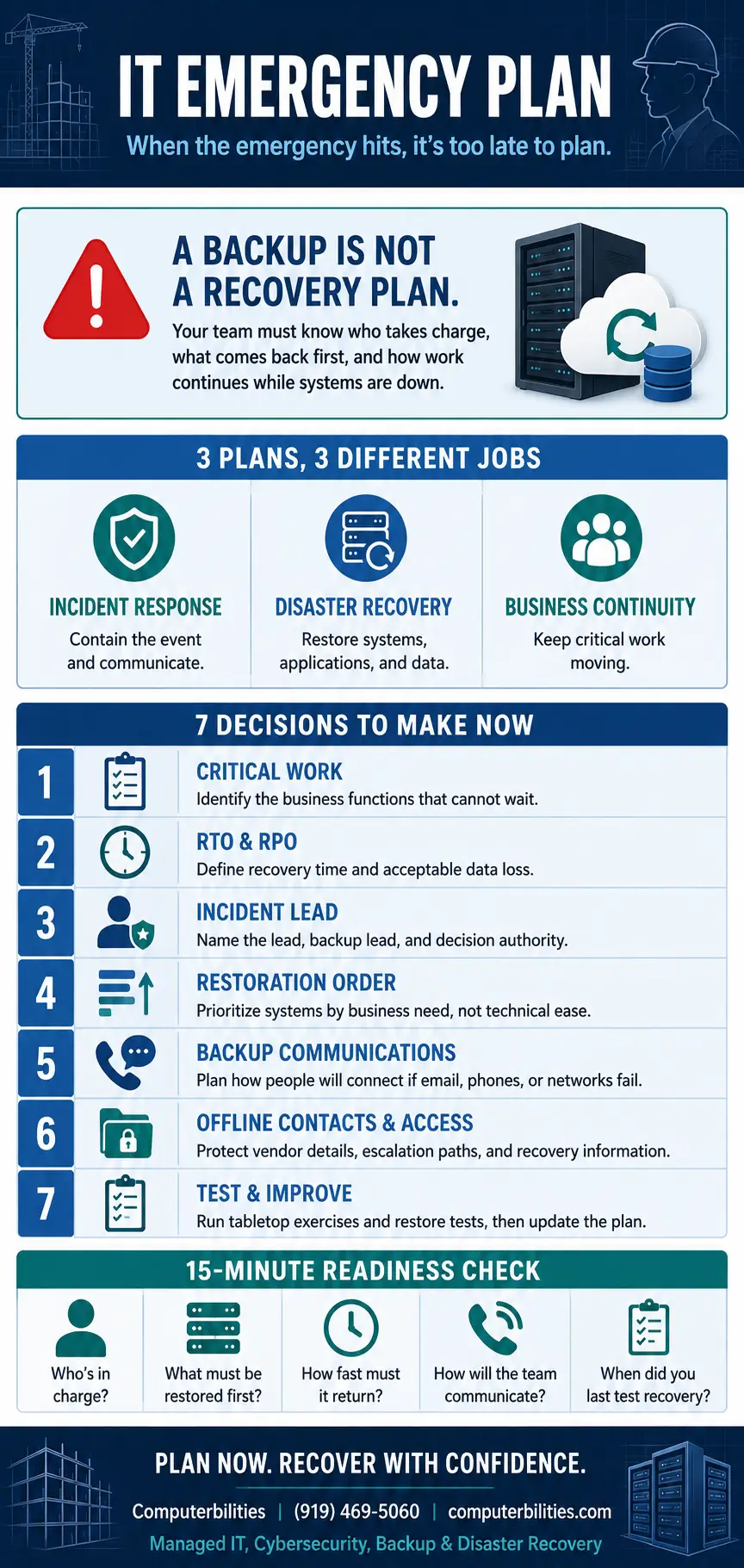
The 7 Decisions to Make Before an IT Emergency
1. Decide Which Business Functions Cannot Wait
Start with the work, not the hardware. Identify the activities that must continue to protect safety, revenue, contractual commitments, customer service, and regulatory obligations.
A project-driven company might prioritize access to current drawings, project-management platforms, email, field communications, accounting, and payroll. A real estate management company may prioritize tenant communications, payment systems, and property records. The priorities should reflect how your business actually operates today.
This analysis becomes the foundation for the system restoration order. If everything is labeled critical, nothing is truly prioritized.
2. Define How Fast Recovery Must Happen
Two recovery objectives turn vague expectations into decisions:
- Recovery Time Objective (RTO): the maximum acceptable time a system or process can remain unavailable.
- Recovery Point Objective (RPO): the maximum acceptable amount of data loss measured in time.
Different systems may need different objectives. Payroll, current project files, historical archives, and a public website do not necessarily require the same restoration speed or backup frequency. Business leadership should set the operational requirements, and the IT team should design and test a recovery method that can meet them.
3. Name the Incident Lead and Decision Authority
An emergency plan should identify one incident lead, a backup lead, and the people authorized to make high-impact decisions. Those decisions may include isolating systems, shutting down services, contacting cyber insurance, engaging legal counsel, approving emergency purchases, or notifying customers.
The incident lead does not need to solve every technical problem. The role is to coordinate the response, maintain a reliable status picture, assign actions, and make sure leadership receives consistent information.
4. Set the Restoration Order Before Pressure Starts
The easiest system to restore is not always the system the business needs first. Your plan should document dependencies and restoration priorities before anyone is under pressure.
For example, employees may need identity services, internet connectivity, and secure remote access before they can use cloud applications. A design team may need file storage and licensing services before CAD or BIM workflows can resume. Accounting may need access before a payroll or filing deadline. The correct order is a business decision supported by technical knowledge.
5. Create an Alternate Communication and Work Plan
If email, Microsoft 365, VoIP, or the company network is affected, the usual communication channels may be unavailable. Your emergency plan needs a separate, secure method for reaching leadership, employees, key vendors, and customers.
It should also define temporary workflows. Where will field teams find approved documents? How will employees record customer requests? Which activities can continue offline, and which must pause? What information must never be moved to personal email, consumer file-sharing accounts, or unapproved devices?
Temporary procedures should keep the business organized without creating a second security problem.
6. Put Critical Contacts and Access Details Where the Outage Cannot Reach Them
A contact list stored only inside the unavailable network is not an emergency contact list. Keep a protected offline or out-of-band copy of the information needed to begin recovery, including:
- The incident lead, backup lead, executives, and department owners
- The managed IT provider and cybersecurity response contacts
- Internet, phone, cloud, software, hardware, and critical application vendors
- Cyber insurance, legal counsel, and any required reporting contacts
- Escalation procedures, account numbers, and approved authorization paths
Sensitive credentials and recovery keys require stronger protection than a printed phone list. Store them using an approved secure method that remains available during the scenarios covered by the plan.
7. Test the Plan and Correct What Fails
An untested plan is still an assumption. Start with a tabletop exercise: choose a realistic scenario, gather the people named in the plan, and walk through what would happen from the first alert through restored operations.
Then test the technical pieces. Confirm that backup data is complete, protected, and restorable. Verify the time required to retrieve and restore it. Check that critical services return in the intended order and that recovered systems are clean and functioning before they return to production.
Update the plan after tests, staff changes, new software, office moves, vendor changes, mergers, or major workflow changes. Computerbilities’ backup and disaster recovery guidance recommends testing at least quarterly or twice a year. Higher-risk or rapidly changing environments may need more frequent exercises.
A 15-Minute IT Emergency Readiness Check
Your business is not ready if leadership cannot answer these questions quickly and consistently:
- Who has authority to declare an IT emergency and lead the response?
- Which five business functions must be protected or restored first?
- What are the approved RTO and RPO for each critical system?
- Where is the current restoration order documented?
- How will the team communicate if email, phones, or the network is unavailable?
- Who coordinates the internet, cloud, software, phone, and other technology vendors?
- Where are protected offline copies of essential contacts and recovery information?
- When was the last successful restore test or tabletop exercise?
- Who communicates with employees, customers, insurers, legal counsel, and regulators?
- What changed in the business since the plan was last reviewed?
Any answer that begins with ‘we would figure that out’ identifies a planning gap worth addressing now.
Why Backups Alone Are Not Enough
Backups are essential, but a complete response also requires clean restoration points, tested recovery procedures, defined roles, communications, system dependencies, and temporary operating procedures.
Computerbilities supports this broader approach with onsite and offsite backups, cloud and SaaS backup, immutable backup options, automated protection, 24/7 monitoring, regular backup testing, disaster recovery planning, and cybersecurity services. The company also helps define RTO/RPO targets, employee responsibilities, emergency communications, and backup workflows.
That matters for organizations across Cary, Raleigh, Durham, Chapel Hill, Apex, Wake Forest, Holly Springs, and New York City, especially firms whose project schedules, client commitments, and revenue depend on secure access to current information.
Make the Decisions While the Business Is Calm
The goal of an IT emergency plan is not to predict every possible failure. It is to remove avoidable uncertainty from the first minutes and hours of the response.
When ownership is clear, recovery priorities are documented, backups have been tested, vendors know their roles, and employees have safe temporary procedures, the team can focus on execution. That is the difference between having technology safeguards and having operational resilience.
Computerbilities has provided managed IT and cybersecurity support since 1995. Its team works with small and midsize businesses, government organizations, and project-driven industries that depend on reliable systems and clear communication.
Book my free 15-minute IT Priorities Call. Discuss your main business IT concern and receive a brief emailed summary of priorities and recommended next steps. No cost, no obligation to purchase, and no system access required. Technical testing and detailed assessments are separately scoped.
Frequently Asked Questions
What should an IT emergency plan include?
An IT emergency plan should identify the incident lead, decision authority, critical business functions, restoration order, RTO/RPO targets, communication methods, vendor contacts, temporary workflows, reporting responsibilities, and testing schedule.
Is a backup the same as a disaster recovery plan?
No. A backup is a protected copy of data. A disaster recovery plan explains how systems, applications, data, and infrastructure will be restored. Business continuity goes further by explaining how critical operations will continue while recovery is underway.
How often should a disaster recovery plan be tested?
Test the plan on a regular schedule and after significant changes to people, systems, vendors, offices, or workflows. Computerbilities recommends at least quarterly or twice-yearly testing, with more frequent exercises when risk or operational change justifies them.
What is the difference between RTO and RPO?
RTO is the maximum acceptable recovery time. RPO is the maximum acceptable data loss measured in time. Together, they help determine backup frequency, recovery architecture, cost, and restoration priorities.
Who should own the IT emergency plan?
Business leadership should own the operational priorities and decision authority. Internal IT staff or a managed IT provider should document and test the technical response. Legal, communications, HR, finance, operations, and external vendors may also have assigned responsibilities.
Author Bio
Adam K. Pittman is the founder and president of Computerbilities, Inc., a Cary, North Carolina-based managed IT services and cybersecurity firm founded in 1995. A U.S. Air Force veteran with more than four decades of technology experience, Adam has worked with government agencies and more than 2,000 businesses across over 100 industries.
Review your recovery priorities, backup testing, and business continuity readiness before an outage tests them for you.