
Disaster Recovery Testing for Construction Firms: The IT Fire Drill You Cannot Skip
A fire drill does not predict when smoke will appear. It proves that people can recognize the alarm, follow a route, and reach safety when the normal routine breaks. Disaster recovery testing serves the same purpose for a construction firm. It shows whether your team can restore the systems, data, and communications that keep projects moving when a cyberattack, server failure, power event, or human mistake takes them offline.
That distinction matters because having backups is not the same as being able to recover. A dashboard may report that last night’s backup completed, yet the file set could be incomplete, the recovery credentials could be inaccessible, or the restored application could depend on another system that no one included in the plan. The only dependable way to expose those gaps is to run the IT fire drill before the emergency is real.
For construction companies in Raleigh and across the Triangle, the stakes extend beyond the office. Estimating, accounting, payroll, email, cloud storage, CAD or BIM files, submittals, RFIs, change orders, schedules, and field communications form a connected workflow. If one critical link stays down, crews may be ready while the information needed to direct, document, or bill their work is unavailable.
A Disaster Recovery Plan Is More Than a Backup Schedule
A disaster recovery plan explains how the organization will restore technology after a disruption. It identifies critical systems, recovery priorities, responsible people, backup locations, technical steps, vendors, communication methods, and the criteria for returning systems to production. A useful plan is specific enough to follow under pressure and current enough to match the environment that exists today.
A business continuity plan is broader. It explains how the company will continue essential operations while technology is impaired. For a construction firm, that might mean an approved way to distribute daily assignments, access emergency contact information, record field activity, approve purchases, process payroll, or communicate with owners and subcontractors while primary applications are unavailable.
A ransomware response plan addresses the security decisions that surround a malicious incident: who isolates affected devices, who preserves evidence, who contacts cyber insurance and legal counsel, how leadership communicates, and how the team determines that a recovery point is clean. These plans overlap, but they are not interchangeable. The ransomware response contains the threat; disaster recovery restores trusted technology; business continuity keeps the company functioning in the meantime.
CISA recommends testing backup procedures regularly and exercising incident response plans. NIST likewise describes contingency planning as a coordinated combination of plans, procedures, and technical measures, and its backup guidance emphasizes that backups should be conducted, maintained, and tested. In plain English: recovery readiness must be demonstrated, not assumed.
Why Construction Firms Need a Different Kind of Recovery Test
Construction IT is distributed by nature. Employees work from headquarters, home offices, temporary jobsite networks, mobile devices, and client locations. Data may live in Microsoft 365, a project management platform, a file server, specialized estimating software, an accounting system, and vendor portals. A test that restores one folder while ignoring identities, application integrations, permissions, connectivity, and field access provides only partial confidence.
The right test starts with business impact. Ask what happens if estimators cannot reach bid documents before a deadline, project managers lose the latest drawing set, accounting cannot issue payments, or supervisors cannot retrieve approved change orders. Those scenarios reveal which systems deserve priority and what a successful recovery must accomplish for the business, not merely for the server.
Two targets make those expectations measurable:
- Recovery Time Objective (RTO): the maximum acceptable time to restore a process or system after disruption.
- Recovery Point Objective (RPO): the maximum acceptable amount of recent data loss, expressed as time between the incident and the last usable recovery point.
Different workflows deserve different targets. Email and active project files may need faster recovery than archived project records. Payroll may become the top priority near a processing deadline. The test should compare actual results with the agreed targets and document any gap. If a system takes six hours to restore against a two-hour RTO, the exercise has found a business decision that needs attention.
Run the IT Fire Drill: A Seven-Step Disaster Recovery Test
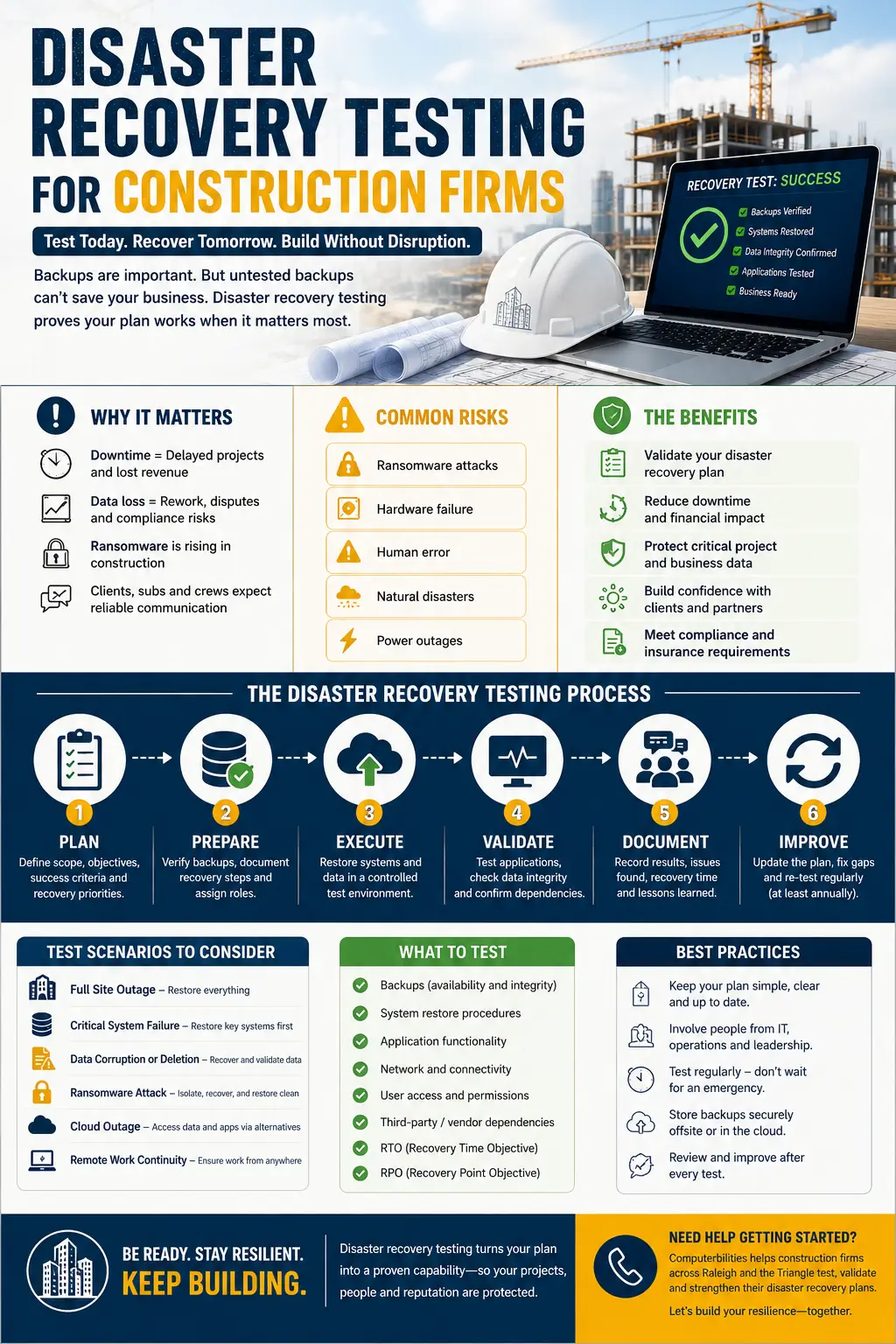
- Choose a realistic scenario. Use one event with a clear scope, such as ransomware encrypting a shared project drive, a failed server, accidental deletion of an active project folder, an unavailable cloud administrator account, or an office outage that forces remote operations. State what is unavailable and what the team is allowed to assume.
- Name the exercise team and decision owners. Include technology support, executive leadership, operations, finance, project management, and communications as appropriate. Assign who can declare an incident, isolate systems, approve restoration, contact outside parties, and authorize the return to production. Keep current phone numbers and vendor escalation paths somewhere accessible without the affected network.
- Confirm recovery priorities and dependencies. List the minimum systems needed to resume the selected workflow. Restoring project files may also require identity services, multifactor authentication, network access, application licensing, database services, and correct permissions. Sequence the work so teams do not restore a secondary application before the services it depends on.
- Select a known-good recovery point. For a routine failure, the newest intact backup may be appropriate. For ransomware, the newest backup is not automatically the safest. The response team must consider when the intrusion began, whether malicious access or altered files could be present, and what validation is required before restored data reconnects to production.
- Restore in an isolated environment. Whenever practical, conduct the technical portion away from production. Restore a representative project folder, server, virtual machine, database, mailbox, or application. Confirm that it opens, that permissions work, that expected records are present, and that the application can perform the business task it supports.
- Exercise the people and the workaround. Have leaders walk through notifications and decision points. Ask a project manager to retrieve the restored drawing, an accounting user to validate a test record, or a field leader to access the documented continuity process. A recovery is incomplete if IT can open a file but the intended user cannot work with it.
- Record results and assign corrections. Capture start and finish times, the recovery point used, missing data, failed steps, access problems, unclear decisions, vendor delays, and the actual RTO/RPO result. Give each corrective action an owner and due date, update the disaster recovery plan, and schedule a targeted retest.
What a Good Test Should Prove
A disaster recovery test passes only when it produces evidence. “The backup job was green” is an input, not an outcome. At the end of the exercise, your firm should be able to answer the following questions with records rather than confidence alone:
- Did the selected backup contain the expected files, records, configurations, and permissions?
- Could authorized users access the restored system and complete a representative business task?
- Did recovery finish within the approved RTO, and was data loss within the approved RPO?
- Were backup copies protected from the same credentials, network paths, or administrative compromise as production?
- Could the team find the plan, contacts, recovery credentials, and vendor procedures while primary systems were unavailable?
- Did leadership know when to activate the business continuity plan and ransomware response plan?
- Were restored systems validated as trustworthy before reconnecting to production?
The final deliverable should be a short after-action report: what was tested, what succeeded, what failed, how long recovery took, what data was recovered, and what must change. It turns an exercise into an improvement cycle and informs risk, budget, and insurance conversations.
How Often Should You Test Disaster Recovery?
There is no single schedule that fits every construction firm. Testing frequency should reflect system criticality, the pace of change, contractual or insurance requirements, and the consequences of downtime. A practical baseline is to perform small file or application restores throughout the year, conduct a structured tabletop exercise at least annually, and run a broader technical recovery exercise on a risk-based schedule. High-impact systems or rapidly changing environments may warrant more frequent testing.
Do not wait for the calendar when something important changes. Revisit the plan after migrating applications, changing backup platforms, adding a major cloud service, replacing key personnel, restructuring permissions, or discovering a security incident. Project mobilization and closeout can also shift data locations and access patterns quickly.
Common Recovery Testing Mistakes
- Testing only files and never the applications, identities, permissions, and integrations needed to use them.
- Letting the same administrator credentials control production and every backup copy without considering how a compromised account affects recovery.
- Writing RTO and RPO targets without measuring actual restoration time and actual data loss.
- Leaving business leaders and department users out of the exercise.
- Treating a ransomware recovery like an ordinary hardware failure and restoring before the environment is investigated and contained.
- Documenting lessons but failing to assign owners, deadlines, and a retest.
The goal is not a flawless first drill. The goal is to find weaknesses while the clock is simulated, the project is still moving, and the team has room to correct them. A failed step in a controlled test is useful information. The same failure during an active ransomware event is downtime.
What Disaster Recovery Services in Raleigh, NC Should Include
A provider offering disaster recovery services in Raleigh, NC should help translate business priorities into a tested recovery capability. For construction firms, that means understanding both office systems and the field workflows they support. The conversation should cover backup scope, retention, protected recovery copies, monitoring, recovery documentation, RTO/RPO alignment, ransomware considerations, testing cadence, reporting, and the responsibilities shared by the client, MSP, cloud provider, and software vendors.
Ask a prospective provider how it verifies recoverability, remediates failed tests, reports evidence, and coordinates recovery with incident response and business continuity. Clear ownership matters when several vendors support the accounting, project management, cloud, and network environment.
Your Next Fire Drill Should Happen Before the Alarm
A disaster recovery plan earns its value when people can use it and technology can be restored from a trustworthy recovery point. Testing replaces assumptions with measured recovery times, verified data, practiced decisions, and a prioritized improvement list. For a construction business, that preparation protects more than servers: it supports payroll, deadlines, documentation, field coordination, client communication, and the ability to keep building through disruption.
Computerbilities helps construction and contracting firms assess backup and disaster recovery readiness across their systems, cloud services, and operating workflows. The focus is practical: identify critical dependencies, validate recovery targets, test a representative restore, and document the next improvements without disrupting production.
Schedule a Disaster Recovery Readiness Assessment Find out whether your current disaster recovery plan, backup coverage, recovery targets, and ransomware procedures can support the way your construction firm actually works. Request a readiness review and identify the highest-priority gaps before your next real outage. Prefer a focused technical check? Request a Backup Recovery Test for a representative system or project data set. |
Frequently Asked Questions
What is disaster recovery testing?
Disaster recovery testing is a controlled exercise that verifies whether an organization can restore critical systems and data after a disruption. It checks technical recovery, user access, timing, responsibilities, communications, and the business work that must resume.
Is a backup the same as a disaster recovery plan?
No. A backup is a copy of data or a system state. A disaster recovery plan defines what to restore, in what order, by whom, from which recovery point, within what time, and how the restored environment will be validated and returned to use.
How does a business continuity plan differ from disaster recovery?
Business continuity covers how essential operations continue during disruption. Disaster recovery focuses on restoring technology. A construction firm may use temporary communication, approval, payroll, or field-documentation procedures while IT restores primary systems.
What should a ransomware recovery test include?
It should include containment and escalation decisions, selection of a known-good recovery point, isolated restoration, security validation, business-user testing, communication steps, and criteria for reconnecting systems. It also should confirm that recovery instructions and credentials remain accessible during the incident.
How long should disaster recovery take?
The answer depends on the approved RTO for each business process. Critical workflows should have recovery targets based on operational impact, and testing should measure whether the current technology, people, and procedures can meet those targets.