
Can ChatGPT Conversations Be Used in Court? A Business Guide to AI Chat Privacy
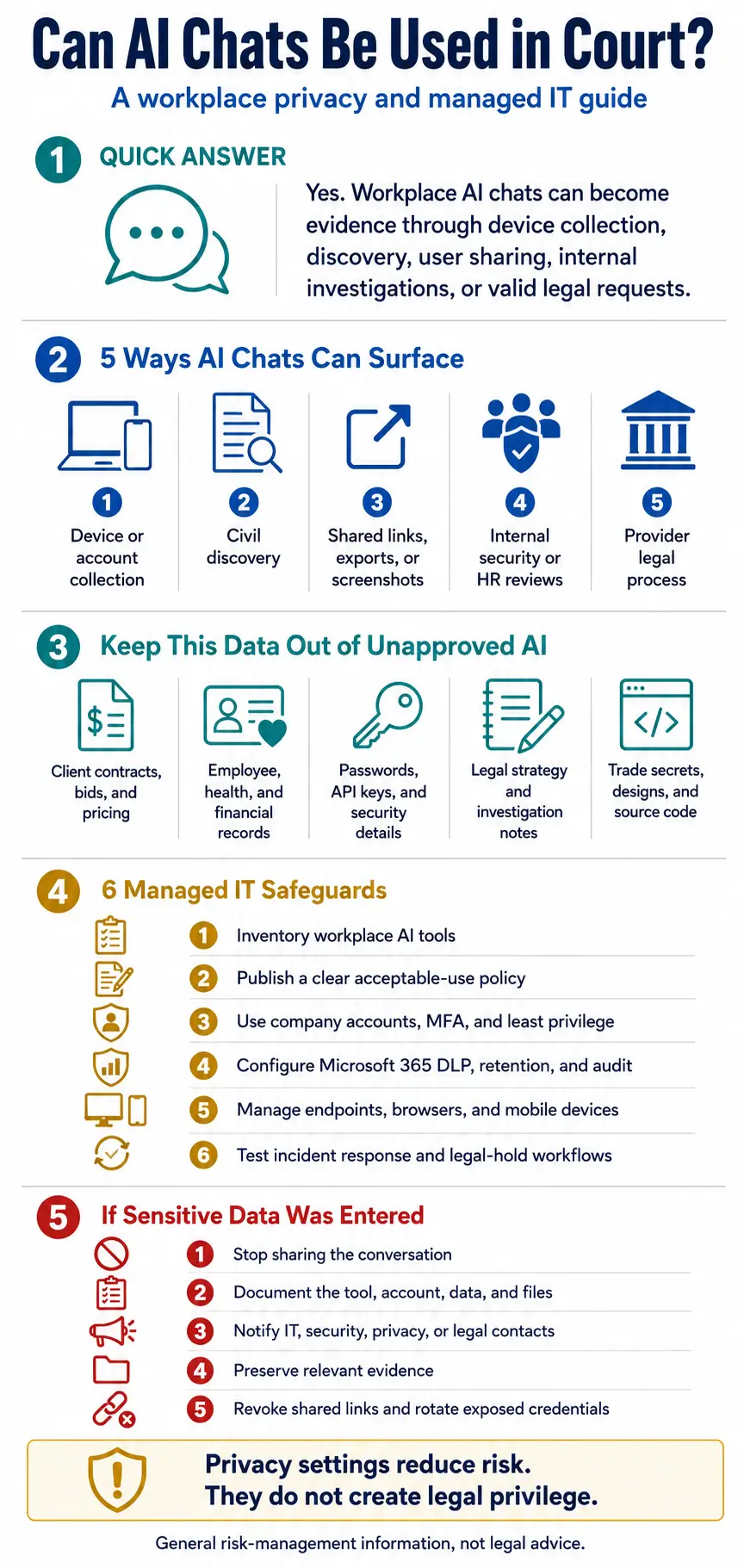
Quick answer: Yes. Workplace AI chats can surface in lawsuits, investigations, employment disputes, and regulatory matters when they are collected from a device, produced in discovery, filed with a court, shared by a user, or lawfully requested from a provider. That does not make every chat automatically public or admissible. It does mean businesses should manage prompts and outputs as potentially sensitive records, not private conversations with a confidential adviser.
Generative AI is rapidly becoming part of normal work. Employees use it to rewrite email, summarize meetings, compare contract language, troubleshoot software, draft performance feedback, analyze spreadsheets, and prepare client communications. In construction and engineering firms, a prompt may include a project delay, a contract excerpt, a drawing issue, or a customer complaint. In accounting, legal, healthcare, and professional services, it may include financial, employment, or regulated information.
The convenience is real, but so is the record created by the interaction. A prompt can capture the user’s exact wording, background facts, assumptions, intent, and follow-up questions. An output can repeat sensitive details and then be pasted into email, Teams, a project platform, or a document. If a dispute later arises, the AI exchange may become relevant in the same way that email, text messages, browser activity, collaboration records, and local files can become relevant.
Recent reporting makes that possibility tangible. The Washington Post identified a dozen U.S. civil and criminal matters over two years in which chatbot logs were cited. The examples included conversations obtained from devices, chats presented in civil litigation, and a business dispute where questions about deleted email became part of an evidence-preservation argument. The lesson is not that every user is headed to court. It is that AI conversations now belong in an organization’s data map, acceptable-use rules, and incident-response planning.
For businesses in Raleigh, Cary, Durham, across the Triangle, and in New York City, the immediate problem is often “shadow AI”: useful tools adopted by employees without a shared decision about accounts, data, retention, access, or support. The risk is greater when office and field teams work across personal phones, laptops, browser extensions, meeting assistants, and cloud applications that IT cannot consistently see.
How Can a Workplace AI Chat End Up in Court?
An AI chat can reach a legal matter through several ordinary routes. The path often starts outside the chatbot provider.
- A device or account is collected. Chats, screenshots, exports, browser artifacts, or synchronized histories may exist on a laptop, phone, tablet, or cloud account involved in an authorized investigation, forensic review, or lawful search.
- A party requests electronically stored information. In civil litigation, relevant and proportional business records may be collected through discovery. AI records can appear directly or through references in email, Teams, tickets, documents, and shared files.
- A user shares the content. Employees can forward outputs, publish shared links, paste conversations into reports, or send screenshots. A record may spread because of normal collaboration, not because the provider disclosed it.
- A provider receives valid legal process. OpenAI publishes procedures for civil user-data requests and says it reviews requests under applicable law. Government requests follow a separate policy. Providers may challenge improper or overbroad demands, but a business should not assume that provider-held data can never be produced.
- An internal review uncovers it. An AI prompt may appear during a security investigation, HR inquiry, data-loss prevention alert, audit, or support ticket and later become part of an insurance claim, regulatory response, or lawsuit.
Discoverable, admissible, and public are different concepts. Material exchanged in discovery may never appear on a public docket. A chat may become public if it is quoted in a filing, attached to a motion, presented at trial, or not protected by a sealing order. Whether a specific record must be produced or can be admitted depends on the facts, legal rules, and court decisions in that matter.
Are AI Chats Protected by Attorney-Client Privilege?
No. Asking a chatbot a legal question does not automatically create attorney-client privilege. AI platforms are not lawyers, and privacy settings are not legal relationships.
In United States v. Heppner, a federal judge in the Southern District of New York considered materials a defendant created with the consumer version of Claude while facing a criminal investigation. His attorneys had not directed him to use the tool. The court held that the materials were protected by neither attorney-client privilege nor the work-product doctrine. Among other reasons, the exchanges were with a third-party platform rather than counsel, and later sending the materials to an attorney did not retroactively make them privileged.
The decision is an important warning, not a universal answer for every platform, workflow, court, or jurisdiction. Privilege is fact-specific. A lawyer-directed process using a carefully vetted tool may raise different questions. Businesses should involve qualified counsel before using AI for an active dispute, investigation, legal strategy, or privileged communication. An IT provider can strengthen confidentiality and governance, but technology controls alone do not create privilege.
Privacy, Training, Retention, and Legal Protection Are Different
Leaders often treat four separate ideas as if they were interchangeable. They are not:
- Training settings address whether content may be used to improve models. Disabling training does not necessarily delete a conversation, prevent sharing, shorten retention, or block valid legal process.
- Retention settings address how long specified records remain under normal conditions. OpenAI says consumer chats remain until deleted and that deleted chats are generally scheduled for permanent deletion within 30 days, subject to stated legal and security exceptions. Temporary Chats are also generally deleted within 30 days and are not used for training; they are not an invisibility mode.
- Business workspace controls can offer stronger contractual and administrative safeguards. OpenAI says content from its business offerings is not used for model training by default, and qualifying organizations can configure retention. Those protections reduce some risks but do not eliminate endpoint copies, user sharing, connected-app records, or preservation obligations.
- Legal protection depends on applicable law, relationships, purpose, and confidentiality. A “private” setting, business subscription, or encrypted connection does not by itself make a chat privileged or immune from discovery.
Before approving a platform, review the exact product tier, contract, retention options, audit features, connected applications, deletion behavior, and administrative controls. Product features change. A browser extension, custom action, or connector may send information to another provider with different terms.
What Business Data Should Stay Out of Unapproved AI Tools?
The practical risk is not limited to someone asking an AI to conceal wrongdoing. Routine work can expose valuable information when a prompt includes more context than the task requires. Examples include:
- Client contracts, bids, estimates, pricing, change orders, or negotiation strategy.
- CAD details, project specifications, unreleased designs, source code, product roadmaps, or trade secrets.
- Employee complaints, medical information, accommodation requests, performance notes, payroll data, or investigation records.
- Customer lists, financial statements, payment information, Social Security numbers, health data, or other regulated personal information.
- Passwords, API keys, network diagrams, security configurations, vulnerability findings, incident evidence, or recovery credentials.
- Attorney communications, legal assessments, litigation strategy, or information subject to a preservation hold.
A usable rule should tell employees what to do instead. Public information may be used in approved tools. Internal information may require an approved company workspace and a defined use case. Confidential, regulated, privileged, or security-sensitive information should require explicit authorization or remain outside generative AI. The categories should be illustrated with examples from the organization’s actual work.
Ten Managed IT Controls for Safer Workplace AI
A policy is necessary, but it cannot carry the entire program. The strongest approach combines clear rules with managed technology and an accessible support path.
- Inventory AI use. Identify approved and unapproved chatbots, copilots, meeting assistants, browser extensions, mobile apps, coding tools, and embedded AI features. Include who uses them, which accounts they use, and what systems or repositories they can access.
- Publish a short acceptable-use standard. Define approved tools, permitted uses, prohibited data, human-review expectations, and the path for requesting a new use case. Keep the employee version short enough to use during real work.
- Use company-managed accounts. Where appropriate, move work into approved business workspaces. Central ownership supports access control, offboarding, configuration, auditing, and response. Personal accounts create gaps in visibility and control.
- Strengthen identity and access. Require multifactor authentication, apply least privilege, review workspace membership, remove inactive accounts, and limit connectors. A managed identity is the foundation for knowing who can reach sensitive business data.
- Configure Microsoft 365 deliberately. Use available identity, conditional access, data-loss prevention, sensitivity, sharing, retention, and audit capabilities based on the organization’s licensing and requirements. Do not assume default settings match the business’s risks.
- Manage endpoints, browsers, and mobile devices. Use appropriate device and browser controls to reduce unapproved extensions, risky applications, unmanaged downloads, and access from lost or departed devices. Include field users and personally owned devices in the policy discussion.
- Minimize prompt data. Teach employees to remove names, credentials, identifiers, and unnecessary background. When an approved task can be completed with an abstracted example, do not paste the original sensitive record.
- Give employees a support path. Make the help desk a place to ask whether a tool or prompt is appropriate. Employees are less likely to work around policy when they can get a timely, understandable answer and an approved alternative.
- Align retention with legal and operational needs. Choose retention deliberately with counsel and records owners. Avoid indefinite storage by default, but do not delete relevant information once litigation, an investigation, or another preservation duty is reasonably anticipated.
- Test incident and legal-response workflows. Define who preserves chats and endpoint evidence, disables shared links, rotates exposed credentials, contacts a provider, documents actions, and coordinates with counsel. Test the workflow before a subpoena or sensitive-data incident occurs.
What Should You Do After a Sensitive AI Prompt?
Treat the event like a data-handling issue, not a reason for impulsive deletion. The right response depends on what was entered, the tool and account used, where copies may exist, and whether a dispute or investigation is involved.
- Do not forward the conversation broadly or instruct coworkers to delete related material.
- Record the platform, account type, date range, users, files, connectors, data entered, output handling, and any shared link.
- Notify the designated IT, security, privacy, or legal contact through an approved channel.
- Preserve relevant evidence when a legal, employment, regulatory, or security matter may exist. Follow counsel’s direction before changing retention or deleting data.
- Review access and integrations. Revoke shared links and rotate exposed credentials when appropriate while documenting the response.
- Assess contractual, insurance, customer, employee, and regulatory obligations with qualified advisers. The presence of sensitive text does not automatically determine whether notification is required.
Make AI Governance Part of Everyday IT
Computerbilities can help an SMB turn AI policy into an IT operating model: identify tools, secure accounts and devices, review Microsoft 365 settings, strengthen data protection, support employees, and connect the program to monitoring, backup, and business continuity. That practical integration matters for growing companies whose teams move between offices, job sites, home networks, customer locations, and mobile devices.
For businesses in Raleigh, Cary, Durham, throughout the Triangle, and in NYC, the best first step is visibility. Find out which AI tools are already in use and what data they can reach. Then address the highest-risk combinations first, such as personal accounts with client data, unapproved meeting bots, open connectors, weak authentication, and no retention or escalation plan.
Frequently Asked Questions
Can deleted ChatGPT chats still be obtained?
Potentially, depending on what still exists, where it exists, the timing, and applicable law. OpenAI says deleted consumer chats are generally scheduled for permanent deletion within 30 days, with stated legal and security exceptions. Copies may also remain in screenshots, exports, email, documents, backups, or devices. Ask counsel about a specific matter.
Are Temporary Chats safe for confidential company data?
Temporary Chats reduce some exposure because they are not saved in normal history, do not create memories, are not used for training, and are generally deleted within 30 days. They are not a substitute for an approved business platform, vendor review, data classification, or legal guidance.
Does ChatGPT Business or Enterprise make conversations privileged?
No. Business offerings can improve contractual, administrative, access, training, and retention controls, but no subscription automatically creates attorney-client privilege. Counsel should design workflows involving legal advice or active disputes.
Can an employer monitor workplace AI use?
The answer depends on company ownership, accounts, devices, notices, policies, technical controls, contracts, and applicable law. Businesses should define authorized monitoring clearly and consult counsel before reviewing personal or sensitive communications.
Should a small business ban ChatGPT and other AI tools?
A blanket ban may push usage into personal accounts and unapproved apps. A risk-based program is usually more practical: approve tools and use cases, prohibit specified data, apply technical controls, train employees, and provide support.
What should an SMB do first?
Start with an AI tool and data-flow inventory. Then publish a one-page acceptable-use rule naming approved platforms and prohibited data. The inventory shows where identity, endpoint, Microsoft 365, retention, and training controls will have the greatest effect.
Important: This article provides general IT, cybersecurity, and risk-management information, not legal advice. Laws, court rules, contracts, and preservation obligations vary. Consult qualified counsel about a specific dispute, investigation, disclosure, or privilege question.
Do you know which AI tools your employees use and what company data those tools can reach? Schedule an IT consultation with Computerbilities to assess shadow AI exposure and build practical controls across identities, Microsoft 365, devices, cloud services, backup, security, and employee support.