

How "We'll Fix It Later" Turns Into Summer Fire Drills
Summer is often viewed as a slower season for many businesses. Employees take vacations, managers attend conferences, and leadership teams focus on strategic planning for the second half of the year. Yet for many small and medium-sized businesses across Raleigh, Cary, Durham, and throughout North Carolina, summer has a way of exposing technology problems that have been quietly building for months.
It starts with a familiar phrase:
“We’ll fix it later.”
A sluggish computer. A server warning. An aging firewall. A software update that keeps getting postponed.
Because everything still appears to be working, addressing these issues gets pushed down the priority list. Unfortunately, technology rarely fixes itself. Small issues often evolve into major disruptions, and summer’s reduced staffing levels can make recovery significantly more difficult.
This is why many businesses find themselves scrambling through unexpected outages, cybersecurity incidents, and productivity losses during the summer months—what many IT professionals refer to as “summer fire drills.”
Let’s explore why these emergencies happen, how they affect businesses, and why proactive IT support is one of the smartest investments an organization can make.
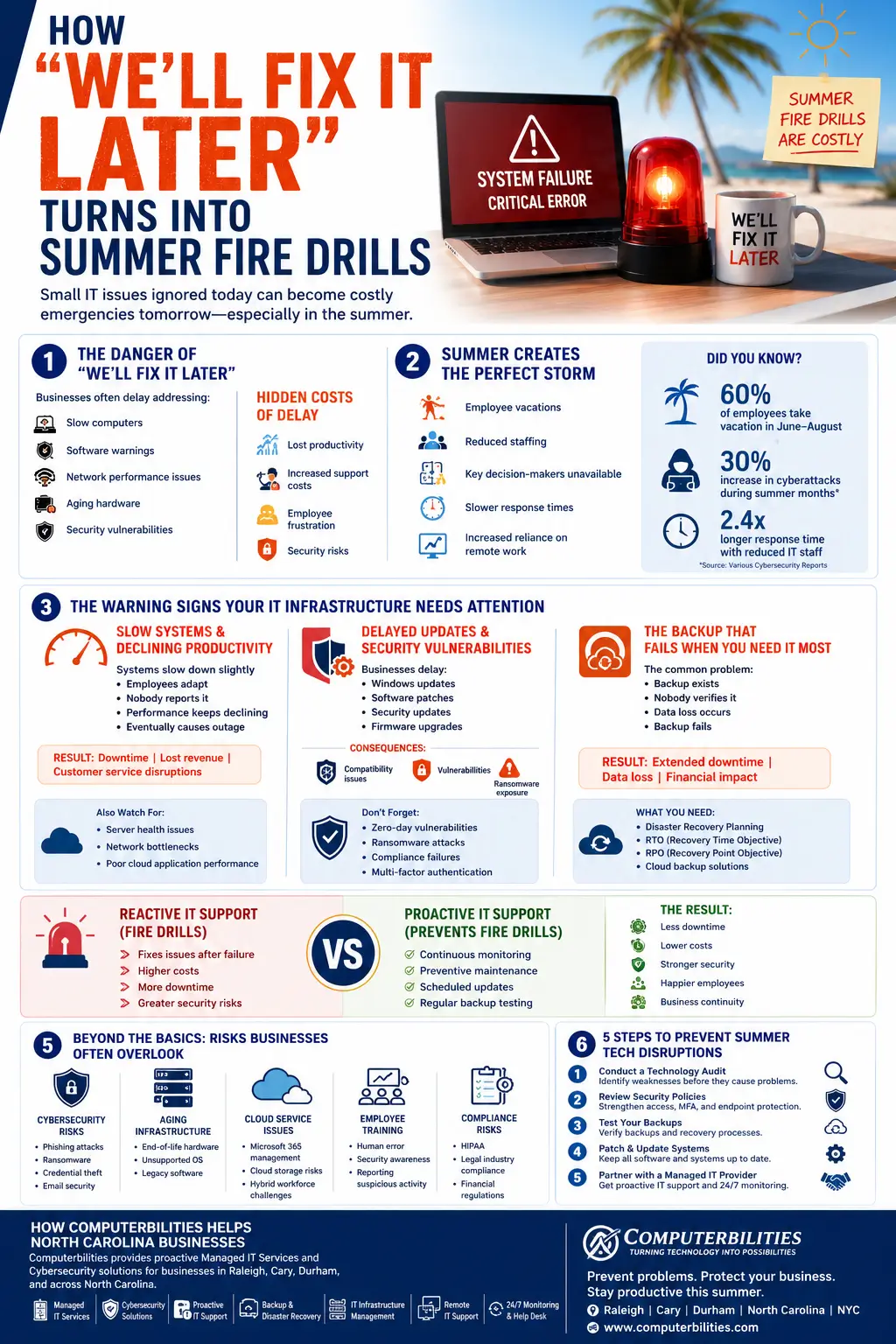
Why Small IT Problems Become Big Business Emergencies
Imagine hearing a strange noise coming from your car’s engine. The vehicle still runs, so you decide to deal with it later. Weeks pass. Eventually, what could have been a minor repair becomes a major engine failure.
Technology works the same way.
Many business owners delay addressing:
- Slow computers
- Software warnings
- Network performance issues
- Aging hardware
- Security vulnerabilities
- Storage capacity alerts
- Failed backup notifications
The danger is that technology issues rarely remain static. They gradually worsen until they impact operations.
The Hidden Costs of Delayed IT Maintenance
Lost Productivity
When systems slow down, employees lose valuable time waiting for applications to load, files to sync, or emails to send.
Even a few minutes lost each day can accumulate into hundreds of hours of reduced productivity annually.
Increased Support Costs
Emergency repairs almost always cost more than preventive maintenance.
A scheduled hardware replacement costs significantly less than an emergency outage requiring immediate intervention.
Employee Frustration
Technology should help employees work efficiently. Persistent issues lead to frustration, lower morale, and reduced productivity.
Security Risks
Unresolved vulnerabilities create opportunities for cybercriminals to exploit weaknesses before organizations even realize they’re exposed.
This is why proactive IT support matters for businesses. Addressing issues early prevents small concerns from becoming major operational disruptions.
How Summer Staffing Challenges Amplify Technology Risks
Summer introduces unique operational challenges that can magnify even minor technology issues.
Employee Vacations Create Knowledge Gaps
Key employees often take extended vacations during summer months.
The employee who understands your accounting software may be at the beach.
The manager responsible for approving emergency purchases might be traveling.
The internal IT contact could be unavailable for days.
When technology issues occur, delays in decision-making often increase downtime.
Reduced Staffing Means Slower Response Times
Many businesses operate with leaner teams during summer.
When fewer people are available:
- Problems take longer to identify
- Escalations are delayed
- Recovery efforts slow down
- Customer service may suffer
Increased Reliance on Remote Work
Summer often brings more remote work arrangements.
Employees connect from:
- Home networks
- Vacation destinations
- Public Wi-Fi networks
- Personal devices
This increases cybersecurity risks while simultaneously making IT troubleshooting more complex.
Cybercriminals Know This
Attackers frequently exploit periods when businesses are understaffed.
Summer cybersecurity risks for businesses include:
- Phishing campaigns
- Business email compromise attacks
- Ransomware attempts
- Credential theft
- Cloud account compromises
Reduced vigilance creates opportunities for attackers to succeed.
The Warning Signs Your IT Infrastructure Needs Attention
Slow Systems and Declining Productivity
One of the most commonly ignored technology issues is system performance degradation.
It usually follows a predictable pattern:
- Systems become slightly slower.
- Employees adapt.
- Nobody reports the issue.
- Performance continues declining.
- Critical systems eventually fail.
What starts as a minor inconvenience can eventually result in:
- Significant IT downtime
- Lost revenue
- Missed deadlines
- Customer dissatisfaction
Server Health Monitoring Matters
Servers often provide warning signs before failure.
These include:
- High CPU usage
- Storage limitations
- Excessive memory consumption
- Network congestion
IT monitoring services can identify these issues long before users experience outages.
Network Bottlenecks Impact Everyone
A slow network affects every employee.
Signs include:
- Delayed file transfers
- Video conferencing issues
- Cloud application lag
- Frequent disconnects
Without proper system monitoring and IT infrastructure management, businesses may not realize the root cause until productivity suffers.
Cloud Application Performance Issues
Today’s businesses rely heavily on cloud-based platforms such as:
- Microsoft 365
- Google Workspace
- CRM systems
- Accounting software
Poor performance can indicate:
- Bandwidth limitations
- Configuration issues
- Security concerns
- Infrastructure bottlenecks
Ignoring these signs often leads to larger operational disruptions.
Delayed Updates and Security Vulnerabilities
Software updates often feel inconvenient.
Many businesses postpone:
- Windows updates
- Security patches
- Firmware upgrades
- Application updates
The problem is that attackers actively target unpatched systems.
Why Software Updates Matter
The importance of regular software updates cannot be overstated.
Updates often address:
- Security vulnerabilities
- Performance issues
- Compatibility concerns
- Compliance requirements
Consequences of Delayed Updates
Businesses risk:
- Ransomware attacks
- Data breaches
- Compliance violations
- System instability
Zero-Day Vulnerabilities
Cybercriminals constantly search for newly discovered vulnerabilities.
Without timely patching, businesses may unknowingly leave critical systems exposed.
Multi-Factor Authentication is No Longer Optional
MFA significantly reduces unauthorized access risks.
Yet many businesses continue delaying implementation until after a security incident occurs.
The Backup That Fails When You Need It Most
Many organizations believe they are protected because they have backups.
But having backups is not enough.
The real question is:
Have you tested them?
The Common Backup Problem
The scenario is surprisingly common:
- Backups run automatically.
- Nobody verifies them.
- Data loss occurs.
- Recovery fails.
The consequences can be devastating.
Extended Downtime
Failed backups often mean longer recovery times.
Data Loss
Critical business information may be permanently lost.
Financial Impact
Downtime affects revenue, productivity, and customer trust.
Business Continuity and Disaster Recovery
Effective backup and disaster recovery strategies should include:
- Recovery Time Objectives (RTO)
- Recovery Point Objectives (RPO)
- Backup verification
- Cloud backup solutions
- Regular recovery testing
Why backup testing is essential becomes painfully clear when businesses discover their backup systems failed months earlier.
The Hidden Costs of Reactive IT Support
Reactive IT support focuses on fixing problems after they occur.
While this approach may seem cost-effective initially, it often creates larger expenses over time.
Higher Repair Costs
Emergency responses require urgent resources and often involve significant downtime.
More Downtime
Problems aren’t addressed until operations are affected.
Greater Security Risks
Vulnerabilities remain exposed for longer periods.
Reduced Productivity
Employees work around recurring technology issues instead of focusing on business objectives.
Technology Risk Management Challenges
Reactive environments make it difficult to manage:
- Cybersecurity risks
- Compliance requirements
- Infrastructure planning
- Business continuity planning
Why Proactive Managed IT Services Prevent Fire Drills
Proactive IT support takes the opposite approach.
Rather than waiting for failures, proactive teams identify and resolve issues before they impact operations.
Continuous Monitoring
IT monitoring services detect problems early.
Preventive IT Maintenance
Routine maintenance reduces unexpected failures.
Scheduled Software Updates
Regular patching closes security gaps.
Backup Verification
Testing ensures recoverability during emergencies.
Strategic IT Planning
Technology audits help businesses align infrastructure with growth objectives.
Benefits of Managed IT Services
Businesses gain:
- Reduced downtime
- Better cybersecurity
- Predictable costs
- Improved productivity
- Stronger compliance posture
- Enhanced business continuity
For many organizations, managed IT services in Raleigh NC provide access to enterprise-level expertise without the cost of building an internal IT department.
Cybersecurity Risks Most Businesses Still Ignore
Many competitor articles stop at backups and updates.
However, today’s threat landscape extends much further.
Phishing Attacks
Employees remain the most targeted attack vector.
Credential Theft
Compromised passwords continue to cause breaches.
Email Security Threats
Sophisticated attacks often bypass traditional filters.
Ransomware
Modern ransomware can cripple operations within hours.
Employee Security Awareness
Human error remains a leading cause of cybersecurity incidents.
Regular training helps employees:
- Recognize phishing attempts
- Report suspicious activity
- Follow security best practices
Aging Infrastructure: The Silent Business Risk
Many businesses continue relying on:
- End-of-life servers
- Unsupported operating systems
- Legacy software
While these systems may function today, they often:
- Lack security updates
- Create compliance concerns
- Increase downtime risks
Technology audits help identify infrastructure weaknesses before they become business emergencies.
Cloud Service Challenges SMBs Often Overlook
Cloud adoption simplifies operations but introduces new risks.
Microsoft 365 Management
Misconfigurations can expose sensitive data.
Cloud Storage Risks
Improper permissions increase security vulnerabilities.
Hybrid Workforce Challenges
Remote access must be secured properly.
Without expert oversight, cloud environments can create hidden security gaps.
Compliance Risks Continue to Grow
Regulatory requirements continue evolving.
Organizations must address:
HIPAA Compliance
Healthcare organizations face strict data protection requirements.
Legal Industry Compliance
Law firms must safeguard confidential client information.
Financial Regulations
Financial organizations face increasing cybersecurity obligations.
Proactive IT services help businesses maintain compliance while reducing operational risks.
5 Steps Businesses Can Take Before Summer Disruptions Strike
- Conduct a Technology Audit
Identify vulnerabilities, aging infrastructure, and performance issues.
- Review Security Policies
Evaluate MFA, access controls, and endpoint protection.
- Test Backups
Verify recovery processes before an emergency occurs.
- Patch and Update Systems
Apply critical security patches promptly.
- Partner With a Managed IT Provider
Leverage proactive monitoring and strategic technology guidance.
How Computerbilities Helps North Carolina Businesses Stay Ahead of IT Problems
At Computerbilities, we understand that technology should support business growth—not create unexpected emergencies.
Our team provides comprehensive IT support for North Carolina businesses through:
- Managed IT Services
- Cybersecurity Solutions
- Proactive IT Support
- Remote IT Support
- IT Infrastructure Management
- Backup and Disaster Recovery
- Technology Audits
- Network Monitoring
- Business Continuity Planning
Whether your business is located in Raleigh, Cary, Durham, or elsewhere across North Carolina, our goal is simple: prevent technology problems before they disrupt your operations.
Instead of reacting to crises, we help businesses build resilient, secure, and reliable technology environments that support long-term success.
Conclusion
The phrase “We’ll fix it later” often seems harmless.
But in technology, postponing maintenance frequently transforms minor issues into major emergencies—especially during summer when staffing levels are reduced and response times slow down.
The good news is that most summer fire drills are preventable.
By investing in proactive IT support, regular maintenance, cybersecurity best practices, and business continuity planning, businesses can reduce downtime, improve productivity, and protect themselves from costly disruptions.
The choice is simple: address small issues today or risk facing a much larger problem tomorrow.
For businesses throughout Raleigh, Cary, Durham, and North Carolina, proactive managed IT services provide the foundation for a more secure and productive future.
Frequently Asked Questions (FAQs)
- Why do IT issues become more problematic during summer?
Summer often brings employee vacations, reduced staffing, and increased remote work, making it harder to identify and resolve technology issues quickly.
- What are the most common IT problems businesses ignore?
Common IT problems businesses ignore include slow computers, delayed software updates, aging hardware, backup failures, and network performance issues.
- Why is proactive IT support better than reactive IT support?
Proactive IT support identifies and resolves issues before they cause downtime, while reactive IT support only addresses problems after systems fail.
- How can managed IT services reduce downtime?
Managed IT services use continuous monitoring, preventive maintenance, security updates, and backup testing to prevent disruptions before they impact operations.
- Why is backup testing important?
Backup testing confirms that data can actually be recovered during an emergency. Untested backups often fail when businesses need them most.
- What cybersecurity risks increase during summer?
Summer cybersecurity risks for businesses include phishing attacks, ransomware, credential theft, business email compromise, and remote access vulnerabilities.
- How often should businesses perform IT maintenance?
Most businesses should conduct routine IT maintenance monthly, with ongoing monitoring and quarterly technology audits to identify emerging risks.
- How can Computerbilities help my business?
Computerbilities provides managed IT services, cybersecurity solutions, proactive IT support, business continuity planning, and technology consulting to help North Carolina businesses stay secure, productive, and resilient.