
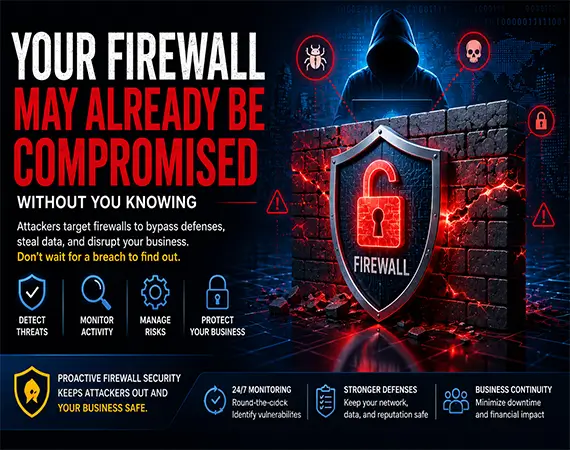
Your Firewall May Already Be Compromised Without You Knowing
Why Today’s Biggest Cybersecurity Threat Might Be Sitting at the Edge of Your Network
Imagine locking every door and window in your office before heading home for the night. You install security cameras, set the alarm, and leave with complete confidence that your business is protected. But what if someone had quietly copied the master key weeks earlier? Every lock would still appear secure, yet an intruder could walk in whenever they wanted without forcing a single door.
That is exactly how many modern cyberattacks unfold.
For years, businesses have viewed their firewall as the first and strongest line of defense against hackers. Whether you’re a construction company in Raleigh, a law firm in Cary, a manufacturer in Durham, or a healthcare provider anywhere in North Carolina, you’ve probably invested thousands of dollars in a business firewall believing it keeps cybercriminals out.
Unfortunately, today’s attackers have changed their strategy.
Instead of trying to break through the firewall, many now focus on compromising the firewall itself.
Once attackers gain control of this critical security device, it can quietly become an entry point into your network rather than a barrier protecting it. The most concerning part? A compromised firewall often continues functioning normally while silently allowing unauthorized access, making detection extremely difficult without proactive firewall monitoring and regular firewall security assessments.
This growing trend is why firewall security, network firewall security, and managed firewall services have become essential components of modern business cybersecurity. Small and medium-sized businesses are no longer overlooked by cybercriminals. In fact, many attackers deliberately target SMBs because they often have fewer security resources, outdated firmware, or misconfigured firewall settings that create opportunities for exploitation.
Today’s cybercriminals are patient. They don’t always launch ransomware immediately. Instead, they may spend weeks—or even months—inside a compromised network gathering sensitive information, monitoring business operations, stealing credentials, and preparing for a larger attack. By the time unusual activity becomes noticeable, the damage has often already been done.
If your firewall hasn’t been updated, monitored, or audited recently, your organization could already be exposed without realizing it.
In this guide, you’ll learn:
- Why firewalls have become one of the most targeted devices in business networks.
- How hackers compromise firewalls without triggering obvious alerts.
- The warning signs that your firewall may already be compromised.
- What attackers do after gaining control of your network perimeter.
- Practical steps to strengthen your business firewall security and reduce cyber risk.
- How proactive firewall management, security monitoring, and regular firewall security audits can help protect your business.
Whether you’re evaluating your current managed IT services provider or simply want to improve your organization’s cybersecurity posture, understanding these risks is the first step toward staying ahead of today’s evolving cyber threats.
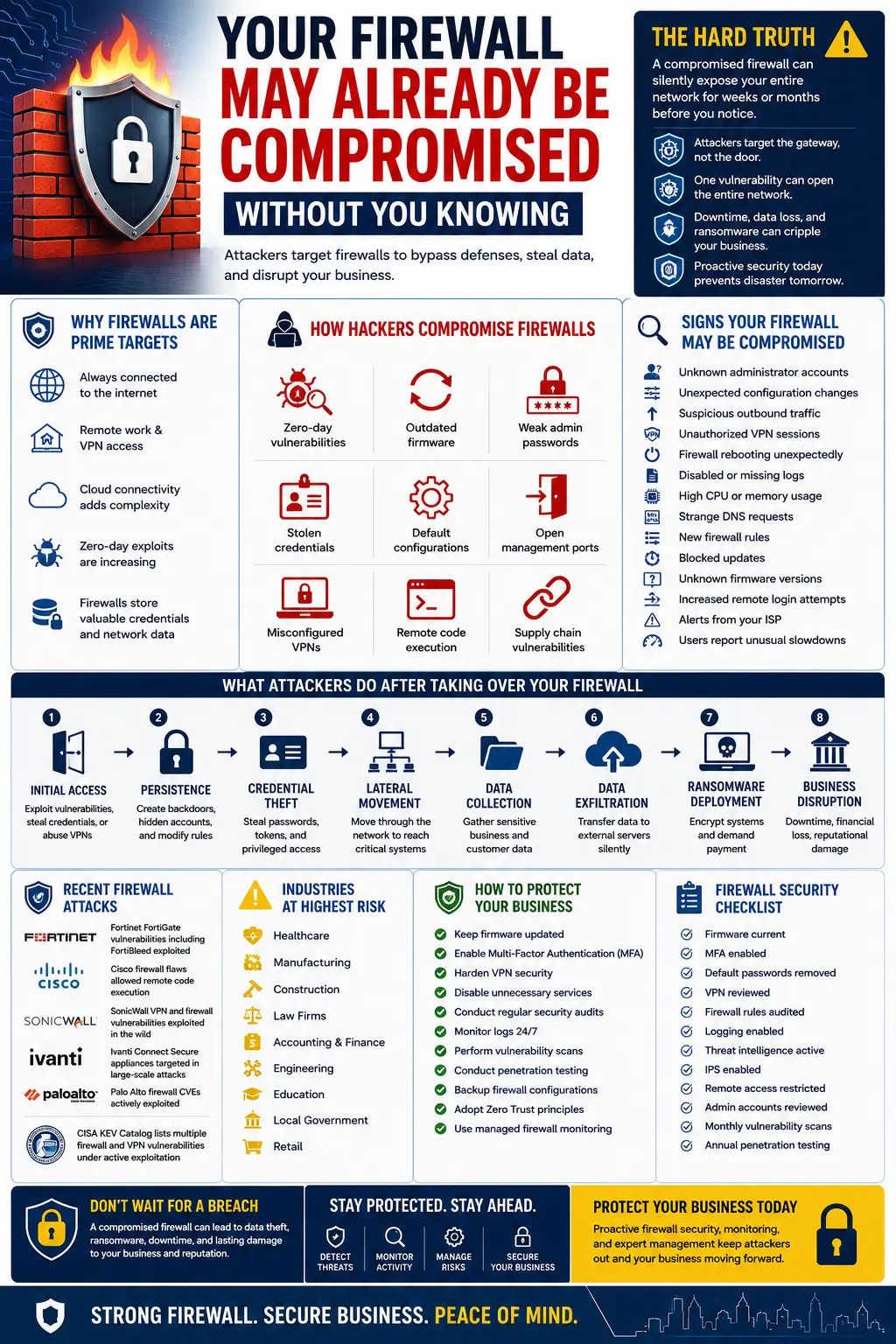
Why Firewalls Have Become Prime Targets for Cybercriminals
Not long ago, cybercriminals primarily targeted desktop computers and email inboxes. Today, their attention has shifted toward something much more valuable: the devices that sit at the edge of your network.
Modern firewalls are no longer simple traffic filters. Today’s next-generation firewalls (NGFWs) handle virtual private networks (VPNs), web filtering, intrusion prevention systems (IPS), application control, encrypted traffic inspection, remote access, cloud connectivity, and threat intelligence. In many organizations, a firewall acts as the central gateway through which nearly every internet connection passes.
For attackers, compromising one firewall can provide access to an entire business network.
- Firewalls Are Always Connected to the Internet
Unlike employee computers that are occasionally turned off or disconnected, firewalls operate around the clock. They are continuously exposed to internet traffic, making them one of the most frequently scanned devices by automated attackers.
Cybercriminals use sophisticated scanning tools that search the internet for organizations running vulnerable firewall firmware or exposing insecure management interfaces. These scans occur continuously, often identifying potential targets within hours of a newly disclosed vulnerability.
For businesses, this means that delaying firmware updates by even a few weeks can significantly increase exposure to known firewall vulnerabilities.
- Remote Work Has Expanded the Attack Surface
Hybrid work has transformed how businesses operate. Employees now connect from home offices, client locations, hotels, and public Wi-Fi networks. To support this flexibility, organizations rely heavily on VPN gateways and remote access services hosted on their firewalls.
While these capabilities improve productivity, they also increase the attack surface.
If remote access services are improperly configured or protected with weak credentials, attackers may exploit them to bypass traditional perimeter defenses. Stolen usernames, weak passwords, and the absence of multi-factor authentication (MFA) remain among the most common ways businesses experience firewall compromise.
- Cloud Connectivity Has Increased Complexity
Today’s firewalls manage traffic flowing not only to on-premises servers but also to Microsoft 365, Azure, AWS, Google Cloud, and dozens of SaaS platforms.
This complexity creates additional opportunities for configuration mistakes.
A single misconfigured firewall rule may unintentionally expose sensitive systems to the internet or allow unnecessary outbound communication that attackers can exploit after gaining access.
Regular firewall security audits and configuration reviews help identify these hidden weaknesses before cybercriminals do.
- Zero-Day Vulnerabilities Are Increasing
One of the biggest cybersecurity challenges today is the rise of zero-day vulnerabilities—previously unknown software flaws that attackers exploit before vendors release patches.
Major firewall vendors have all faced serious vulnerabilities in recent years, including Fortinet, Cisco, SonicWall, Palo Alto Networks, and Ivanti.
These vulnerabilities often allow attackers to:
- Execute malicious code remotely.
- Bypass authentication.
- Escalate privileges.
- Access sensitive configurations.
- Deploy malware without user interaction.
Because these attacks target the firewall itself, traditional endpoint security solutions may never detect them.
- Firewalls Store Valuable Information
Many business owners underestimate how much information resides inside a firewall.
A compromised firewall may contain:
- VPN credentials
- Administrative accounts
- Network topology
- Internal IP addressing
- Firewall rules
- Security policies
- DNS configurations
- Device certificates
- Authentication settings
- Traffic logs
For attackers, this information serves as a roadmap for moving deeper into the network.
Instead of guessing where critical systems are located, they can use firewall data to navigate directly toward file servers, accounting systems, healthcare records, engineering data, or cloud resources.
- Attackers Prefer Quiet Access Over Loud Attacks
Hollywood often portrays hackers launching dramatic cyberattacks the moment they gain access.
Reality is much different.
Sophisticated threat actors typically avoid immediate disruption. Once they compromise a firewall, they often establish persistence, monitor business operations, collect credentials, and wait for the most profitable opportunity to strike.
This patient approach allows attackers to remain hidden for extended periods while gathering intelligence about your organization.
That is why many cybersecurity experts now recommend continuous firewall monitoring, threat detection, and managed security operations rather than relying solely on periodic updates.
How Hackers Compromise Firewalls
A firewall doesn’t have to fail completely for attackers to gain access. In many cases, cybercriminals exploit small weaknesses that accumulate over time. Understanding these common attack methods can help businesses strengthen their defenses before an incident occurs.
Exploiting Zero-Day Vulnerabilities
One of the fastest-growing threats is the exploitation of zero-day vulnerabilities. These previously unknown software flaws can allow attackers to bypass authentication, execute malicious code remotely, or gain administrative control before a vendor has released a security patch.
Organizations that delay firmware updates or fail to monitor security advisories are especially vulnerable during this window.
Outdated Firmware and Delayed Patching
Many businesses postpone firmware updates because they fear disrupting operations. While understandable, this creates an opportunity for attackers.
Once a vulnerability becomes public, cybercriminals quickly automate scanning for unpatched devices. Firewalls running outdated firmware are often discovered and targeted within days.
Keeping firmware current is one of the simplest—and most effective—ways to reduce firewall security risks.
Weak Administrator Passwords
Administrative interfaces protected by weak or reused passwords remain a common cause of firewall compromise.
Attackers frequently use credential-stuffing and password-spraying techniques with usernames and passwords obtained from previous data breaches. Without strong password policies and multi-factor authentication, unauthorized access becomes far easier than many organizations realize.
Stolen Credentials and Phishing
Sometimes the firewall itself isn’t the first target—your employees are.
Phishing emails designed to steal administrator credentials can give attackers legitimate access to firewall management consoles. Once authenticated, they can modify security policies, create hidden accounts, or disable protective controls without triggering immediate suspicion.
Signs Your Firewall May Already Be Compromised
One of the biggest misconceptions about firewall security is that a successful cyberattack always causes an immediate outage or obvious disruption. In reality, experienced attackers work hard to avoid drawing attention. Their goal is to remain hidden for as long as possible, quietly collecting information, stealing credentials, and expanding their access before launching a more damaging attack.
A compromised firewall often continues to perform its normal functions. Employees can still browse the internet, send emails, connect to cloud applications, and access shared files. From the outside, everything appears normal.
Behind the scenes, however, attackers may already be controlling one of the most critical devices in your network.
Knowing the warning signs can help your organization detect a firewall compromise before it turns into a full-scale data breach or ransomware incident.
- Unknown Administrator Accounts
Your firewall should have a clearly documented list of authorized administrator accounts. If you discover new accounts that no one in your organization recognizes, treat it as a serious security incident.
Attackers often create hidden administrative accounts after gaining access so they can return even if passwords are changed. These unauthorized accounts may use names that resemble legitimate administrator accounts, making them easy to overlook during routine reviews.
Regular firewall security audits should include a review of all administrator accounts, permissions, and authentication methods.
- Unexpected Configuration Changes
Firewall configurations rarely change without a reason. If you notice new rules, altered security policies, or disabled protections that your IT team did not authorize, investigate immediately.
Common unauthorized changes include:
- Opening unnecessary inbound ports
- Allowing unrestricted outbound traffic
- Disabling intrusion prevention features
- Modifying VPN settings
- Adding new trusted IP addresses
- Creating firewall rule exceptions
These changes often provide attackers with persistent access while avoiding detection.
- Suspicious Outbound Traffic
Many businesses focus on blocking incoming threats but overlook outbound communications.
Once attackers gain access, they frequently establish encrypted connections to external command-and-control (C2) servers. These connections allow them to receive instructions, transfer stolen data, and deploy additional malware.
Warning signs include:
- Large amounts of outbound traffic during non-business hours
- Connections to unfamiliar countries
- Unexpected encrypted sessions
- Repeated DNS requests to suspicious domains
- Unknown applications generating internet traffic
Continuous firewall traffic monitoring and security monitoring can help identify these anomalies before sensitive information leaves your network.
- VPN Sessions You Didn’t Authorize
Virtual Private Networks (VPNs) provide secure remote access for employees, but they are also attractive targets for attackers.
If your firewall logs show VPN connections from unfamiliar locations, unexpected login times, or users who were not working remotely, it could indicate stolen credentials or unauthorized access.
Questions to ask include:
- Is someone connected from another state or country?
- Are multiple logins occurring simultaneously from different locations?
- Are connections happening outside normal business hours?
- Have VPN settings been modified recently?
Modern businesses should combine VPN access with Multi-Factor Authentication (MFA) to reduce the risk of credential theft.
- Firewall Rebooting Unexpectedly
Occasional maintenance reboots are normal. Random or unexplained restarts are not.
Unexpected reboots may indicate:
- Failed exploitation attempts
- Malware installation
- Firmware corruption
- Resource exhaustion caused by malicious activity
- Active exploitation of a vulnerability
If your firewall restarts without scheduled maintenance, investigate the event immediately rather than assuming it is a software glitch.
- Disabled Security Logging
Logs are often the first thing attackers try to disable.
Without logs, organizations lose visibility into unauthorized activity, making incident investigations significantly more difficult.
Watch for:
- Missing log history
- Logging unexpectedly turned off
- Shortened log retention periods
- Deleted audit records
- Missing administrator activity
Your firewall logs should be regularly backed up to a centralized logging or SIEM platform where attackers cannot easily erase them.
- High CPU or Memory Usage
Firewalls process enormous amounts of network traffic, so occasional spikes are expected. Persistent high CPU or memory utilization without an obvious business reason deserves investigation.
Possible causes include:
- Cryptomining malware
- Denial-of-Service attacks
- Malware communicating externally
- Excessive scanning activity
- Hidden backdoors
Performance issues combined with unusual network activity may indicate that your firewall is doing much more than simply filtering traffic.
- Strange DNS Requests
DNS traffic is often overlooked, making it an attractive communication channel for attackers.
Compromised devices may repeatedly query malicious domains or use DNS tunneling to secretly transfer information outside your network.
Signs include:
- Requests to unfamiliar domains
- Excessive DNS traffic
- Repeated failed lookups
- Communications with newly registered domains
Monitoring DNS activity has become an important part of modern network firewall security.
- New Firewall Rules That Nobody Created
Firewall rules should only change through documented change management procedures.
If your organization discovers:
- Newly opened ports
- Removed restrictions
- Expanded access permissions
- Disabled inspection policies
without approval, assume compromise until proven otherwise.
Even one unauthorized firewall rule can provide attackers with continuous access to sensitive business systems.
- Firmware Updates Suddenly Stop
Some attackers intentionally block firmware updates after compromising a firewall.
Why?
Because future updates may remove their access.
If your firewall has stopped checking for updates, reports firmware errors, or remains several versions behind despite scheduled maintenance, investigate immediately.
Routine firewall maintenance should always include verification that updates are being successfully installed.
- Unknown Firmware Versions
Cybercriminals sometimes install modified firmware or unauthorized software images to maintain long-term persistence.
Compare your installed firmware against official vendor releases.
Unexpected versions, unsigned updates, or inconsistencies should be treated as potential indicators of compromise.
- Remote Login Attempts Increase Dramatically
Repeated administrator login attempts may indicate:
- Credential stuffing
- Password spraying
- Brute-force attacks
- Automated bot activity
Organizations should enable account lockout policies, Multi-Factor Authentication, and geo-based access controls whenever possible.
- Alerts From Your Internet Service Provider
Some businesses first discover a compromise because their ISP contacts them.
Internet providers may detect:
- Malware traffic
- Spam campaigns
- Botnet participation
- Denial-of-Service attacks
- Unusual outbound traffic
Never ignore these notifications. They often indicate genuine security issues requiring immediate investigation.
- Employees Report Strange Network Behavior
Users are often the first to notice subtle issues.
Pay attention when employees report:
- Slow internet connections
- Random VPN disconnects
- Difficulty accessing applications
- Frequent authentication prompts
- Network instability
While these issues can have legitimate causes, they can also indicate malicious activity affecting firewall performance.
What Attackers Do After Taking Over a Firewall
Compromising a firewall is rarely the attacker’s final objective.
It is the beginning of a carefully planned operation.
Most sophisticated cyberattacks follow a predictable lifecycle.
Stage 1: Initial Access
The attacker exploits a firewall vulnerability, steals administrator credentials, abuses a VPN weakness, or takes advantage of outdated firmware.
At this point, they have crossed your organization’s perimeter.
Stage 2: Persistence
Rather than attacking immediately, cybercriminals establish persistence.
They may:
- Create hidden administrator accounts
- Install backdoors
- Modify firewall rules
- Disable security alerts
- Change logging settings
This ensures they can regain access even if passwords are changed.
Stage 3: Credential Theft
Next, attackers begin collecting usernames, passwords, VPN credentials, authentication tokens, and privileged administrator accounts.
They often use legitimate administrative tools to avoid detection.
The more credentials they collect, the easier it becomes to move throughout the network.
Stage 4: Lateral Movement
Once inside, attackers rarely stay on the firewall.
Instead, they move laterally toward:
- File servers
- Microsoft 365 environments
- Domain controllers
- Accounting systems
- Engineering repositories
- Healthcare databases
- Cloud infrastructure
- Backup servers
The firewall simply becomes the gateway.
Stage 5: Data Collection
After identifying valuable systems, attackers quietly gather sensitive information.
Examples include:
- Customer records
- Financial reports
- Intellectual property
- Employee information
- Legal documents
- Healthcare data
- Vendor contracts
- Email archives
Some attackers spend weeks identifying the most valuable assets before stealing anything.
Stage 6: Data Exfiltration
Once sufficient information has been collected, it is transferred outside the organization.
Modern attackers often encrypt stolen data before transmitting it, making detection significantly more difficult.
Many organizations never realize information has been stolen until customers or regulators notify them.
Stage 7: Ransomware Deployment
Only after maximizing their access do many attackers launch ransomware.
Because they already understand your environment, they know exactly which systems will cause the greatest operational disruption.
This often results in:
- Business downtime
- Regulatory investigations
- Recovery costs
- Customer notification requirements
- Reputation damage
Stage 8: Business Disruption
The final stage extends beyond the technical attack.
Organizations may face:
- Lost revenue
- Operational delays
- Legal expenses
- Cyber insurance claims
- Customer attrition
- Compliance penalties
- Long-term reputational damage
For many small and medium-sized businesses, these indirect costs exceed the ransom demand itself.
Recent Firewall Attacks Show Why This Threat Is Growing
The idea of attackers targeting firewalls is no longer theoretical. Over the past several years, multiple high-profile vulnerabilities have demonstrated that internet-facing security appliances are prime targets for both cybercriminals and nation-state actors.
Notable examples include:
- Fortinet vulnerabilities, including the widely discussed FortiBleed issue, which exposed sensitive memory data and highlighted the importance of rapid firmware updates.
- Cisco firewall vulnerabilities, where critical flaws allowed remote code execution or privilege escalation if left unpatched.
- SonicWall vulnerabilities, which have been actively exploited to gain unauthorized access to business networks through VPN and management interfaces.
- Ivanti Connect Secure and edge appliance exploits, which showed how remote access infrastructure can become an entry point for widespread compromise.
- Palo Alto Networks firewall CVEs, where emergency patches were released after active exploitation of internet-facing devices.
- CISA’s Known Exploited Vulnerabilities (KEV) Catalog, which regularly includes firewall and VPN vulnerabilities that are confirmed to be exploited in real-world attacks.
The common thread across these incidents is not that a particular vendor failed—it is that attackers move incredibly quickly once a vulnerability becomes public. Organizations that delay firmware updates, neglect firewall monitoring, or skip regular security assessments remain exposed long after fixes are available.
Industries at Highest Risk of Firewall Compromise
Every business relies on internet connectivity, cloud applications, and remote access. However, some industries are particularly attractive to cybercriminals because of the sensitive information they handle or the financial impact of downtime.
If your organization operates in one of the industries below, firewall security should be considered a business priority—not just an IT responsibility.
Healthcare
Hospitals, medical clinics, dental practices, and specialty healthcare providers manage electronic health records (EHRs), insurance information, and highly sensitive patient data.
A compromised firewall could expose:
- Protected Health Information (PHI)
- Patient billing records
- Prescription systems
- Medical imaging platforms
- Appointment scheduling systems
Healthcare organizations must also comply with HIPAA regulations, making a firewall breach particularly costly.
Manufacturing
Modern manufacturing depends on connected production equipment, Industrial Control Systems (ICS), and cloud-based inventory management.
A successful firewall cyberattack can result in:
- Production shutdowns
- Supply chain delays
- Intellectual property theft
- Equipment downtime
- Revenue loss
Even a few hours of manufacturing disruption can cost tens of thousands of dollars.
Construction & Engineering
Construction companies increasingly use cloud collaboration platforms, Building Information Modeling (BIM), drones, GPS equipment, and connected job sites.
Attackers often target:
- Project blueprints
- Financial contracts
- Vendor payment systems
- Remote job site connections
- Employee credentials
A compromised firewall can disrupt multiple active projects simultaneously.
Law Firms
Law firms store confidential legal documents, merger agreements, litigation files, and privileged client communications.
Cybercriminals view law firms as valuable targets because they often contain information about multiple businesses simultaneously.
Accounting & Financial Services
Financial organizations process banking information, payroll data, tax records, and investment documents.
Firewall compromise can lead to:
- Financial fraud
- Business Email Compromise (BEC)
- Wire transfer theft
- Identity theft
- Regulatory investigations
Retail
Retail businesses increasingly rely on:
- Point-of-sale systems
- Payment gateways
- Inventory management
- Customer loyalty platforms
- E-commerce infrastructure
A firewall breach may expose customer payment information and interrupt daily operations.
Education
Schools, colleges, and universities manage thousands of users, remote learning platforms, and sensitive student information.
Large user populations often make educational institutions attractive targets for ransomware groups.
Local Government
Municipal governments maintain public records, emergency services, tax systems, and utility infrastructure.
Successful attacks can interrupt essential public services while exposing sensitive citizen information.
How to Protect Your Business from Firewall Attacks
The good news is that most successful firewall attacks are preventable.
Cybersecurity isn’t about finding a single perfect solution. It’s about building multiple layers of protection that make your organization significantly harder to compromise.
Here are the best practices every business should follow.
Keep Firewall Firmware Updated
One of the simplest yet most effective ways to reduce risk is keeping your firewall firmware current.
Manufacturers routinely release updates that address newly discovered vulnerabilities.
Unfortunately, many organizations delay updates because they worry about downtime.
The reality is that cybercriminals often exploit known vulnerabilities within days of public disclosure.
Treat firmware updates with the same urgency as operating system security patches.
Enable Multi-Factor Authentication (MFA)
Administrative access should never rely on passwords alone.
Even strong passwords can be stolen through phishing attacks or previous data breaches.
Adding MFA significantly reduces the likelihood that stolen credentials will result in unauthorized firewall access.
Harden VPN Security
Remote work isn’t going away.
Review your VPN configuration regularly by:
- Disabling unused VPN accounts
- Removing former employees immediately
- Enforcing MFA
- Restricting login locations
- Monitoring unusual VPN activity
Remote access should always follow the principle of least privilege.
Disable Unnecessary Services
Many firewalls include features your organization may never use.
Every unnecessary service increases your attack surface.
Review and disable:
- Unused management interfaces
- Legacy protocols
- Unnecessary ports
- Inactive VPN services
- Test accounts
A smaller attack surface means fewer opportunities for attackers.
Conduct Regular Firewall Security Audits
Many businesses install a firewall and rarely review its configuration again.
That approach creates risk.
A comprehensive firewall security audit should examine:
- Firewall rules
- Administrative accounts
- Firmware versions
- VPN configuration
- Logging
- Security policies
- Remote access permissions
Annual reviews are a minimum.
High-risk organizations should review configurations quarterly.
Monitor Firewall Logs Continuously
Your firewall generates valuable security intelligence every day.
Those logs can reveal:
- Failed login attempts
- Malware communication
- Port scanning
- VPN abuse
- Configuration changes
- Suspicious outbound traffic
Continuous firewall monitoring allows organizations to identify attacks before they become major incidents.
Perform Vulnerability Scanning
Routine vulnerability assessments identify weaknesses before attackers do.
Regular scans should include:
- Firewall firmware
- Internet-facing services
- VPN gateways
- Management interfaces
- SSL/TLS configuration
- Exposed ports
Think of vulnerability scanning as preventive maintenance for your cybersecurity.
Conduct Penetration Testing
Automated scanning finds known weaknesses.
Penetration testing goes further.
Ethical hackers simulate real-world attacks to determine whether attackers could actually compromise your firewall or move throughout your network.
This provides valuable insight that automated tools often miss.
Backup Firewall Configurations
Imagine replacing a failed firewall without a backup.
Recovery becomes slower, more expensive, and more stressful.
Maintain secure backups of:
- Firewall rules
- VPN configuration
- Administrative settings
- Certificates
- Security policies
Encrypted offline backups help accelerate recovery after hardware failure or cyberattack.
Adopt a Zero Trust Security Model
Modern cybersecurity assumes no device or user should be trusted automatically.
Zero Trust emphasizes:
- Identity verification
- Least-privilege access
- Continuous monitoring
- Network segmentation
- Device validation
Even if a firewall is compromised, Zero Trust helps prevent attackers from freely moving throughout the network.
Consider Managed Firewall Monitoring
Small and medium-sized businesses often lack dedicated cybersecurity teams.
Managed Firewall Services provide:
- 24/7 monitoring
- Threat detection
- Firmware management
- Configuration reviews
- Incident response
- Security reporting
- Compliance support
This proactive approach dramatically improves your ability to detect and respond to emerging threats.
Firewall Security Checklist
Use this checklist to evaluate the health of your organization’s firewall.
Firewall Security Health Check
✅ Firewall firmware is fully updated
✅ Multi-Factor Authentication enabled for administrators
✅ Default passwords removed
✅ VPN configuration reviewed
✅ Firewall rules audited
✅ Logging enabled and securely retained
✅ Intrusion Prevention System (IPS) active
✅ Threat intelligence subscriptions enabled
✅ Remote management restricted
✅ Administrative accounts reviewed
✅ Security patches applied promptly
✅ Monthly vulnerability scans completed
✅ Annual penetration testing performed
✅ Firewall configuration backed up securely
✅ Firewall logs reviewed regularly
✅ Security monitoring operating 24/7
If you answered “No” to several of these items, your firewall—and your business—may be at greater risk than you realize.
How Computerbilities Helps Protect Your Business
At Computerbilities, we understand that today’s cyber threats are constantly evolving. Simply installing a firewall isn’t enough. To remain effective, your firewall requires continuous monitoring, timely updates, expert management, and ongoing validation against emerging attack techniques.
That’s why we deliver comprehensive cybersecurity solutions designed specifically for small and medium-sized businesses throughout Raleigh, Cary, Durham, Chapel Hill, Wake Forest, Apex, Morrisville, and across North Carolina.
Our services include:
Managed Firewall Services
We proactively monitor, configure, update, and optimize your firewall to help reduce security risks while improving network performance.
24/7 Security Monitoring
Our security professionals continuously watch for suspicious activity, unusual traffic patterns, unauthorized access attempts, and emerging cyber threats.
Vulnerability Management
Regular vulnerability assessments help identify weaknesses before attackers can exploit them.
Firewall Security Assessments
Our team performs comprehensive firewall security audits to evaluate:
- Firewall configuration
- VPN security
- Access controls
- Administrative permissions
- Security policies
- Firmware status
- Logging and monitoring
- Compliance readiness
Patch & Firmware Management
We ensure security updates are tested, scheduled, and deployed promptly to reduce exposure to newly discovered vulnerabilities.
Incident Response Support
If suspicious activity is detected, our cybersecurity specialists work quickly to investigate, contain, and remediate potential threats before they escalate.
Security Awareness Training
Technology alone cannot stop every attack.
We help employees recognize phishing attempts, credential theft, social engineering, and other common attack methods that often lead to firewall compromise.
Compliance Assistance
Whether your business must comply with HIPAA, PCI DSS, FTC Safeguards Rule, or other industry requirements, we help align your network security with recognized best practices.
Protect Your Business Before Attackers Do
A firewall is one of the most important components of your cybersecurity strategy—but it should never be treated as a “set it and forget it” device.
As attackers continue to exploit zero-day vulnerabilities, stolen credentials, misconfigurations, and outdated firmware, organizations that fail to monitor and maintain their firewalls face an increasing risk of data breaches, ransomware attacks, and costly operational disruptions.
If it’s been months—or even years—since your firewall was thoroughly reviewed, now is the time to act.
Schedule Your Firewall Security Assessment Today
Think your firewall is protecting your business? It may already be compromised without showing obvious signs.
Computerbilities can help you identify hidden vulnerabilities, validate your firewall configuration, strengthen your network defenses, and reduce your exposure to evolving cyber threats.
Whether you’re located in Raleigh, Cary, Durham, or anywhere across North Carolina, our cybersecurity experts are ready to help you build a more resilient and secure IT environment.
Contact Computerbilities today to schedule a comprehensive Firewall Security Assessment and take the first step toward protecting your business before attackers find an opening.
Frequently Asked Questions
- Can hackers bypass a firewall?
Yes. Modern attackers often exploit firewall vulnerabilities, stolen administrator credentials, misconfigured VPNs, or phishing attacks rather than attempting to break through firewall filtering directly. A firewall is a critical security layer, but it should be combined with regular updates, monitoring, MFA, endpoint protection, and security awareness training.
- Can a firewall be hacked?
Yes. Like any internet-connected device, firewalls can be compromised if they contain unpatched vulnerabilities, weak passwords, insecure configurations, or exposed management interfaces. Regular firmware updates and proactive security management significantly reduce this risk.
- How do hackers compromise a firewall?
Attackers commonly exploit zero-day vulnerabilities, outdated firmware, weak administrator credentials, stolen VPN accounts, open management ports, remote code execution flaws, and firewall misconfigurations. They may also gain access through phishing campaigns that steal administrative login credentials.
- What happens when a firewall is compromised?
Once attackers control a firewall, they can modify security rules, create hidden administrator accounts, monitor network traffic, steal credentials, move laterally through the network, exfiltrate sensitive data, and eventually deploy ransomware or other destructive malware.
- What are the signs of a compromised firewall?
Warning signs include unexplained configuration changes, unknown administrator accounts, suspicious outbound traffic, unusual VPN sessions, disabled logging, unexpected firewall reboots, blocked firmware updates, unfamiliar firewall rules, increased login attempts, and alerts from your internet service provider.
- How often should firewall firmware be updated?
Firewall firmware should be updated whenever vendors release critical security patches. Organizations should also review firmware status regularly and subscribe to vendor security advisories to ensure vulnerabilities are addressed as quickly as possible.
- Can ransomware bypass firewalls?
Yes. Ransomware often enters through phishing emails, stolen credentials, vulnerable VPN services, or compromised remote access rather than directly attacking firewall filtering. Once inside, attackers may use the firewall to maintain persistence or conceal malicious activity.
- Do firewalls stop hackers?
Firewalls play an essential role in network security, but they cannot stop every attack on their own. Effective cybersecurity also requires endpoint protection, vulnerability management, continuous monitoring, employee training, secure backups, and incident response planning.
- Why do companies still get hacked even with firewalls?
Many breaches occur because firewalls are misconfigured, running outdated firmware, monitored infrequently, or protected by weak administrative credentials. Human error and phishing attacks also allow attackers to bypass technical defenses.
- How do I know if my firewall has malware?
Indicators include unusual outbound traffic, unexplained performance issues, modified configurations, disabled logging, unexpected administrator accounts, suspicious VPN activity, or alerts from monitoring systems. A professional firewall security assessment can help identify hidden compromise.
- What causes firewall vulnerabilities?
Firewall vulnerabilities may result from software bugs, outdated firmware, insecure default configurations, weak authentication, exposed management interfaces, or newly discovered zero-day exploits. Regular maintenance and patch management help minimize these risks.
- How do businesses secure their firewalls?
Organizations improve firewall security by applying firmware updates promptly, enabling MFA, reviewing firewall rules, monitoring logs, conducting vulnerability assessments, performing penetration testing, limiting administrative access, and using managed firewall monitoring services.
- What is firewall monitoring?
Firewall monitoring is the continuous review of firewall logs, traffic, configuration changes, authentication events, and threat alerts to identify suspicious activity, detect attacks early, and respond before significant damage occurs.
- What is a managed firewall service?
A managed firewall service provides ongoing administration, monitoring, firmware updates, rule management, threat detection, reporting, and incident response by cybersecurity professionals. This helps businesses maintain stronger security without needing a full-time in-house security team.
- Should small businesses replace old firewalls?
If a firewall no longer receives security updates, lacks support for modern security features, or cannot meet current business requirements, replacing it is often the safest option. Aging hardware and unsupported firmware increase the likelihood of successful cyberattacks and compliance issues.