
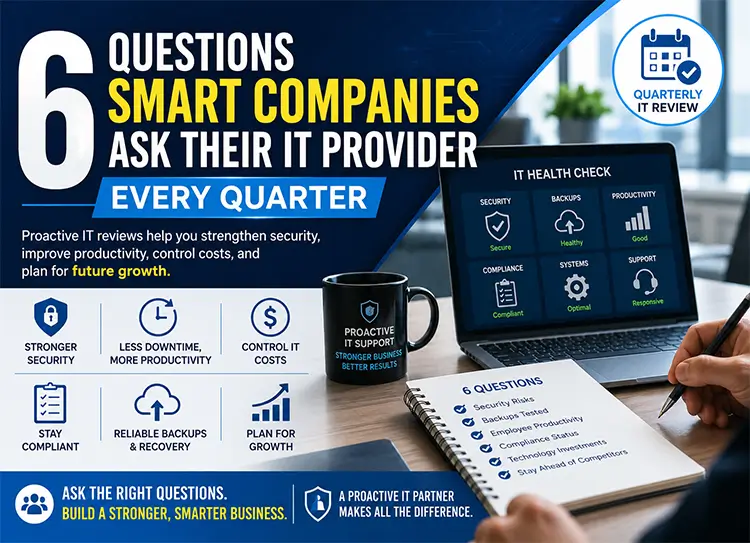
6 Questions Smart Companies Ask Their IT Provider Every Quarter
Is Your IT Provider Helping Your Business Grow—Or Just Fixing Problems?
Most business owners don’t think about their technology until something goes wrong.
An employee can’t access company files. Email stops working. The internet slows to a crawl. A ransomware attack locks critical systems. Suddenly, IT becomes the most important topic in the office.
Unfortunately, reactive technology management is expensive. Downtime, lost productivity, unexpected repair costs, and cybersecurity incidents can quickly impact revenue and customer trust.
The most successful small and medium-sized businesses take a different approach.
Instead of waiting for technology failures, they schedule Quarterly IT Reviews with their Managed IT Services provider. These meetings are not simply status updates—they’re strategic conversations about security, productivity, compliance, budgeting, and business growth.
A proactive IT Provider should function as a technology advisor, helping leadership anticipate challenges, reduce risks, and identify opportunities before they become costly problems.
Whether your business operates in Raleigh, Cary, Durham, across North Carolina, or anywhere in the United States, asking the right questions every quarter can help you stay ahead of cyber threats, improve employee productivity, and maximize the return on your technology investments.
Here are the six questions every smart company should ask during its next Quarterly IT Review.
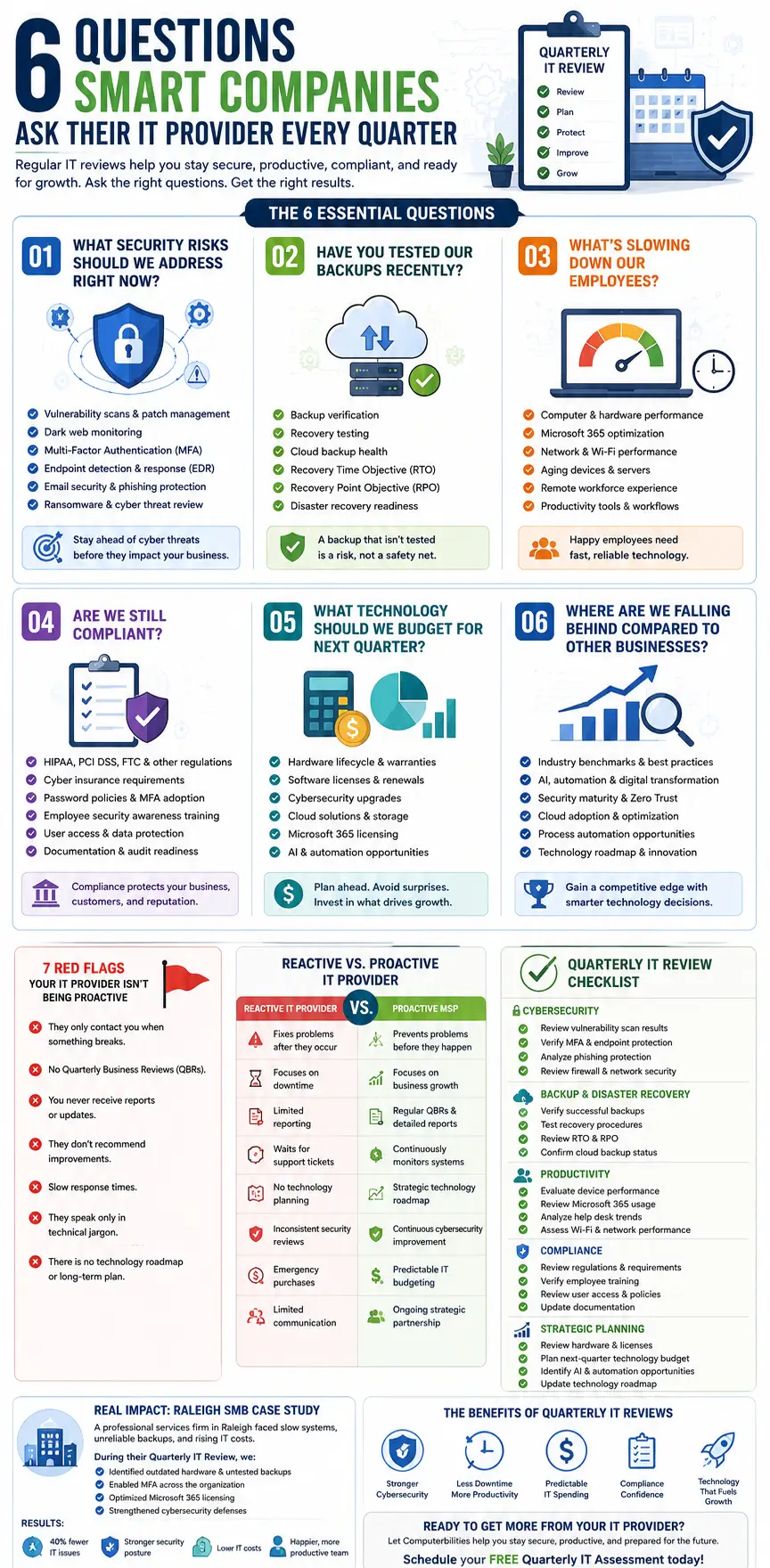
Why Quarterly IT Reviews Matter More Than Ever
Technology changes faster than almost any other part of a business.
Every few weeks, software vendors release security updates. New ransomware campaigns emerge. Cybercriminals develop more sophisticated phishing techniques. Cloud platforms introduce new features, while compliance requirements continue to evolve.
At the same time, your business is changing too.
You may have hired new employees, opened another location, adopted Microsoft 365, expanded remote work, implemented AI tools, or migrated critical systems to the cloud.
If your technology strategy isn’t evolving alongside your business, you’re gradually increasing operational risk.
A proactive Quarterly IT Assessment helps answer important questions such as:
- Are our systems still secure?
- Are backups actually recoverable?
- Is aging hardware slowing employees down?
- Are we compliant with current regulations?
- What should we budget for next quarter?
- Are we keeping pace with competitors?
Think of a Quarterly IT Review as a routine health check for your business technology. Just as regular medical checkups help identify health issues before they become serious, quarterly technology reviews uncover hidden vulnerabilities, performance bottlenecks, and opportunities for improvement before they disrupt operations.
Businesses that conduct regular technology reviews typically experience:
- Fewer unexpected outages
- Improved cybersecurity resilience
- Better employee productivity
- More predictable IT spending
- Stronger disaster recovery readiness
- Increased confidence in technology decisions
Rather than reacting to problems, they build an IT strategy that supports long-term business growth.
Question #1: What Security Risks Should We Address Right Now?
Cybersecurity isn’t a project you complete once—it’s an ongoing process.
Every quarter brings new vulnerabilities, new attack methods, and new opportunities for cybercriminals. Even businesses with strong security measures can develop gaps over time if systems aren’t reviewed regularly.
One of the first questions you should ask your IT provider is:
“What security risks should we be addressing today?”
A capable Managed Service Provider should be able to answer this with real data—not vague assurances.
During your Quarterly IT Review, they should discuss:
- Results of recent vulnerability scans
- Missing security patches
- Devices nearing end-of-life
- Multi-Factor Authentication (MFA) coverage
- Endpoint Detection and Response (EDR) status
- Email security performance
- Dark web monitoring alerts
- Network security assessments
- Firewall performance
- Cloud security posture
- Microsoft 365 security settings
Cybersecurity Should Be Measurable
Your IT provider should provide clear reporting that demonstrates your organization’s current security posture.
For example:
- How many phishing emails were blocked?
- How many devices are missing updates?
- Were any unusual login attempts detected?
- Are privileged accounts protected by MFA?
- Have any employee passwords appeared in known data breaches?
These insights allow leadership to make informed business decisions rather than relying on assumptions.
AI Is Changing the Threat Landscape
Artificial Intelligence has made cybercriminals faster and more effective.
Today’s phishing emails are more convincing than ever. AI-generated voice scams, automated credential attacks, and intelligent malware are becoming increasingly common.
That’s why proactive security reviews have become essential—not optional.
An experienced IT provider should continually evaluate whether your security controls remain effective against modern threats.
Example
Imagine a Raleigh accounting firm that completed its quarterly security review.
The review identified:
- Several employee accounts without MFA
- Two outdated workstations no longer receiving security updates
- An exposed Remote Desktop configuration
- Three employee passwords found on the dark web
None of these issues had caused problems yet—but any one of them could have become the entry point for a ransomware attack.
Because they were identified during the Quarterly IT Review, the company resolved each issue before it affected operations.
That’s the value of proactive IT support.
Question #2: Have You Tested Our Backups Recently?
Many business owners assume their data is protected simply because backups are running every night.
Unfortunately, that’s a dangerous assumption.
A backup that cannot be restored isn’t really a backup.
One of the smartest questions you can ask during your Quarterly IT Review is:
“Have you actually tested our backups?”
The answer should never be:
“We think they’re working.”
Instead, your IT provider should explain:
- When backups were last tested
- Whether files were successfully restored
- Recovery Time Objective (RTO)
- Recovery Point Objective (RPO)
- Disaster Recovery readiness
- Cloud backup health
- Off-site backup verification
- Backup encryption status
Why Backup Testing Matters
Imagine your primary server fails tomorrow.
Could your business resume operations within a few hours?
Would employees lose one day of work—or one week?
Would customer information still be accessible?
The answers depend entirely on how well your backup and disaster recovery plan has been tested—not how often data is copied.
Beyond Backup—Think Business Continuity
Modern businesses need more than file backups.
They need a comprehensive Business Continuity and Disaster Recovery (BCDR) strategy that addresses:
- Cyberattacks
- Hardware failures
- Natural disasters
- Human error
- Cloud outages
- Power failures
- Insider threats
Your IT provider should demonstrate that recovery processes have been tested under realistic conditions rather than simply confirming that backup jobs completed successfully.
Questions Worth Asking
During your next Quarterly IT Review, ask:
- When was our last recovery test?
- How long would it take to restore critical systems?
- Which applications would be available first?
- Are Microsoft 365 backups included?
- Are cloud services protected?
- What improvements should we make this quarter?
If your provider struggles to answer these questions, your disaster recovery strategy may need immediate attention.
Real-World Perspective
Consider a growing professional services firm in Durham that believed its backup system was functioning correctly. During a quarterly recovery test, the IT team discovered that a key database had not been included in the backup schedule due to a configuration error introduced months earlier. Because the issue was identified during a routine review—not during an emergency—the database was added to the backup policy, recovery procedures were updated, and the company avoided what could have been a devastating data loss event.
This illustrates why successful organizations don’t just back up data—they regularly verify that it can be restored when it matters most.
Question #3: What’s Slowing Down Our Employees?
Technology should make work easier—not become another obstacle employees have to overcome every day.
Yet, many businesses unknowingly lose dozens of productive hours each month because of slow computers, outdated hardware, unstable Wi-Fi, poorly configured Microsoft 365 environments, or aging business applications. These issues often don’t generate emergency support tickets, but they quietly drain productivity, frustrate employees, and increase operational costs.
That’s why one of the most valuable questions you can ask during your Quarterly IT Review is:
“What’s slowing our employees down, and how can we fix it?”
A proactive Managed IT Services provider should already be monitoring system performance and identifying productivity bottlenecks before employees begin complaining.
Rather than simply fixing individual issues, your IT Provider should help you understand why those problems are occurring and recommend long-term improvements.
Productivity Is a Business Metric
Many business owners underestimate how much slow technology costs.
Imagine just ten employees each losing fifteen minutes every day waiting for computers to boot, applications to load, or files to synchronize.
That’s:
- Over 12 hours of lost productivity every week
- More than 600 hours every year
- Thousands of dollars in wasted payroll and missed opportunities
These hidden costs rarely appear on financial reports, yet they directly affect profitability.
A Quarterly IT Assessment helps uncover these inefficiencies before they become accepted as “normal.”
Common Productivity Killers
During your Quarterly Business Review (QBR), your IT provider should evaluate whether employees are being slowed down by:
- Aging laptops and desktop computers
- Insufficient RAM or storage
- Slow internet connectivity
- Wi-Fi dead zones
- Outdated servers
- Microsoft 365 performance issues
- Poor cloud application configuration
- VPN performance
- Frequent login problems
- Excessive help desk tickets
- Printing issues
- Software compatibility problems
Many of these problems develop gradually, making them difficult for employees to notice until productivity has significantly declined.
Optimize Microsoft 365 for Better Collaboration
Many companies subscribe to Microsoft 365 but use only a small fraction of its capabilities.
Your Quarterly IT Review should include an assessment of:
- Microsoft Teams usage
- SharePoint collaboration
- OneDrive synchronization
- Email storage
- Security settings
- License utilization
- AI-powered productivity features
- User adoption
Optimizing these tools can significantly improve collaboration while reducing unnecessary software costs.
Remote and Hybrid Employees Need Regular Reviews
If your workforce operates remotely or follows a hybrid model, your IT infrastructure must support secure and efficient access from virtually anywhere.
Your IT provider should review:
- VPN performance
- Endpoint security
- Cloud application accessibility
- Home office connectivity
- Device health
- Remote monitoring tools
A seamless remote work experience is no longer a luxury—it’s a competitive advantage.
Ask for Real Performance Data
Rather than relying on anecdotal feedback, request measurable performance metrics.
Ask questions such as:
- Which employees experience the most recurring issues?
- Which computers are approaching replacement?
- What applications consume the most resources?
- Which departments generate the highest number of support tickets?
- Are there repetitive issues that could be automated?
A proactive IT partner should use monitoring tools to answer these questions with objective data.
Example
A growing marketing agency in Cary believed occasional computer slowness was simply part of daily operations. During its Quarterly IT Review, Computerbilities analyzed support data and discovered that most issues stemmed from outdated laptops with limited memory and inefficient Microsoft 365 configurations.
After upgrading the hardware and optimizing Microsoft 365 settings, the company experienced noticeably faster application performance, fewer help desk requests, and improved employee satisfaction.
Sometimes the biggest productivity gains come from fixing small technology issues before they become major frustrations.
Question #4: Are We Still Compliant?
Compliance isn’t something businesses achieve once and forget about.
Regulations evolve. Security standards change. Cyber insurance providers introduce new requirements. Employees join and leave the organization. New software is deployed.
Without regular reviews, even businesses that were fully compliant six months ago can unknowingly fall out of compliance today.
That’s why another critical question to ask during every Quarterly IT Review is:
“Are we still compliant with the regulations and security requirements that affect our business?”
For many organizations, compliance isn’t just about avoiding fines—it’s about protecting customer trust, maintaining contracts, and qualifying for cyber insurance coverage.
Compliance Requirements Continue to Evolve
Depending on your industry, your organization may need to comply with standards such as:
- HIPAA for healthcare organizations
- PCI DSS for businesses processing credit card payments
- FTC Safeguards Rule for financial institutions
- State privacy regulations
- Cyber insurance security requirements
- Industry-specific contractual obligations
Your Managed IT Provider should continuously evaluate whether your technology environment continues to meet these expectations.
Compliance Goes Beyond Technology
Many organizations assume compliance is solely an IT responsibility.
In reality, it involves people, processes, and documentation.
During your Quarterly Technology Review, discuss:
- Password policies
- Multi-Factor Authentication adoption
- User access permissions
- Employee cybersecurity awareness training
- Device encryption
- Backup retention policies
- Incident response procedures
- Documentation updates
- Vendor risk management
Even a simple oversight—such as a former employee retaining access to company systems—can create significant compliance risks.
Cyber Insurance Requirements Are Becoming More Strict
Many cyber insurance providers now require businesses to demonstrate security best practices before issuing or renewing policies.
Common requirements include:
- Multi-Factor Authentication
- Endpoint Detection and Response (EDR)
- Email filtering
- Vulnerability management
- Regular security awareness training
- Tested backups
- Incident response planning
Failing to meet these standards could result in higher premiums—or denied claims following a cyberattack.
Your Quarterly IT Review should confirm that your business continues to satisfy these evolving requirements.
Security Awareness Matters
Technology alone cannot stop every cyberattack.
Employees remain one of the most common entry points for cybercriminals.
Ask your IT provider:
- Have employees completed recent security awareness training?
- Were phishing simulations conducted?
- Which departments need additional education?
- Have risky user behaviors been identified?
A well-informed workforce significantly reduces the likelihood of successful phishing attacks and ransomware infections.
Compliance Is an Ongoing Process
Think of compliance as routine maintenance rather than a one-time project.
Businesses that review their security posture every quarter are better prepared for:
- Client audits
- Regulatory inspections
- Cyber insurance renewals
- Security certifications
- Vendor assessments
Instead of scrambling to gather documentation during an audit, they’ll already have the necessary processes in place.
Example
A financial services firm in Raleigh scheduled quarterly compliance reviews with its Managed Service Provider. During one review, the team discovered that several privileged accounts were missing Multi-Factor Authentication following recent employee promotions.
The issue was resolved immediately, preventing a potential compliance violation and helping the organization maintain its cyber insurance eligibility without interruption.
Question #5: What Technology Should We Budget for Next Quarter?
One of the biggest mistakes businesses make is treating IT spending as an unexpected expense instead of a strategic investment.
Many organizations wait until a server fails, a laptop crashes, or software licenses expire before allocating a budget. This reactive approach often leads to emergency purchases, higher costs, and avoidable downtime.
A smarter approach is to ask your IT provider:
“What technology investments should we plan for next quarter?”
A proactive IT partner should help you forecast upcoming technology needs, allowing your business to make informed financial decisions rather than reacting to unexpected issues.
Technology Planning Should Be Predictable
Your Quarterly IT Review should include a forward-looking discussion about:
- Hardware reaching end-of-life
- Warranty expirations
- Software license renewals
- Cloud subscription costs
- Microsoft 365 licensing
- Cybersecurity upgrades
- Network infrastructure improvements
- Storage capacity
- Backup expansion
- AI and automation opportunities
When these items are planned in advance, businesses can spread costs over time instead of facing large, unplanned expenses.
Replace Hardware Before It Fails
Waiting for equipment to fail often results in lost productivity, emergency procurement, and frustrated employees.
Ask your IT provider:
- Which devices should be replaced next year?
- Which servers are approaching end-of-support?
- Are any network switches or firewalls nearing replacement?
- Which warranties are about to expire?
Creating a hardware lifecycle management plan helps eliminate surprises and ensures your technology remains reliable.
Review Software Licensing
Many businesses unknowingly overspend on software because they:
- Pay for unused licenses
- Purchase duplicate applications
- Use outdated subscription plans
- Miss opportunities to consolidate services
A Quarterly IT Review should include a software audit to identify savings and ensure employees have access to the tools they actually need.
Invest in Cybersecurity Before an Incident Occurs
Cybersecurity should never be viewed as an optional expense.
Instead of asking, “Can we afford this security upgrade?” ask, “Can we afford the consequences of not implementing it?”
Potential investments may include:
- Advanced email security
- Endpoint Detection and Response (EDR)
- Security awareness training
- Multi-Factor Authentication enhancements
- Vulnerability management tools
- Backup and disaster recovery improvements
- Network segmentation
- Zero Trust initiatives
Planning these investments proactively is far less expensive than recovering from a ransomware attack or major data breach.
Explore AI and Automation Opportunities
Artificial intelligence is transforming how businesses operate.
Your IT provider should help identify practical AI use cases, such as:
- Automating repetitive administrative tasks
- AI-assisted customer support
- Intelligent document management
- Workflow automation
- Microsoft Copilot integration
- Predictive analytics
- Business reporting enhancements
The goal isn’t to adopt AI for the sake of it, but to identify opportunities that improve efficiency and deliver measurable business value.
Align Technology Spending with Business Goals
Technology investments should directly support your organization’s strategic objectives.
Whether you’re expanding into new markets, hiring additional staff, opening another location, or improving customer service, your IT roadmap should align with those priorities.
A Quarterly IT Review ensures that every technology decision contributes to long-term business growth rather than simply maintaining existing systems.
Question #6: Where Are We Falling Behind Compared to Other Businesses?
Technology is evolving at an unprecedented pace. Artificial intelligence, automation, cloud computing, and cybersecurity innovations are changing how businesses operate, compete, and serve customers. Companies that embrace these advancements often gain a competitive edge, while those that delay technology investments risk falling behind.
That’s why every Quarterly IT Review should include one critical strategic question:
“Where are we falling behind compared to businesses like ours?”
A proactive Managed IT Services provider shouldn’t simply maintain your existing technology—they should help you identify opportunities to innovate, improve efficiency, and stay ahead of industry trends.
Benchmark Your Technology Against Industry Standards
An experienced IT Provider should regularly compare your technology environment against industry best practices.
Some important questions include:
- Are we using outdated hardware or software?
- Is our cybersecurity stronger or weaker than similar businesses?
- Are competitors leveraging AI more effectively?
- Is our cloud infrastructure optimized?
- Are our employees using modern collaboration tools?
- Could automation reduce repetitive work?
- Are we making the most of Microsoft 365?
Benchmarking helps identify technology gaps before they become business disadvantages.
AI Is Becoming a Business Necessity
Artificial Intelligence is no longer reserved for large enterprises.
Small and medium-sized businesses are using AI to:
- Automate repetitive administrative tasks
- Improve customer support
- Generate reports faster
- Enhance marketing campaigns
- Improve cybersecurity monitoring
- Summarize meetings
- Draft documents
- Analyze business data
Your IT provider should help determine where AI delivers genuine value—not just follow the latest trend.
Modern Security Is a Competitive Advantage
Today’s customers expect businesses to protect their information.
Strong cybersecurity isn’t just about preventing attacks—it’s also about building trust.
Your Quarterly Technology Review should evaluate whether your organization is adopting modern security practices such as:
- Zero Trust Security
- Endpoint Detection and Response (EDR)
- Security awareness training
- Multi-Factor Authentication
- Network segmentation
- Continuous vulnerability management
- Advanced email protection
Businesses with mature cybersecurity programs are often better positioned to win contracts, satisfy compliance requirements, and qualify for cyber insurance.
Digital Transformation Is an Ongoing Journey
Technology should evolve alongside your business.
Ask your IT provider:
- Which manual processes could be automated?
- Can cloud technologies improve collaboration?
- Are there newer productivity tools we should evaluate?
- Which legacy systems are limiting growth?
- What should our technology roadmap look like over the next 12 to 24 months?
Rather than making isolated technology purchases, create a strategic roadmap that aligns with your business objectives.
Example
A construction company serving Raleigh and Durham believed its technology was “good enough.” During its Quarterly Business Review, Computerbilities identified opportunities to automate project documentation, modernize file sharing through Microsoft 365, strengthen endpoint security, and implement AI-assisted reporting tools.
Within six months, the company reduced administrative workloads, improved collaboration between field and office teams, and enhanced its overall cybersecurity posture.
Sometimes, staying competitive isn’t about working harder—it’s about using smarter technology.
7 Red Flags Your IT Provider Isn’t Being Proactive
Not all IT providers deliver the same level of service. Some focus solely on fixing issues after they occur, while others work strategically to prevent problems and support business growth.
If you recognize several of the warning signs below, it may be time to reevaluate your IT partnership.
🚩 1. They Only Contact You When Something Breaks
If your provider only reaches out after an issue occurs or when it’s time to renew a contract, they’re acting as a repair service—not a strategic technology partner.
🚩 2. They Never Schedule Quarterly Business Reviews
A proactive Managed Service Provider should meet with you regularly to discuss performance, security, budgeting, and future planning.
🚩 3. You Never Receive Reports
Your IT provider should regularly share reports covering:
- Security status
- Backup success
- System health
- Help desk performance
- Patch management
- Network monitoring
- Technology recommendations
Without reporting, it’s difficult to measure the value of your IT investment.
🚩 4. They Never Recommend Improvements
Technology changes constantly.
If your provider hasn’t suggested new security measures, productivity improvements, or infrastructure upgrades in years, they’re likely reacting instead of planning.
🚩 5. Response Times Are Consistently Slow
Long wait times for support requests negatively impact employee productivity and customer service.
Reliable IT Support should be responsive, communicative, and focused on minimizing downtime.
🚩 6. They Speak Only in Technical Jargon
A great IT partner explains technology in business terms.
You should understand:
- Business risks
- Financial impacts
- Productivity improvements
- Strategic recommendations
—not just technical specifications.
🚩 7. There Is No Technology Roadmap
Without a documented roadmap, technology decisions become reactive and unpredictable.
A proactive IT provider should help you plan hardware refreshes, cybersecurity investments, cloud initiatives, and budgeting well in advance.
Reactive IT Provider vs. Proactive Managed IT Partner
Reactive IT Provider | Proactive Managed IT Partner |
Fixes problems after they occur | Prevents problems before they happen |
Focuses on downtime | Focuses on business growth |
Limited reporting | Regular Quarterly Business Reviews |
Waits for support tickets | Continuously monitors systems |
No technology planning | Strategic technology roadmap |
Inconsistent security reviews | Continuous cybersecurity improvement |
Emergency purchases | Predictable IT budgeting |
Limited communication | Ongoing strategic partnership |
The difference isn’t just technical—it directly impacts business productivity, cybersecurity, and long-term costs.
Quarterly IT Review Checklist
Use this checklist during every Quarterly IT Review to ensure your technology remains aligned with your business goals.
✅ Review vulnerability scan results
✅ Verify Multi-Factor Authentication coverage
✅ Review Endpoint Detection and Response (EDR)
✅ Analyze phishing protection performance
✅ Review firewall and network security
✅ Verify successful backups
✅ Test recovery procedures
✅ Review Recovery Time Objective (RTO)
✅ Review Recovery Point Objective (RPO)
✅ Confirm cloud backup status
Productivity
✅ Evaluate computer performance
✅ Review Microsoft 365 usage
✅ Analyze help desk trends
✅ Identify recurring employee issues
✅ Assess Wi-Fi and network performance
Compliance
✅ Review HIPAA / PCI DSS / FTC Safeguards Rule requirements
✅ Verify employee security awareness training
✅ Review user permissions
✅ Confirm documentation updates
Strategic Planning
✅ Review hardware lifecycle
✅ Evaluate software licensing
✅ Plan next-quarter technology budget
✅ Identify AI opportunities
✅ Update the technology roadmap
Conducting this checklist every quarter helps reduce downtime, improve security, and support long-term business growth.
Real Business Example: How a Quarterly IT Review Helped a Raleigh Business Stay Ahead
A growing professional services company in Raleigh partnered with Computerbilities for Managed IT Services after experiencing recurring technology issues and increasing cybersecurity concerns.
During its first Quarterly Business Review, Computerbilities identified several hidden risks:
- Aging workstations nearing end-of-life
- Untested cloud backups
- Inactive Multi-Factor Authentication for several users
- Unused Microsoft 365 licenses increasing monthly costs
- Delayed security patch deployment on multiple devices
Rather than waiting for these issues to cause downtime or security incidents, Computerbilities developed a prioritized action plan.
Over the following months, the company:
- Replaced outdated hardware
- Successfully tested disaster recovery procedures
- Enabled Multi-Factor Authentication across the organization
- Optimized Microsoft 365 licensing
- Strengthened endpoint security
- Reduced recurring help desk requests
The result was a more secure, reliable, and productive IT environment that supported future growth while giving leadership greater confidence in its technology strategy.
How Computerbilities Helps Businesses Stay Ahead
At Computerbilities, we believe your IT provider should do far more than resolve support tickets.
Our goal is to become a trusted technology partner that helps your business grow with confidence.
Our Managed IT Services include:
- Proactive 24/7 monitoring and maintenance
- Quarterly Business Reviews (QBRs)
- Strategic IT consulting
- Advanced cybersecurity services
- Microsoft 365 management and optimization
- Backup and Disaster Recovery solutions
- Cloud infrastructure management
- Network monitoring and optimization
- Compliance support
- Hardware lifecycle planning
- Technology budgeting and roadmaps
- Responsive local IT Support
Whether your business is located in Raleigh, Cary, Durham, Chapel Hill, Apex, Wake Forest, or anywhere across North Carolina, our experienced team helps organizations reduce downtime, strengthen cybersecurity, improve productivity, and align technology with long-term business goals.
Ready to get more from your IT provider?
Schedule a FREE Quarterly IT Assessment with Computerbilities. We’ll evaluate your current technology environment, identify opportunities for improvement, and provide practical recommendations to help your business operate more securely and efficiently.
Conclusion
Technology should never be an afterthought. It should be a strategic asset that supports your people, protects your data, and enables your business to grow.
By asking these six questions every quarter, business leaders gain valuable insight into their cybersecurity posture, operational efficiency, compliance readiness, technology investments, and long-term strategy. More importantly, these conversations help prevent costly surprises and ensure your IT environment evolves alongside your business.
The most successful companies don’t wait for systems to fail before taking action. They partner with a proactive Managed Service Provider that continuously monitors, advises, and improves their technology environment.
If your current IT provider isn’t helping you answer these questions—or isn’t bringing them up at all—it may be time to expect more.
With Computerbilities as your technology partner, you’ll receive more than dependable IT Support. You’ll gain a team committed to helping your business stay secure, productive, and prepared for whatever comes next.
Frequently Asked Questions (FAQs)
- Why should businesses review their IT every quarter?
Quarterly IT reviews help identify security risks, improve productivity, verify backups, maintain compliance, and plan future technology investments before problems affect business operations.
- What happens during a Quarterly IT Review?
A Quarterly IT Review typically covers cybersecurity, system performance, backup testing, compliance, hardware lifecycle, software licensing, budgeting, and strategic technology planning.
- What questions should I ask my Managed IT Provider?
Ask about current security risks, backup testing, employee productivity, compliance status, upcoming technology investments, and how your business compares with industry best practices.
- How often should backups be tested?
Businesses should verify backup integrity regularly and perform full recovery tests at least quarterly to ensure critical systems and data can be restored when needed.
- What is a Quarterly Business Review (QBR)?
A Quarterly Business Review is a scheduled meeting between a business and its IT provider to review technology performance, cybersecurity, strategic initiatives, and future planning.
- How can I tell if my IT provider is proactive?
A proactive provider conducts regular reviews, shares performance reports, monitors systems continuously, recommends improvements, plans future technology investments, and helps reduce business risks before issues occur.
- What should be included in an IT roadmap?
An IT roadmap should include hardware replacement schedules, cybersecurity improvements, cloud initiatives, software upgrades, budgeting, compliance milestones, and long-term technology goals aligned with business objectives.
- Why should cybersecurity be reviewed every quarter?
Cyber threats evolve rapidly. Quarterly reviews help organizations address newly discovered vulnerabilities, implement security updates, strengthen defenses, and reduce the risk of ransomware, phishing, and data breaches.
- What reports should my IT provider share during a Quarterly Review?
Your provider should present reports covering system health, backup status, security posture, help desk performance, patch management, asset lifecycle, network performance, and strategic recommendations.
- How do Quarterly IT Reviews reduce business costs?
Regular reviews reduce emergency repairs, minimize downtime, improve employee productivity, optimize software licensing, extend hardware life, and enable predictable IT budgeting, ultimately lowering the total cost of technology ownership.