
Why Delaying Windows Updates Could Cost Your Business Millions
Technology has become the backbone of nearly every modern business. From processing customer payments and managing inventory to collaborating with remote teams and protecting sensitive information, your Windows-powered devices keep daily operations moving. Yet one of the most overlooked aspects of business technology is also one of the most critical—Windows updates.
For many small and medium-sized businesses, updating Windows often falls into the category of “We’ll do it later.” Maybe your employees are busy, maybe you’re worried about software compatibility, or perhaps you’re simply trying to avoid interruptions during the workday. Unfortunately, every postponed Windows Update creates another opportunity for cybercriminals to exploit known vulnerabilities.
Today’s cyber threats evolve at an astonishing pace. Criminal organizations no longer rely solely on manual hacking techniques. They leverage automation, artificial intelligence, and sophisticated exploit tools to identify businesses running outdated software. A single missing Windows security update can leave an organization vulnerable to ransomware, credential theft, data breaches, and operational downtime that costs thousands—or even millions—of dollars.
The risk is becoming even greater as businesses prepare for the Windows 10 end of support. Organizations that continue relying on unsupported operating systems or delay a Windows 11 upgrade face an expanding attack surface with fewer security protections from Microsoft. What once seemed like a minor maintenance task has become a critical component of business cybersecurity, regulatory compliance, and long-term business resilience.
For companies throughout Raleigh, Cary, Durham, and across North Carolina, staying current with Microsoft Windows updates isn’t simply about installing new features. It’s about protecting customer trust, ensuring business continuity, reducing cyber risk, and maintaining a competitive advantage in an increasingly digital marketplace.
In this guide, we’ll explore why delaying Windows operating system updates can become one of the most expensive decisions a business makes, the hidden costs many organizations fail to recognize, and how proactive Windows update management helps keep your business secure, productive, and prepared for the future.
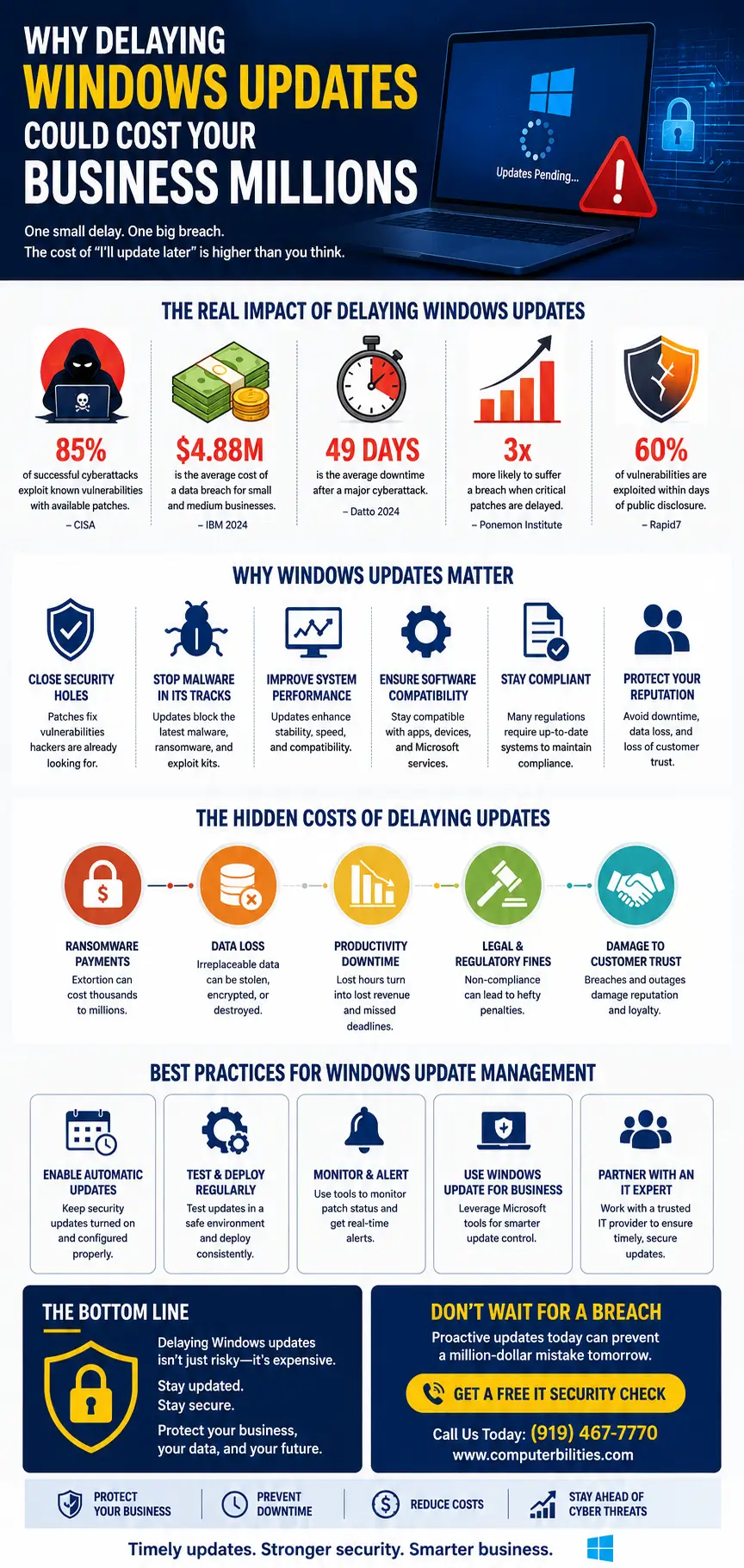
Why Businesses Delay Windows Updates
If installing Windows software updates is so important, why do so many businesses continue putting them off?
The answer isn’t usually negligence. Most business owners have legitimate concerns about productivity, compatibility, and operational continuity. Unfortunately, these short-term concerns often create much larger long-term problems.
Let’s examine the most common reasons organizations postpone updates—and why these assumptions can ultimately cost far more than the updates themselves.
- Fear of Downtime
One of the biggest reasons businesses delay updates is the fear of disrupting daily operations.
Imagine a busy accounting office in Raleigh during tax season. Employees are processing returns, meeting client deadlines, and handling sensitive financial information. The last thing anyone wants is for dozens of computers to restart unexpectedly because of a Windows update.
While this concern is understandable, delaying updates indefinitely creates a dangerous cycle. Instead of scheduling a brief maintenance window, businesses eventually face unexpected outages caused by cyberattacks, failed hardware, or corrupted operating systems.
A planned 20-minute reboot is significantly less disruptive than days of downtime following a ransomware attack.
- Concerns About Software Compatibility
Many organizations depend on specialized business applications that have been in place for years.
Manufacturing companies in Cary may use legacy production software. Healthcare providers in Durham may rely on electronic medical record systems. Engineering firms may operate industry-specific design tools.
Business owners often worry that installing the latest Microsoft security updates will break these applications.
While compatibility testing is an important part of Windows patch management, postponing updates indefinitely isn’t the solution. Modern Managed IT Services providers use testing environments and phased deployments to verify compatibility before rolling updates across the organization.
- Limited Internal IT Resources
Many small businesses don’t employ full-time IT professionals.
Instead, technology responsibilities often fall on:
- Office managers
- Administrative staff
- Owners
- Finance teams
- Operations managers
These individuals already juggle numerous responsibilities. Monitoring Windows update compliance, testing patches, performing backups, and managing endpoints becomes another task on an already overwhelming to-do list.
Without dedicated Business IT Support, updates quickly move to the bottom of the priority list.
- Budget Constraints
Some organizations mistakenly assume delaying updates saves money.
They postpone:
- Hardware upgrades
- Windows migration projects
- Device replacements
- Security improvements
- Patch management investments
However, the financial reality is often the opposite.
A proactive Windows upgrade strategy typically costs far less than responding to:
- Data breaches
- Lost productivity
- Legal investigations
- Compliance violations
- Customer compensation
- Business interruption
Preventive maintenance remains one of the most cost-effective cybersecurity investments any organization can make.
- Busy Day-to-Day Operations
Every business has busy seasons.
Retailers prepare for holidays.
Healthcare organizations manage increasing patient volumes.
Construction firms coordinate multiple job sites.
Manufacturers work to meet production deadlines.
Professional service firms balance client demands with internal operations.
When schedules become hectic, technology maintenance is often viewed as something that can wait.
Unfortunately, cybercriminals don’t pause their attacks during your busiest months. In fact, they often increase activity during periods when organizations are distracted.
- The “We’ll Do It Next Week” Mentality
Perhaps the most dangerous reason businesses delay updates is simple procrastination.
It starts innocently.
“We’ll install the updates after quarter-end.”
“Let’s wait until this project finishes.”
“We’ll handle it next month.”
Before long:
- Three months become six.
- Six months become a year.
- Unsupported operating systems remain in production.
- Critical Windows security patches never get installed.
Meanwhile, attackers continuously scan the internet for devices running outdated software.
Every missed update expands the organization’s attack surface.
The Hidden Cost of Delaying Windows Updates
Many organizations focus solely on the inconvenience of installing updates. What they fail to recognize are the substantial financial, operational, and reputational costs associated with delaying them.
The true expense rarely appears as a single invoice. Instead, it accumulates through lost productivity, security incidents, regulatory exposure, and customer dissatisfaction.
Security Breaches Become More Likely
Every month Microsoft releases Windows security updates that address newly discovered vulnerabilities.
Some vulnerabilities receive high severity ratings because they allow attackers to:
- Execute malicious code remotely
- Escalate system privileges
- Steal authentication credentials
- Install ransomware
- Access sensitive business information
When these security patches aren’t installed promptly, attackers know exactly which weaknesses remain available to exploit.
This transforms an outdated computer into a potential entry point for your entire network.
Ransomware Attacks Continue to Rise
Modern ransomware groups actively target organizations with outdated operating systems.
They use automated tools to identify:
- Missing updates
- Unsupported Windows versions
- Weak remote access configurations
- Poor endpoint security
- Unpatched vulnerabilities
Once inside the network, attackers can encrypt:
- Financial records
- Customer databases
- Shared drives
- Backup repositories
- Cloud synchronization folders
The result is often days—or even weeks—of operational disruption while organizations attempt to recover.
For many businesses, the recovery costs far exceed the original investment required for proactive Windows Update Management.
Lost Productivity Across the Organization
Cyber incidents affect more than IT departments.
When computers become unavailable:
- Employees cannot access files.
- Customer service slows.
- Sales teams lose opportunities.
- Finance departments miss deadlines.
- Production schedules fall behind.
- Projects are delayed.
Even a single day of downtime can have ripple effects that extend for weeks.
Employee productivity suffers, customers become frustrated, and management must divert attention from strategic initiatives to crisis management.
Unexpected Downtime Is More Expensive Than Planned Maintenance
Many organizations delay updates to avoid scheduled interruptions.
Ironically, this decision often results in far longer periods of unplanned downtime.
Compare the difference:
Planned Maintenance
- Scheduled after business hours
- Employees notified in advance
- Systems backed up beforehand
- Updates monitored by IT professionals
- Minimal disruption
Unexpected Outage
- Operations stop immediately
- Customer transactions fail
- Employees wait for systems to recover
- Emergency troubleshooting begins
- Revenue generation slows or stops
The difference between these scenarios can represent thousands of dollars in lost productivity for a single business day.
Data Recovery Costs Escalate Quickly
Recovering from a cyberattack is rarely simple.
Organizations may need to:
- Restore backups
- Rebuild servers
- Replace compromised devices
- Conduct forensic investigations
- Hire cybersecurity consultants
- Notify customers
- Implement new security controls
These expenses accumulate rapidly and frequently exceed the cost of maintaining an effective Windows patch management program.
For many SMBs, even one significant incident can consume a year’s technology budget.
Lost Customer Trust Can Last for Years
Customers expect businesses to safeguard their information.
When a breach occurs because known Microsoft Windows updates were never installed, clients may question whether the organization takes cybersecurity seriously.
The consequences often include:
- Lost contracts
- Negative publicity
- Customer attrition
- Damaged reputation
- Reduced referrals
Rebuilding trust after a security incident is far more difficult—and expensive—than preventing the incident in the first place.
Legal Expenses and Regulatory Penalties
Organizations operating in regulated industries may also face legal and compliance consequences after preventable cyber incidents.
Depending on the industry, delayed Windows security updates can contribute to violations involving:
- HIPAA
- PCI DSS
- FTC Safeguards Rule
- State privacy regulations
- Cyber insurance policy requirements
Regulatory investigations, legal fees, breach notifications, and potential fines can significantly increase the overall financial impact of a preventable incident.
The lesson is clear: delaying updates may seem like a way to avoid short-term inconvenience, but the long-term costs can be substantial.
Unpatched Systems Are Hackers’ Favorite Targets
Cybercriminals don’t need to invent new ways to break into every network. In many cases, they simply exploit vulnerabilities that already have publicly available fixes—but those fixes were never installed.
An unpatched Windows computer is like leaving the front door of your office unlocked overnight. Attackers don’t need extraordinary skills when organizations unintentionally provide an easy entry point.
Today, threat actors continuously scan the internet for devices missing Microsoft security updates. Once they identify vulnerable systems, automated tools attempt to exploit those weaknesses before businesses have a chance to respond.
This is why Windows update risks extend far beyond individual computers. A single compromised endpoint can provide attackers with access to an organization’s broader network, increasing the likelihood of ransomware deployment, credential theft, and widespread operational disruption.
Real Business Risks of Delaying Windows Updates
Many business owners assume that if their computers appear to be working normally, everything is fine. Unfortunately, cybercriminals don’t care whether your systems seem stable—they care whether they’re vulnerable.
Every missed Windows Update increases your exposure to threats that can impact every department in your organization. The financial consequences often extend well beyond repairing computers. They affect customer relationships, employee productivity, regulatory compliance, and your company’s reputation.
Let’s examine the real-world risks businesses face when Windows security updates are delayed.
- Financial Loss That Extends Beyond IT
Cyber incidents are expensive.
The obvious costs include replacing hardware, recovering data, and paying cybersecurity consultants. However, many businesses underestimate the hidden financial impact.
Consider what happens after a successful ransomware attack:
- Employees cannot work.
- Customer orders are delayed.
- Vendors cannot be paid.
- Accounting systems become unavailable.
- Customer support slows dramatically.
- Sales opportunities are lost.
Every hour of downtime translates directly into lost revenue.
For a growing business in Raleigh, Cary, or Durham, even a single day of disruption can mean thousands—or tens of thousands—of dollars in lost productivity and missed opportunities.
- Customer Data Exposure
Customer trust takes years to build but only moments to lose.
Businesses routinely store sensitive information such as:
- Customer names
- Email addresses
- Phone numbers
- Financial records
- Payment information
- Contracts
- Employee records
If attackers exploit unpatched vulnerabilities, this information can be stolen, encrypted, or publicly exposed.
The consequences often include:
- Customer notifications
- Credit monitoring expenses
- Regulatory investigations
- Legal claims
- Loss of future business
For industries such as healthcare, financial services, legal services, and professional consulting, protecting sensitive data isn’t simply good practice—it’s a business requirement.
- Email Compromise
Cybercriminals frequently target business email because it provides access to conversations, invoices, passwords, and customer communications.
Once attackers compromise a Windows device, they often attempt to:
- Steal Microsoft 365 credentials
- Monitor executive email accounts
- Redirect invoice payments
- Launch phishing attacks from legitimate addresses
- Gain access to cloud applications
A compromised email account can quickly become a gateway to your entire business ecosystem.
- Credential Theft
Passwords remain one of the most valuable assets for cybercriminals.
Modern malware is designed to collect:
- Windows login credentials
- Browser passwords
- VPN credentials
- Remote Desktop access
- Microsoft 365 accounts
- Banking information
Once credentials are stolen, attackers often move laterally across the network, compromising additional systems without triggering immediate alarms.
Strong endpoint protection and timely Windows security patches significantly reduce this risk.
- Business Interruption
Imagine arriving at your office on Monday morning only to discover:
- Shared files are inaccessible.
- Accounting software won’t open.
- Printers are offline.
- Customer databases are encrypted.
- Employees cannot log in.
Operations stop almost immediately.
Whether you’re running a law firm in Raleigh, a manufacturing company in Cary, or a medical practice in Durham, technology outages disrupt every aspect of business.
Business interruption often becomes the largest financial consequence of delayed updates.
- Supply Chain Attacks
Your cybersecurity is only as strong as the weakest link in your business ecosystem.
Attackers increasingly target suppliers, contractors, and service providers to gain access to larger organizations.
If your systems are compromised because critical Microsoft Windows updates were delayed, your business may unintentionally become the entry point into another organization’s network.
This can damage valuable partnerships and expose your company to contractual liabilities.
- Cyber Extortion Beyond Ransomware
Today’s attackers don’t always stop after encrypting data.
Many criminal groups now use “double extortion” or even “triple extortion” tactics.
They may:
- Steal confidential files
- Threaten to publish customer information
- Contact your clients directly
- Demand additional ransom payments
- Launch distributed denial-of-service (DDoS) attacks
This makes proactive Windows update management far less expensive than responding to an advanced cyberattack.
Windows 10 End of Support and Why Windows 11 Matters
One of the biggest technology challenges facing businesses today is the Windows 10 end of support.
Many organizations continue using Windows 10 because it is familiar, stable, and compatible with existing applications. However, relying on an unsupported operating system dramatically increases cybersecurity risks.
Understanding what Microsoft’s support lifecycle means is essential for every business owner.
What Does “End of Support” Actually Mean?
When Microsoft ends support for an operating system, it no longer provides:
- Regular security updates
- Vulnerability patches
- Bug fixes
- Technical support
- Feature improvements
While your Windows 10 computer may continue to function, it gradually becomes less secure as newly discovered vulnerabilities remain unpatched.
Cybercriminals know this—and actively look for unsupported devices.
No More Security Patches Means Greater Risk
Every month Microsoft releases Windows security updates that address newly discovered vulnerabilities.
Without those updates:
- Known security flaws remain open.
- New attack methods become increasingly effective.
- Malware evolves faster than your defenses.
- Endpoint security weakens over time.
An unsupported operating system creates an expanding attack surface that becomes more attractive to attackers each month.
The Growing Attack Surface
Business networks are more connected than ever.
Employees work remotely.
Cloud applications synchronize continuously.
Mobile devices connect from multiple locations.
Third-party vendors access shared resources.
Every connection increases the potential attack surface.
Outdated Windows systems create weak points that sophisticated attackers can exploit to gain broader access to your environment.
Hardware Compatibility Matters
Some businesses hesitate to upgrade because older computers may not meet Windows 11 hardware requirements.
This creates an opportunity to evaluate:
- Device age
- Performance
- Security capabilities
- Trusted Platform Module (TPM) support
- Processor compatibility
- Long-term maintenance costs
Rather than waiting until hardware fails unexpectedly, businesses should develop a planned Windows migration strategy that aligns with budget cycles and operational goals.
Understanding Extended Security Updates (ESU)
Microsoft offers Extended Security Updates (ESU) for certain organizations after Windows 10 support ends.
While ESU can provide temporary access to important security updates, it is not intended as a long-term replacement for upgrading.
Businesses should view ESU as a short-term bridge—not a permanent strategy.
Planning a Windows 11 upgrade remains the better long-term investment for security, productivity, and software compatibility.
Why Migration Planning Should Start Now
Successful Windows migration projects rarely happen overnight.
Planning should include:
- Hardware assessments
- Software compatibility reviews
- User training
- Backup verification
- Pilot deployments
- Phased rollouts
Organizations that plan early experience significantly less disruption than those forced into emergency upgrades after support ends.
Compliance Risks of Delaying Windows Updates
Cybersecurity isn’t only about preventing attacks—it is also about meeting regulatory and contractual obligations.
Many industries require businesses to maintain secure systems and apply security updates promptly. Delaying Windows operating system updates may increase compliance risk, particularly if a cyber incident occurs.
HIPAA
Healthcare organizations must protect electronic protected health information (ePHI).
Outdated operating systems can increase the likelihood of unauthorized access to patient data.
Timely Windows security patches, strong endpoint security, and documented patch management processes help support a secure IT environment.
PCI DSS
Businesses that process payment card information are expected to maintain secure systems and address known vulnerabilities.
Failing to keep systems updated can increase exposure to security incidents and complicate compliance efforts.
Regular Windows Update Management supports a stronger overall security posture.
FTC Safeguards Rule
Organizations subject to the FTC Safeguards Rule are expected to implement reasonable administrative, technical, and physical safeguards to protect customer information.
A structured vulnerability and patch management program is an important part of maintaining secure systems.
CMMC and Government Contractors
Organizations working with federal agencies or defense contractors may need to satisfy cybersecurity requirements under the Cybersecurity Maturity Model Certification (CMMC).
While requirements vary by level and contract, maintaining supported operating systems and addressing known vulnerabilities are important elements of a mature cybersecurity program.
Cyber Insurance Requirements
Many cyber insurance providers increasingly evaluate an organization’s cybersecurity controls before issuing or renewing policies.
Businesses may be asked about:
- Patch management processes
- Multi-factor authentication
- Endpoint detection and response
- Backup strategies
- Vulnerability management
Poor update practices can affect underwriting decisions, policy terms, or claim outcomes, depending on the circumstances and policy language.
Audit Findings and Business Reputation
Whether you’re pursuing certifications, responding to customer security questionnaires, or completing internal audits, outdated systems can raise concerns about your cybersecurity practices.
Maintaining current Microsoft Windows updates demonstrates that your organization takes technology risk seriously.
The True Cost of an Emergency Upgrade
Businesses often postpone technology investments because everything appears to be working.
Unfortunately, emergencies rarely happen on a convenient schedule.
Waiting until systems fail usually results in a more expensive, stressful, and disruptive experience.
Planned Upgrade vs. Emergency Upgrade
Planned Windows Upgrade | Emergency Windows Upgrade |
Budgeted over time | Unplanned expense |
Scheduled after hours | Immediate business disruption |
Thoroughly tested | Limited or no testing |
Backups verified | Recovery often starts after failure |
Minimal downtime | Extended downtime |
Employees prepared | Employees caught off guard |
Low operational risk | High operational and financial risk |
A proactive approach gives businesses control over timing, budget, and implementation.
An emergency upgrade forces decisions under pressure—often when systems are already compromised.
Best Practices for Windows Update Management
Keeping Windows secure requires more than clicking “Install Updates.”
An effective Windows update management strategy combines planning, automation, monitoring, and ongoing security practices.
Here are the best practices every business should adopt.
Automate Patch Management
Manual updates are easy to forget.
Automated patch management tools help ensure that critical Microsoft security updates are deployed consistently across desktops, laptops, and servers while allowing IT teams to schedule installations during maintenance windows.
Establish a Monthly Patch Cycle
Create a routine process that includes:
- Reviewing newly released updates
- Evaluating security severity
- Testing critical patches
- Scheduling deployments
- Confirming successful installation
- Documenting results
Consistency reduces the likelihood of overlooked systems.
Prioritize Critical Security Updates
Not every update carries the same level of urgency.
Organizations should prioritize:
- Critical security patches
- Actively exploited vulnerabilities
- Zero-day vulnerability mitigations
- Remote code execution fixes
- Privilege escalation vulnerabilities
Addressing high-risk issues promptly reduces exposure to cyber threats.
Test Before Wide Deployment
Businesses running specialized software should validate updates in a controlled environment before organization-wide deployment.
Testing helps identify compatibility issues while minimizing disruption to daily operations.
Always Verify Backups First
Before deploying significant Windows operating system updates, confirm that reliable backups exist and that recovery procedures have been tested.
A verified backup provides an important safety net if unexpected issues occur during deployment.
Maintain an Accurate Device Inventory
You cannot secure devices you don’t know exist.
Maintain an inventory that includes:
- Workstations
- Laptops
- Servers
- Virtual machines
- Remote devices
- Operating system versions
- Support status
Visibility is the foundation of effective Windows device management.
Monitor Endpoints Continuously
Continuous Network Monitoring and endpoint monitoring help identify:
- Missing patches
- Failed installations
- Unauthorized devices
- Security alerts
- Configuration changes
Early detection allows businesses to address issues before they become major incidents.
Perform Regular Vulnerability Scans
Routine vulnerability assessments identify:
- Missing security patches
- Unsupported operating systems
- Misconfigurations
- Weak security settings
- Emerging risks
Combined with Managed Patch Management, vulnerability scanning helps organizations maintain a stronger security posture.
By implementing these best practices, businesses can significantly reduce the risks associated with outdated systems while improving operational stability, compliance readiness, and overall cybersecurity resilience.
Why Managed IT Services Help Keep Windows Secure
Managing Windows updates across a growing business is no longer as simple as clicking “Install Now.” Modern organizations often have dozens—or even hundreds—of endpoints, including desktops, laptops, remote devices, virtual machines, and cloud-connected systems. Ensuring that every device receives the latest Microsoft Windows updates without disrupting daily operations requires planning, monitoring, and expertise.
This is where Managed IT Services provide tremendous value.
A proactive Managed Service Provider (MSP) doesn’t just react when something breaks. Instead, they continuously monitor your technology environment, identify vulnerabilities before attackers do, and ensure that Windows security updates are installed in a controlled and strategic manner.
For small and medium-sized businesses across Raleigh, Cary, Durham, and throughout North Carolina, partnering with a trusted IT provider can significantly reduce cybersecurity risks while allowing employees to stay focused on serving customers rather than troubleshooting technology.
24/7 Monitoring for Emerging Threats
Cybercriminals don’t work traditional business hours.
Threat actors launch attacks overnight, during weekends, and even on holidays. Without continuous monitoring, vulnerabilities can remain undetected for days or weeks.
A Managed IT Services provider delivers:
- 24/7 system monitoring
- Real-time security alerts
- Endpoint health monitoring
- Automated patch verification
- Performance monitoring
- Threat detection and response
Rather than discovering a problem after employees report it, proactive monitoring allows IT teams to address issues before they become costly disruptions.
Automated Windows Update Management
One of the biggest advantages of partnering with an MSP is centralized Windows Update Management.
Instead of relying on employees to install updates manually, an MSP can:
- Schedule updates outside business hours
- Test updates before deployment
- Prioritize critical Microsoft security updates
- Verify successful installation
- Resolve failed updates quickly
- Generate compliance reports
This structured approach reduces the likelihood of missed patches while minimizing operational downtime.
Comprehensive Patch Management
Effective Windows patch management involves much more than updating the operating system.
Businesses also need to keep applications and supporting software current.
An MSP typically manages updates for:
- Windows operating systems
- Microsoft Office and Microsoft 365
- Web browsers
- Adobe products
- Security software
- Third-party business applications
- Device drivers
- Firmware (where applicable)
A comprehensive patch management strategy helps close multiple attack vectors instead of focusing solely on Windows.
Stronger Endpoint Security
Every desktop, laptop, and remote computer represents a potential entry point for attackers.
Modern endpoint security combines several protective technologies, including:
- Antivirus and anti-malware
- Endpoint Detection and Response (EDR)
- Threat intelligence
- Device encryption
- Multi-factor authentication
- Security policy enforcement
Combined with regular Windows security patches, these tools create multiple layers of defense against ransomware, malware, phishing, and credential theft.
Continuous Vulnerability Management
Installing updates is only one part of maintaining a secure environment.
Businesses also need ongoing vulnerability management to identify:
- Missing patches
- Unsupported operating systems
- Weak passwords
- Misconfigured systems
- Exposed remote access services
- Security policy violations
Regular vulnerability assessments help organizations prioritize remediation efforts before attackers exploit known weaknesses.
Compliance Reporting
For businesses operating in regulated industries, documentation matters.
Managed IT providers can assist with reporting that supports internal security practices and compliance efforts by tracking:
- Patch status
- Device inventory
- Security update history
- Vulnerability remediation
- Backup status
- Endpoint protection health
Maintaining accurate records makes audits and customer security questionnaires much easier to navigate.
Backup Verification and Disaster Recovery
Even with excellent security, no organization can eliminate every risk.
That’s why reliable backups remain essential.
A proactive MSP helps ensure:
- Backups run successfully
- Recovery points are verified
- Backup integrity is tested
- Disaster recovery procedures are documented
- Business continuity plans remain current
If a cyber incident occurs, verified backups can dramatically reduce recovery time and business disruption.
Strategic Windows Lifecycle Planning
Technology should never reach the point where emergency upgrades become your only option.
Managed IT providers help businesses plan ahead by evaluating:
- Device age
- Hardware compatibility
- Windows support lifecycle
- Software dependencies
- Future technology requirements
- Budget planning
Instead of reacting to the Windows 10 end of support, businesses can migrate to Windows 11 on a schedule that aligns with operational needs and financial planning.
Local Business Example: The Cost of Waiting
To understand the real impact of delayed updates, consider the following realistic scenario.
A Raleigh Accounting Firm
A growing accounting firm in Raleigh employed 28 staff members and relied heavily on Microsoft 365, cloud accounting software, and Windows desktops.
Because tax season was approaching, management repeatedly postponed installing Windows security updates, believing they couldn’t afford even a short period of downtime.
Over several months, numerous Microsoft Windows updates remained uninstalled.
One Monday morning, an employee unknowingly opened a malicious email attachment.
The attackers exploited an unpatched vulnerability on the workstation, allowing ransomware to spread rapidly throughout the firm’s network.
Within hours:
- Shared files became inaccessible.
- Client tax documents were encrypted.
- Employees lost access to accounting software.
- Email services were disrupted.
- Customer appointments had to be rescheduled.
The business spent several days restoring systems, rebuilding affected computers, and recovering files from backups.
In addition to technology recovery costs, the firm experienced:
- Lost billable hours
- Delayed tax filings
- Customer frustration
- Emergency cybersecurity consulting expenses
- Temporary reputational damage
A structured Windows Update Management program combined with proactive endpoint monitoring could have significantly reduced the likelihood and impact of the incident.
A Cary Manufacturing Company
A manufacturing company in Cary continued using older Windows workstations connected to production equipment.
Concerned about interrupting operations, management delayed software updates for months.
Attackers later exploited known vulnerabilities to gain access to the internal network.
Production systems remained unavailable for nearly two days while IT teams isolated affected devices and restored operations.
The resulting downtime delayed shipments, disrupted customer schedules, and created unexpected overtime costs.
Routine Windows patch management, network segmentation, and scheduled maintenance windows could have helped prevent the disruption.
A Durham Healthcare Practice
A healthcare provider in Durham relied on Windows computers for patient scheduling, electronic health records, and secure communications.
Several older devices had not received recent Windows operating system updates.
During a routine security assessment, the practice discovered multiple unsupported systems that increased overall cyber risk.
Rather than waiting for a security incident, leadership partnered with a Managed IT Services provider to:
- Upgrade outdated devices
- Implement automated patch management
- Improve endpoint security
- Enhance backup verification
- Establish monthly vulnerability assessments
The proactive investment improved operational resilience and reduced technology-related risks while supporting a stronger overall security posture.
Action Plan: How to Protect Your Business
If your organization has delayed Windows updates, now is the time to take action.
The following checklist can help reduce risk and improve long-term security.
- Inventory Every Windows Device
Create a complete inventory of:
- Desktop computers
- Laptops
- Servers
- Remote devices
- Virtual machines
You cannot secure devices you don’t know exist.
- Identify Unsupported Systems
Determine which devices are:
- Running Windows 10 nearing or past support milestones
- Using unsupported hardware
- Missing recent security updates
- No longer receiving Microsoft security patches
Prioritize these systems for review.
- Review Your Current Patch Status
Evaluate:
- Which devices are fully updated
- Which updates have failed
- Which critical vulnerabilities remain open
This provides a clear picture of your organization’s current exposure.
- Test Windows 11 Compatibility
Review hardware requirements and identify systems that are ready for a Windows 11 upgrade.
Planning ahead helps avoid last-minute replacement costs.
- Replace Aging Hardware Strategically
Older computers often struggle to meet modern security requirements.
Replacing aging devices gradually is typically more cost-effective than emergency hardware purchases following a cyber incident.
- Enable Automatic Updates Where Appropriate
For many business environments, automated updates—combined with centralized management—help reduce missed patches while maintaining operational consistency.
- Schedule Regular Vulnerability Assessments
Routine security assessments help identify:
- Missing updates
- Configuration weaknesses
- Unsupported software
- Emerging cyber risks
Addressing these issues proactively strengthens overall cybersecurity.
- Partner with a Trusted Managed IT Provider
If your internal team lacks the time or resources to manage updates consistently, consider working with an experienced Managed Service Provider.
A proactive MSP can help simplify:
- Windows Update Management
- Patch Management Services
- Network Monitoring
- Endpoint Security
- Compliance reporting
- Windows migration planning
- Incident response
- Long-term technology strategy
Conclusion
For many business owners, Windows updates still feel like an inconvenience—a task that interrupts workflows and can always wait until tomorrow.
The reality is very different.
Today’s cybercriminals actively search for businesses running outdated systems because they know unpatched vulnerabilities provide easy opportunities to steal data, deploy ransomware, and disrupt operations. As the Windows 10 end of support approaches, the risks associated with delaying updates will only continue to grow.
A proactive approach to Windows update management is far more than routine maintenance. It is an investment in business continuity, regulatory readiness, employee productivity, and customer trust. Regular Microsoft security updates, effective patch management, strong endpoint security, and a well-planned Windows 11 migration can dramatically reduce your organization’s exposure to modern cyber threats.
For businesses across Raleigh, Cary, Durham, and throughout North Carolina, now is the ideal time to assess your Windows environment, identify outdated devices, and implement a long-term update strategy before minor delays turn into major disruptions.
Remember, the cost of installing updates is measured in minutes. The cost of ignoring them can be measured in lost revenue, damaged reputation, regulatory consequences, and missed opportunities.
The question isn’t whether your business can afford to update Windows.
It’s whether your business can afford not to.
Frequently Asked Questions (FAQs)
- Why are Windows updates important for businesses?
Windows updates provide critical security patches, bug fixes, and performance improvements that help protect business systems from ransomware, malware, and other cyber threats. Regular updates also improve stability and support compliance efforts.
- What happens if you don’t update Windows?
Delaying Windows updates can leave systems vulnerable to known security flaws, increasing the risk of cyberattacks, data breaches, system instability, and costly downtime.
- How often should businesses install Windows security updates?
Businesses should review and deploy critical security updates as soon as practical after appropriate testing. Many organizations follow a monthly patch cycle while prioritizing urgent security patches more quickly.
- Is Windows 10 still safe to use after support ends?
Once Windows 10 reaches the end of Microsoft’s support lifecycle, it will no longer receive regular security updates. Businesses should plan their migration to Windows 11 or another supported solution to maintain a stronger security posture.
- What is Windows patch management?
Windows patch management is the process of identifying, testing, deploying, and monitoring Windows security updates and software patches to reduce cybersecurity risks and maintain system reliability.
- Can delaying Windows updates increase ransomware risk?
Yes. Cybercriminals frequently exploit known vulnerabilities in unpatched systems. Keeping Windows security updates current reduces the number of opportunities attackers have to compromise business devices.
- How can Managed IT Services simplify Windows update management?
A Managed IT Services provider can automate patch deployment, monitor devices around the clock, perform vulnerability assessments, verify backups, and help businesses maintain a consistent and secure update strategy.
- How do I know if my business is ready for Windows 11?
A Windows readiness assessment can evaluate hardware compatibility, software requirements, security configurations, and migration planning to help determine the best path forward.
Ready to Strengthen Your Windows Security?
If your business hasn’t reviewed its Windows update strategy recently, now is the time to act.
At Computerbilities, we help small and medium-sized businesses throughout Raleigh, Cary, Durham, and across North Carolina stay protected with proactive Managed IT Services, Windows Update Management, Patch Management Services, Network Monitoring, and comprehensive Cybersecurity Services.
Whether you need assistance planning a Windows 11 migration, securing remote devices, or improving your overall IT infrastructure, our experienced team is here to help.
Don’t wait for a cyberattack to expose outdated systems. Contact Computerbilities today to schedule a Windows security assessment and ensure your business is prepared for whatever comes next.